Joint event of OCS and SOFINET, a Russian developer and manufacturer of network equipment. During the online meeting, the vendor's experts presented new wireless Wi-Fi solutions that provide high performance, reliability and security for corporate networks.

And also they told how SOFINET solutions allow you to create a flexible and scalable network for an office or industrial facilities, and introduced the features of integration of the manufacturer's equipment into the existing infrastructure, including the use of a single operating system SOFOS.
Today's event was started by Oleg Savin, Development Director of SOFINET.
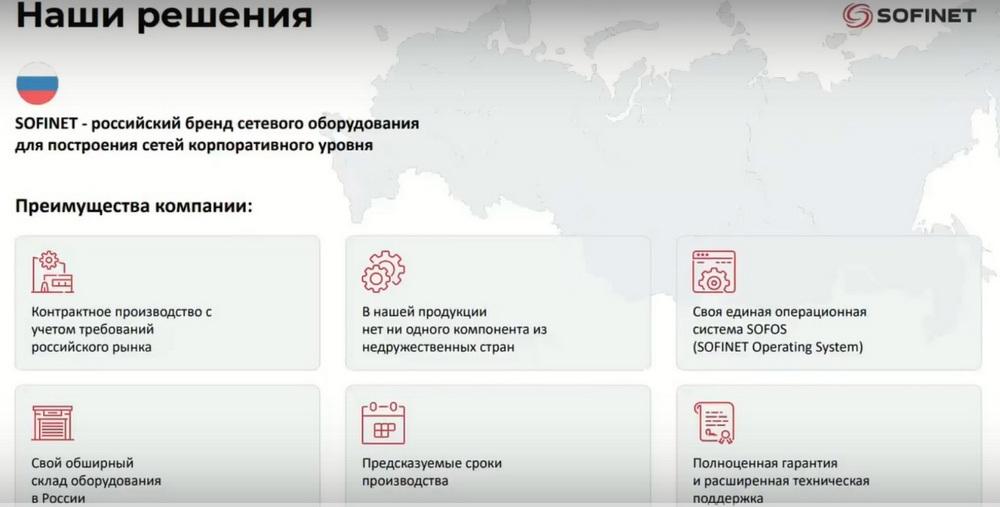
While SOFINET is a Russian brand, I hope that in the near future our company will become a Russian manufacturer. There are no components from unfriendly countries in our products, which minimizes any possible sanctions. In addition, we have our own single operating system, it is called SOFOS, it is registered, it is an Operating System, and it works on all our equipment.
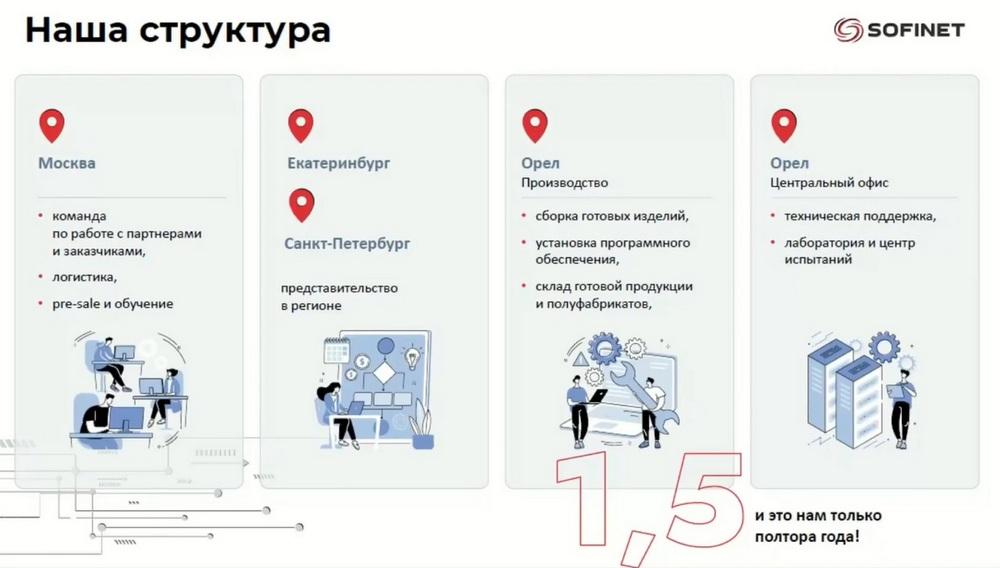
We have predictable production times. We have our own large warehouse, it is located in Russia. We have a full warranty. We are still a fairly young company, we are two years old already. But we are located in a beautiful small town of Orel, where our head office, main production, all warehouses are located. Also in Orel there is a technical support center, our laboratory and testing center. In Moscow, we have a team to work with partners and customers. All the main logistics are in Moscow, as well as our presale and training. We conduct training on the basis of a licensed training center. We also have a representative office in Yekaterinburg and St. Petersburg.
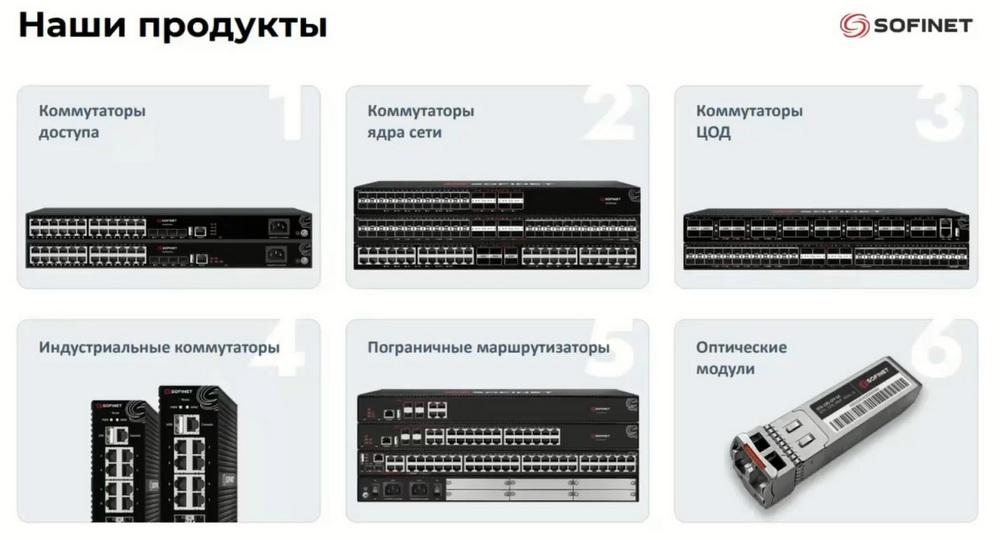
We have been involved in network equipment for many years and want to continue to make the most classy switches. We make both access switches, starting from the L2+ level, and routers. Our equipment is well suited for customers from the corporate and public sectors.
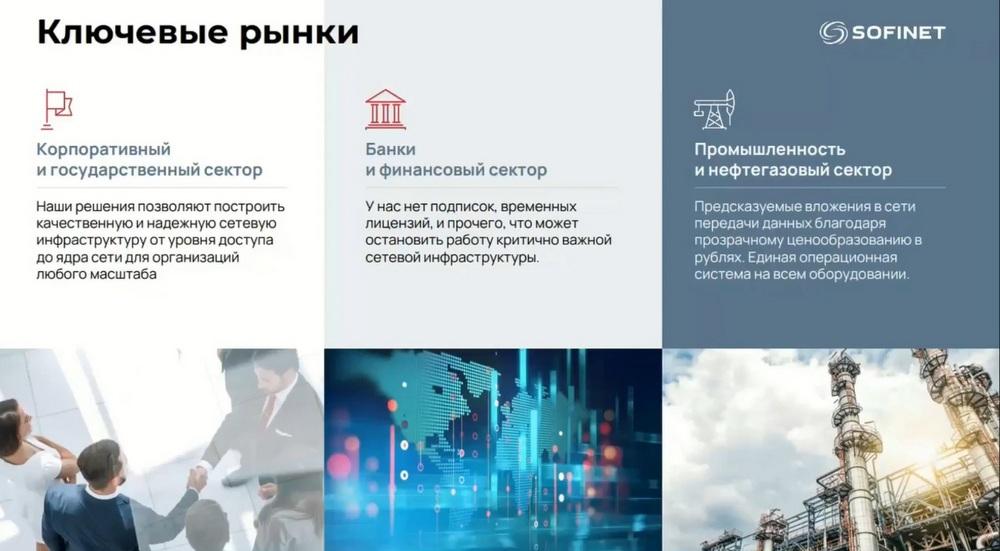
Our equipment is installed in one of the largest banks. There is a video on YouTube where the bank itself talks about the fact that it chose us instead of Cisco and now all branches of this bank have our switches and further expansion is planned. We are very well represented in the industry and in the oil and gas sector, because we have transparent pricing and a single operating system.
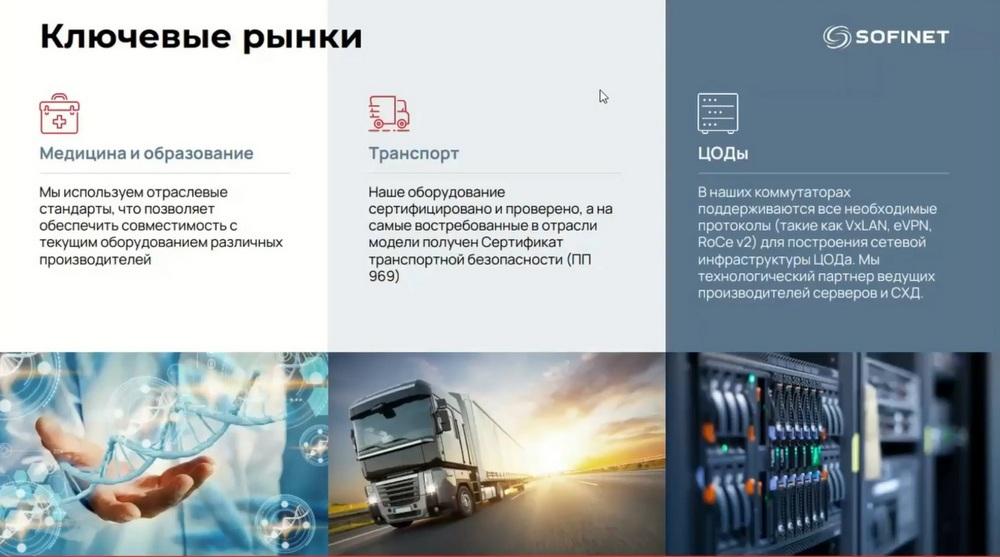
We don't just make network equipment. We help partners and customers in developing optimal solutions for their networks, selecting the most suitable SOFINET equipment, which allows to achieve high network performance with optimal investment costs. We also help to form terms of reference.
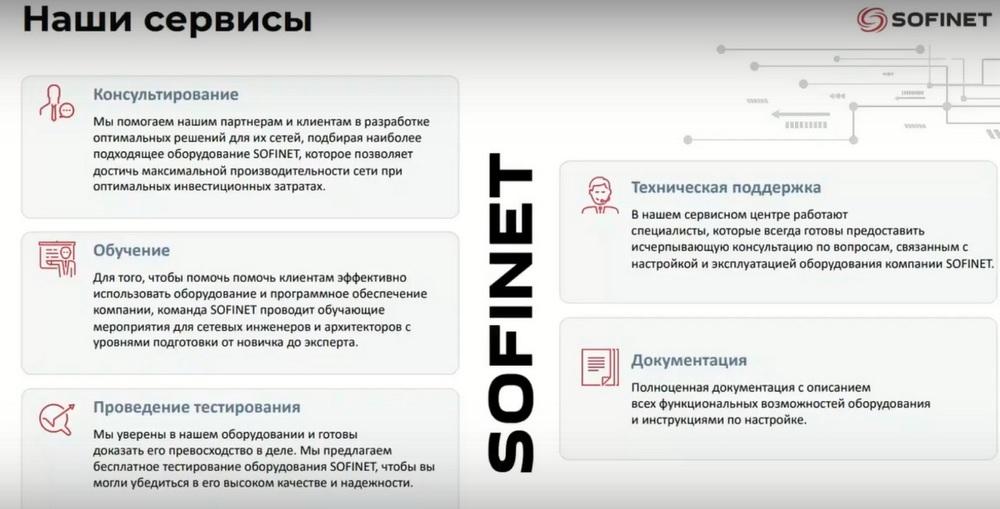
We conduct training for network engineers and architects with training levels from beginner to expert. We have courses that we conduct simply as a kind of elective. And in a licensed training center there is a three-day course with a break from production.
We offer free testing of our equipment. We have a basic warranty on it. It is valid for one year. In addition, we offer technical support.
I give the floor to our Technical Director Grigory Kulikov.
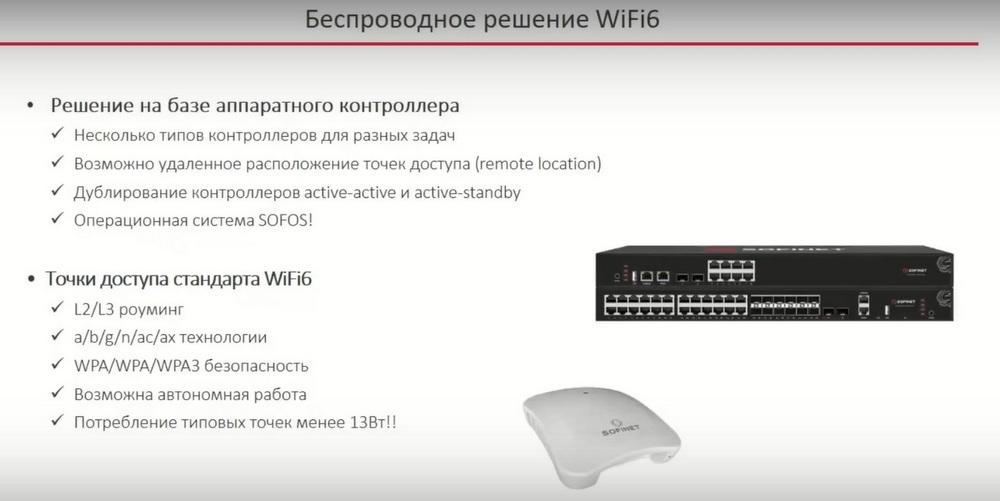
Wi-Fi is built on the basis of hardware controllers. We offer two different models, they are identical in functionality. They differ depending on the number of access points and the bandwidth of the controllers. Access points of the Wi-Fi 6 standard, AX technology. Architecturally, this is a hardware controller and access points. There are two types of controllers.
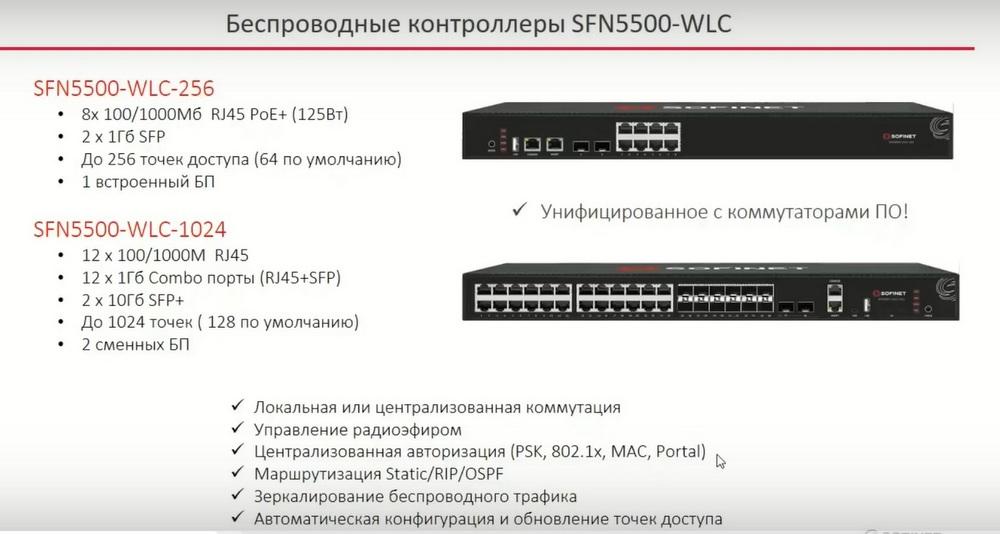
One, SFN5500-WLC-256, is simpler, designed for a maximum of 256 points. It has built-in POE ports, which are mainly used for testing, to connect an access point to the controller and quickly start Wi-Fi, gigabit optical uplinks and 8 gigabit copper POE ports. It comes with a license for 64 points. That is, 64 points can be connected to this controller for free, because it is already included in the basic license.
And another controller, SFN5500-WLC-1024. It is a little more interesting and powerful, for 1024 points of access. By default, it comes with a license for 128 points. Here already appear 10-gigabit optical uplinks and a little more gigabit ports. There are no POE interfaces here anymore, but usually large controllers are located somewhere in the data center, and there POE functionality is not so critical. They also differ in that the small controller has one built-in power supply. They are, of course, both hardware reliable, but with two replaceable power supplies. The functionality that controllers have is listed on the slide. These are: local or centralized switching, radio air management, centralized authorization, Static/RIP/OSPF routing, wireless traffic mirroring, automatic configuration and updating of access points.
Access points. There are four models.
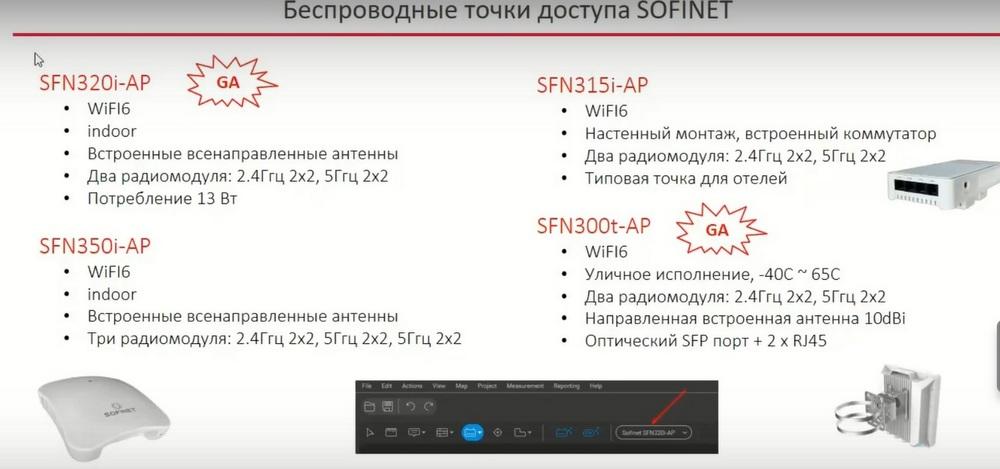
The most basic access point is the SFN320-AP. This is an indoor access point with built-in omni-directional antennas. Inside this access point there are two radio modules 2.4 GHz and 5 GHz. The point consumes no more than 13 W, which allows its Wi-Fi 6 to be used on older switches that only give the AF standard up to 13.3 W and cannot give up to 30 W. SFN320-AP is the most basic, most popular office point. And it is used in 90% of our projects.
The second point is outdoor, it is SFN300t-AP. Again, Wi-Fi 6. Outdoor version. Temperature range - from minus 40 to plus 65 degrees Celsius. Protection IT 67, i.e. it can be watered from a hose with water in the frost, and nothing will happen to it. From a technical point of view, it also has two radio modules 2.4 GHz and 5 GHz. Here is an interesting solution: inside this point there is a built-in directional antenna of 10 dBi. That is, it is a rather narrow beam. Often such outdoor points are hung on top of masts, and thus it is quite convenient to shine a narrow beam down towards customers. The outdoor point has an optical SFP port. If suddenly the access point is located somewhere in the territory far from the distribution center, then you can also hook it up via optics. But still it will need to be powered either locally or with a POE injector.
And there are two more points that we are planning to launch. This is SFN350-AP, an access point for scenarios with a high density of clients. In fact, this is the 320th, to which another radio module was added. That is, the 350th point will have one radio module at 2.4 GHz and two radio modules at 5 GHz. The SFN350-AP will also have a built-in indoor omni-directional antenna for indoor installation.
And a separate SFN315-AP access point, this is a standard form factor for hotels and dormitories. It is hung on the wall, has a built-in switch with the possibility of separation by VLAN. Usually these switches are used to connect a telephone or TV. From the point of view of the radio module, there are also 2.4 GHz 2x2 and 5 GHz 2x2 here.
Regarding the operating system. We have a single OS installed on all our switches, routers, and now also on Wi-Fi controllers. This is our distinctive feature. It is called SOFOS.
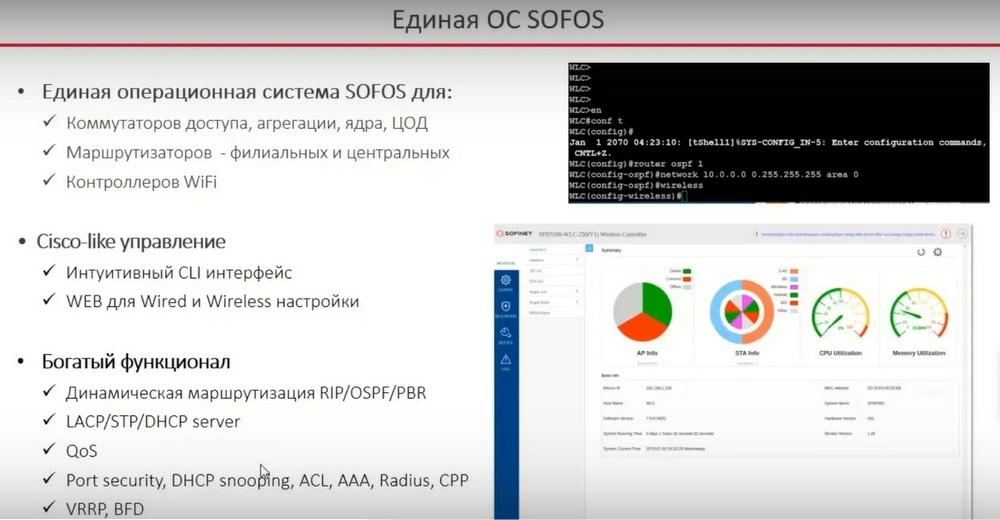
A unified OS is convenient from an administration point of view when the entire network of a customer is built on equipment from one vendor. One operating system means a lower probability of errors and less time spent on staff training. From the point of view of administration, the CLI interface is similar to Cisco. That is, if an engineer has been trained on Cisco or similar devices, they will not have any problems with our operating system either, because the configuration ideology is exactly the same. The commands are similar, but not absolutely. For those who do not like CLI, there is a Web interface, both in switches for basic settings and in controllers, there is a Web interface for configuring the controller itself. Because the controller is essentially a switch with the ability to service Wi-Fi access points. And because the controller is also a switch, the controller can also raise dynamic routing, and there are various functionalities that have come to it from ordinary switches. That is, all the standard network binding is present in the controller.
About licensing. We at SOFINET have an ideology that licensing is practically not used anywhere. And only Wi-Fi is the only product where licensing appears. Licensing is based on the number of access points.
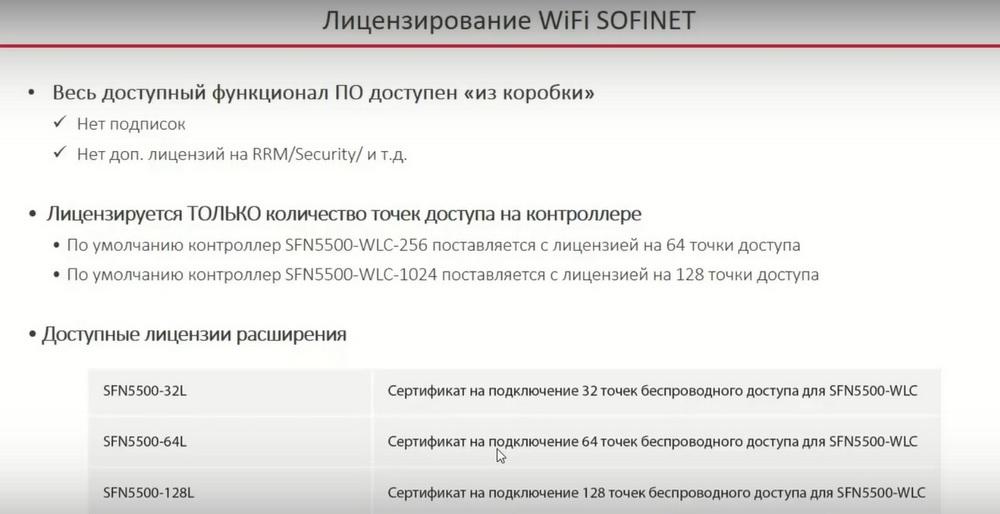
All available functionality, specifically the functionality of the controller, is available out of the box. This applies to switches, routers, and controllers. We do not have any subscriptions, no separate licenses for any separate functionality in the software. Only the number of access points is licensed. The junior controller has a license for 64 access points, and the senior controller already has a base license for 128 access points. On the slide, you see packs of 32 access points, 64 access points, and 128 access points.
L2/L3 usage scenarios.
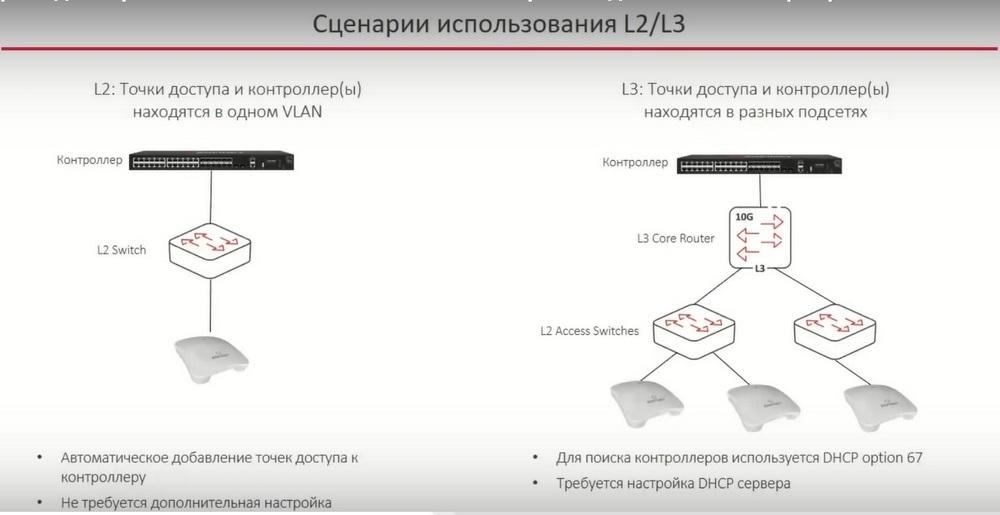
The first usage scenario is simple L2, when both the access points and the controller or controllers are in the same VLAN. In this case, the access points will automatically find the controller, no additional configuration is required. This scenario is used in basic testing and in small installations, when we have a controller somewhere nearby, and it can be placed in the same subnet with all access points. And in the L3 scenario, when the controller is located in the central node, and the access points only have L3 connectivity with the F-controller. In this case, the access points need to find the IP address of the controller or controllers. And this is done with a fairly standard mechanism through DHCP option 67. The IP addresses of the central controllers are specified there. Here, of course, you will need to configure the DHCP server, but this is a fairly simple task.
Both local switching and centralized switching of user traffic are supported.
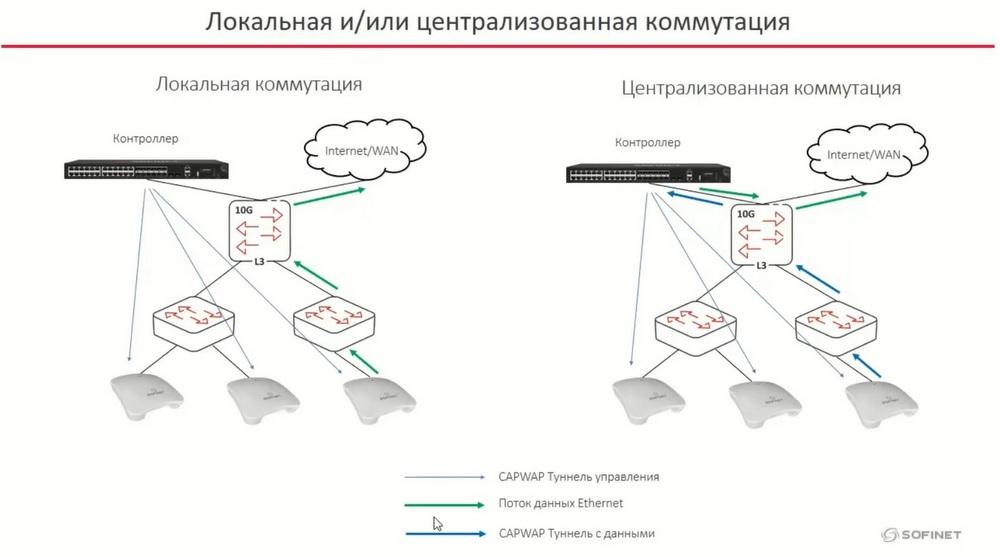
Local switching is shown on the left side of the slide. The controller has a management tunnel to each access point. CAPWAP tunneling is used for both management and data. In a system with local switching, the data stream from the Wi-Fi client goes directly through the wires via ordinary Ethernet, without entering the controller. It is possible to use centralized switching, when the controller has a management tunnel to each access point, but also the traffic from clients via the CAPWAP tunnel goes first to the controller. The controller disassembles this tunnel and then switches and routes according to its tables. In our system, these two systems can be combined. For example, separately allocate SFID to centralized switching. Usually this is some kind of guest traffic, it is usually pulled to the controller, and ordinary Enterprise SFID can be given simply to local switching in order to provide greater bandwidth, lower delays, and everything related to flow optimization.
Roaming is the process of a client moving between access points. The main task of the entire Wi-Fi system is to provide the client with the same conditions, the same connections to new access points, that it had on the previous access point.
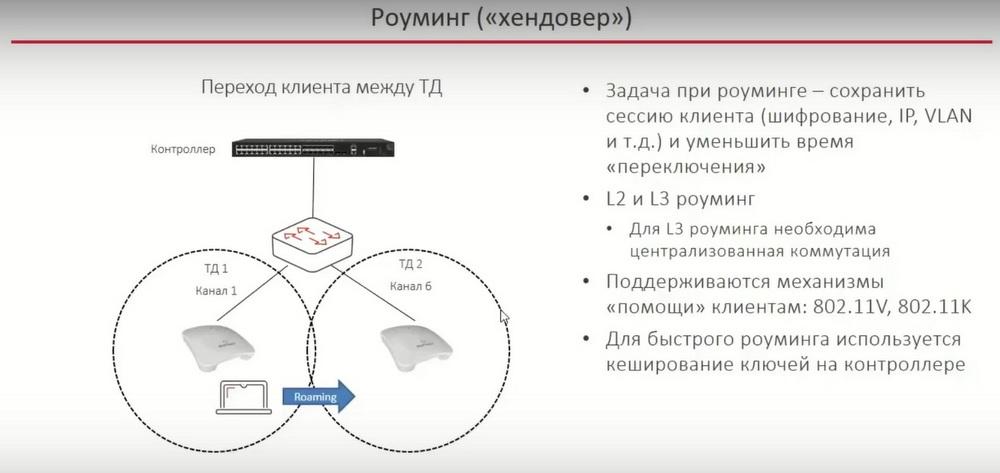
That is, the task is to save the client's session, various encryptions, VLAN, the IP address should not change on the client. In this sense, both L2 and L3 roaming work for us. L2 roaming, when the SSID on the access points, and the access points themselves, are in the same VLAN. L3, when we have part of the access points, for example, broadcasting Wi-Fi and SSID, which already belong to other VLANs. Both L2 and L3 roaming work. The only thing is that centralized switching is necessary for L3 roaming. That is, the SSIDs for which we want to provide L3 roaming must have centralized switching through the controller.
So-called "assistance" mechanisms are supported for clients so that the client can quickly determine in the radio raw material which access points it has nearby, which access points it is better to switch to. And for fast roaming, we use key caching on the controller. The controller stores all the encryption keys of all connected clients. This allows for fast roaming, switching from one access point to another.
There is a built-in RRM (Radio Resource Management) functionality.
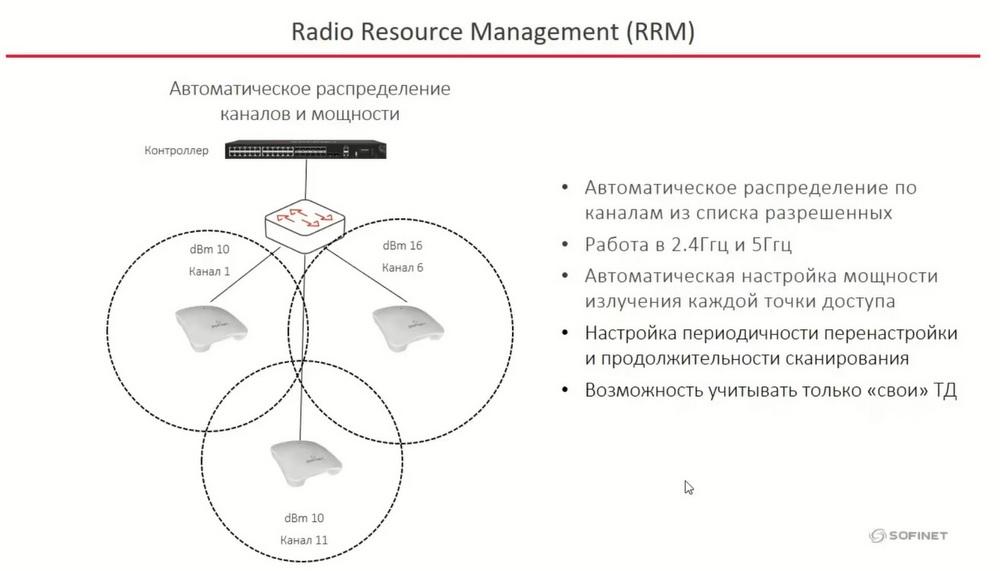
This is the automatic distribution of access points across channels and the automatic distribution of power on each radio interface. After RRM, the access points submit to the list of channels from the list of allowed ones, i.e. we can influence which channel the access point can use and which it cannot. The functionality works in 2.4 GHz and 5 GHz, automatic adjustment of radiation power and automatic channel adjustment are used. The RRM mechanism is configurable, i.e. it can be turned on, for example, once a day at night or during the day, or once an hour. The frequency of RRM activation is configured.
Naturally, it is possible to take into account only your own access points when distributing across channels. That is, you can make the system not respond to the appearance of any third-party access points. It often happens that millions of neighbors in the office turn on or off their Wi-Fi access points. You can make our system not react to this.
There is a rather tricky autonomous AP mode.
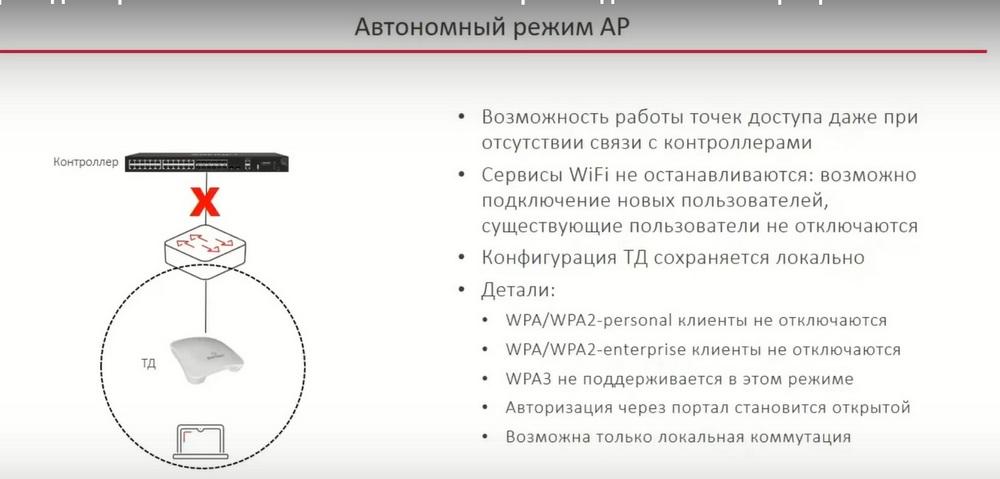
Generally speaking, the access point, at least during the initial "deploy", must find a controller for itself, and must "pull" its configuration from this controller. After that, the link to the controller, the connection to the controller, may be broken. It often happens that the controller is somewhere in the central office, and the access point is hanging on a remote site, and the connection to this remote site is not always stable. Even in the absence of connectivity with the controller, the access points continue to broadcast Wi-Fi, the access points continue to provide services. Clients are not disconnected from the access point at this time. And new clients can also connect to this access point. The configuration of the access point in this sense is stored locally on it, that is, the access point can even reboot, if suddenly the power, for example, disappears. After it boots up, Wi-Fi will work again at the remote site. WPA/WPA2, both personal and Enterprise, will work. WPA3 is not supported in this mode. Only local switching is possible. This is natural, since we have no connection to the controller, so we simply have nowhere to tunnel data traffic. And authorization through the portal becomes open. That is, if we had an SSID with portal authorization on the controller, then such an SSID, in the absence of connectivity with the portal, in essence, with the controller, will connect everyone who wants to connect to Wi-Fi.
A little about security. The standard mechanism for detecting and suppressing third-party access points, the so-called RogueAP, is supported.
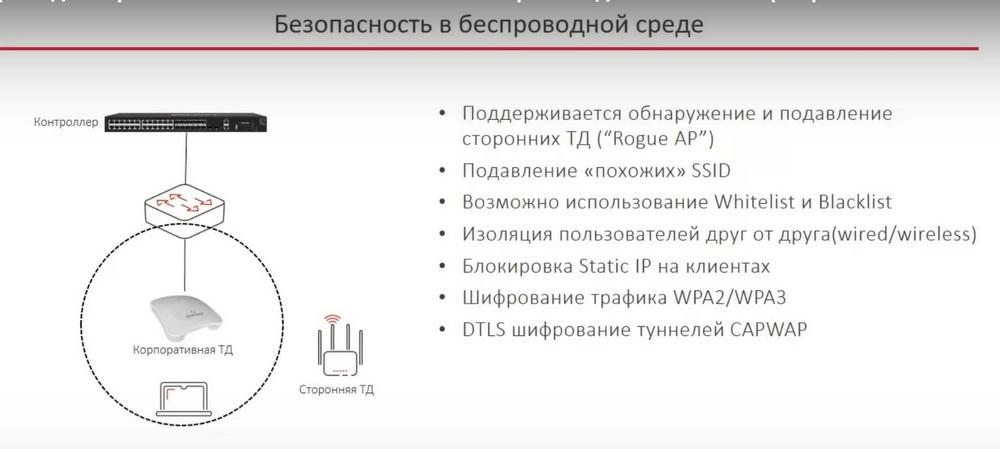
When someone brings a home access point to the customer's office, for example, and starts broadcasting, for example, the same SSID, or similar to the SSID. For example, in our office, access points naturally broadcast on the SSID SOFINET. So, if some villain brings his access point and writes SOFINET, for example, the letter "o" through zero or in lowercase letters, then the system will also work on such an SSID, and will also suppress such a third-party access point. Suppression occurs quite standardly, a deassociation packet is sent to the client and to the access point.
It is possible to use Whitelist and Blacklist. This is a standard access list mechanism based on MAC addresses. Isolation of users from each other (wired/wireless) is supported. This is often required in a hotspot so that clients do not see each other. Clients are connected to one radio, one access point, or to different radios on different access points. They will not see each other.
Blocking Static IP on clients, you can configure it so that the client can connect to Wi-Fi only if it receives a dynamic IP address from a centralized HTTP server. If suddenly a static IP address is written to him, the system will not connect such a user.
WPA2 traffic encryption, this is standard AS-256 encryption, and CAPWAP tunnel encryption from the access point to the controller is possible. Encryption of both the tunnel with user data and the management tunnel. Tunnels can be made encrypted.
Clustering capabilities.
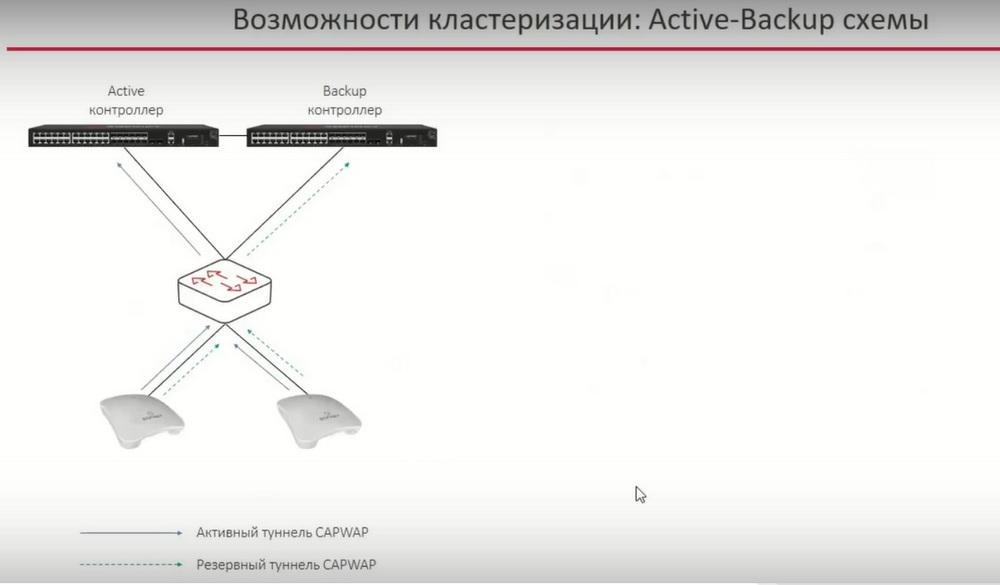
Sometimes we need to back up the controller. The simplest and most understandable scheme is controllers in an Active-Backup scheme. One controller is active, and there is an active tunnel from the access points to it, and at the same time, each access point builds a backup tunnel to the backup controller. But it is not used until the active controller is turned off. IP connectivity between controllers is necessary to combine them into a clustering group.
For large installations, the picture is a little more complicated.
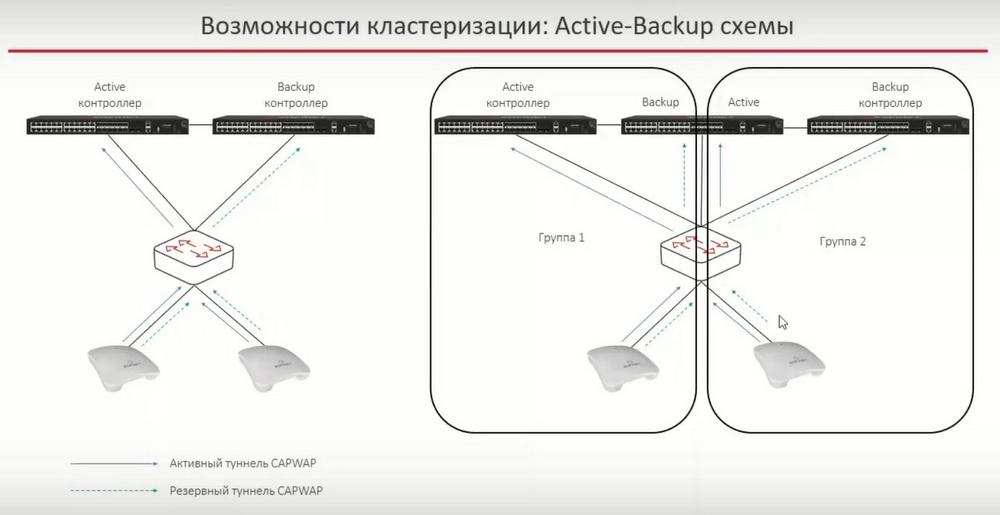
If we do not have enough capabilities of one controller, we can make a bundle of several controllers. The first group of access points is distributed across the first and second controllers using Active-Backup. Another group of points, for example, the second, connects with the main active tunnel to the middle controller, and the third controller is used as a backup . Thus, this structure can be expanded almost infinitely to the right. That is, you can draw group 3, group 4 on the right, and thus make a large installation with access point redundancy. Each individual access point will be backed up on two controllers.
And the second option for using clustering is the Active- Active scheme. In fact, we divide our access points into two groups. One group has the first active controller, the second backup, and the other access points, on the contrary, have the second active controller, and the first backup.
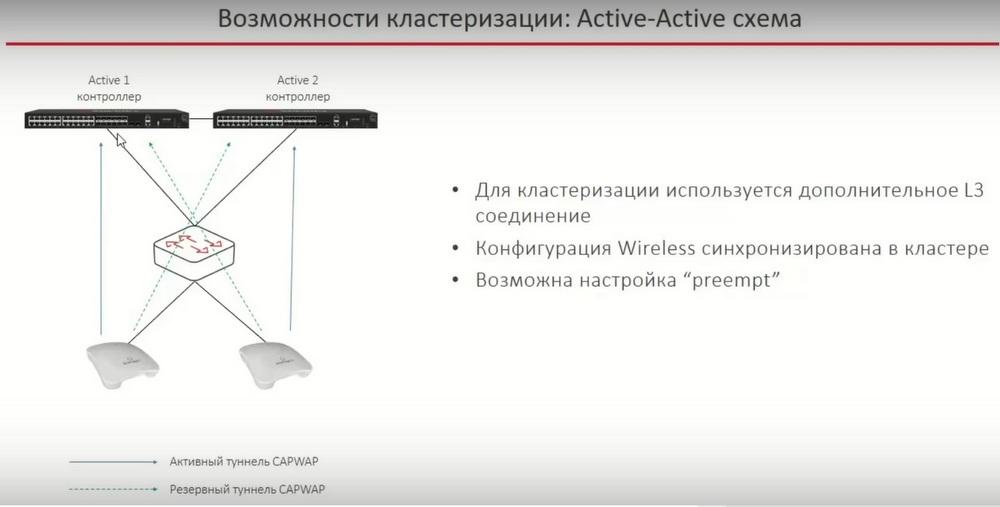
An additional L3 connection is used when clustering controllers. On the slide, this is presented simply as a link. This is often done, additionally just throwing a link. In order not to have to rewrite the same configurations manually on the backup controller, you can synchronize from the main controller. And it is also possible to configure so-called succession, when the active controller is turned off for some reason, all access points switch to the backup, and then the former active controller, for example, turns on again. Here you can influence whether access points should switch back to the first backup controller or not. It is often disabled, because the fewer switches in the system, the more stable it is.
It is necessary to mention additional features. For example, Load-Balance is supported, in two forms.
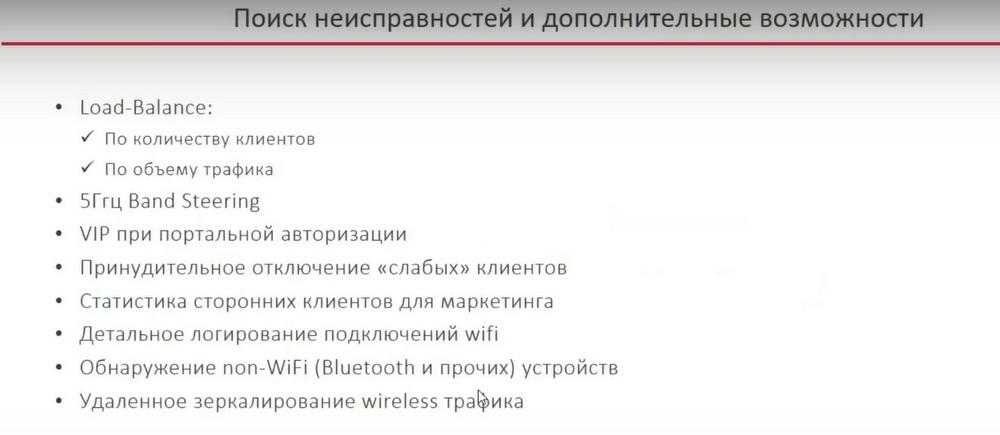
They differ either by the number of clients or by the amount of traffic. So, if there are, for example, 10 clients on one point and 5 on the other, then new clients will most likely connect to the access point with 5 clients. In case Load-Balance is configured to connect new clients based on the amount of traffic, then it is a little more technically interesting. For example, one access point has 10 clients, but they are doing nothing, and the other has 5 clients, but they are all, for example, watching 4K video. And in this case, new clients will connect to the access point that is less loaded.
Band Steering is supported. If a client can simultaneously connect to both 2.4 GHz and 5 GHz, the system will try to move such clients to the 5 GHz band.
Forced disconnection of "weak" clients. If the client is too far from the access point, we simply disassociate it. Thus, our Wi-Fi cell stops degrading due to such remote "weak" clients.
We have support for a technology called "Third-party client statistics for marketing". It is needed in cases where access points are hung, for example, in a shopping center, and we need to see how many clients we have statistically come on different days of the week, how they are distributed across the areas, how much time they spend here or there.
Detailed logging of Wi-Fi connections. In the logs, you can find information about each client, when they connected/disconnected, what their roaming was, etc. By default, this functionality is disabled, but it can be enabled, thereby saving such a history.
Access points can detect non-Wi-Fi radiation. This is a common story with all Bluetooth devices that are constantly near access points and interfere with the radio spectrum.
Remote mirroring of wireless traffic with wireless headers is supported for troubleshooting , for viewing client problems during roaming. This is a pretty useful thing. Now it is not necessary to go to the site to see what is happening in the radio spectrum, you can do it all remotely.
Illustrations are provided by the SOFINET press service