Translated with AI from the Russian original.
We introduce the capabilities of the unified interface of the InfoWatch Investigation Center. We will focus on the tasks of controlling access rights to data to reduce the risks of attacks on information assets using the InfoWatch Data Access Tracker (DAT) module as an example.
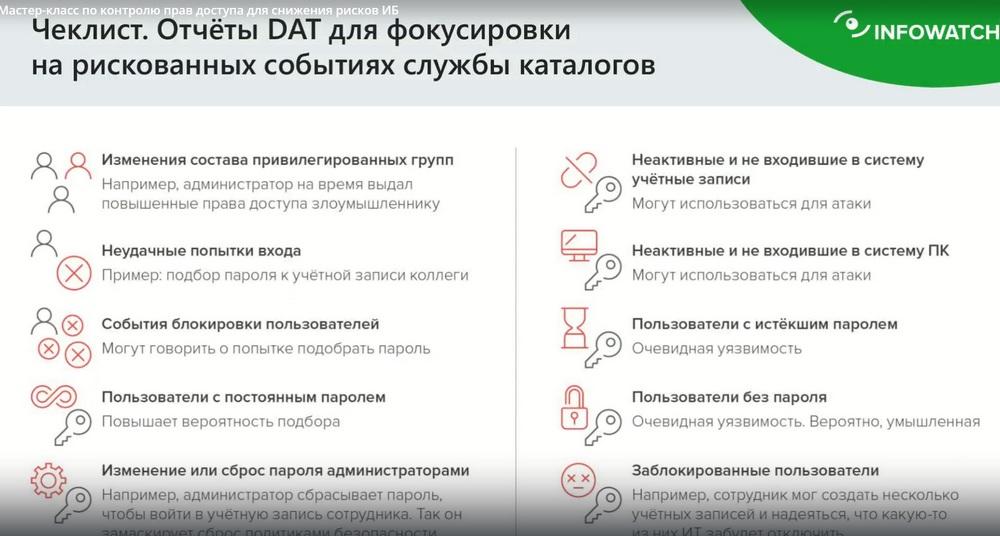
InfoWatch Data Access Tracker is a standalone product and a new module in the unified interface of the Investigation Center. Today we will analyze information security risks associated with events in the Microsoft Active Directory (AD) directory service, using 5 case studies: from changes in the composition of privileged access groups and password resets by administrators to attempts to guess passwords, the presence of "phantom accounts" and other AD events.
We will create a checklist to prevent attacks on information assets through vulnerable user accounts and changes to access groups.
- We will demonstrate how to promptly find out about unauthorized access to data through changes in the composition of access groups or manipulations with accounts.
- What opportunities do end-to-end scenarios for working with access rights in the unified interface of the InfoWatch Investigation Center provide, including for urgent incident prevention.
- What does a real DCAP (Data Centric Audit and Protection) really entail.
Today's event is led by Oleg Mitichkin, Senior Product Development Manager at InfoWatch. He began his presentation with a discussion of such an interesting topic as access control, why it is so important for an organization, in which products there are access control modules, how it is related to the DCAP system.
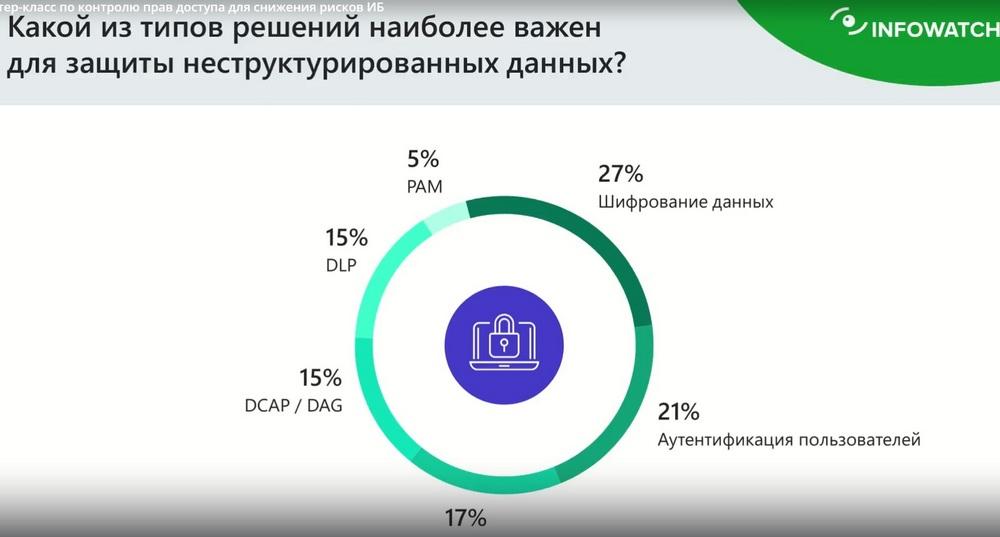
Here we used the results of a survey of our colleagues from AM.Live, a survey of attendees of an event dedicated to protecting unstructured data. First of all, today we will talk about the data that is inside the organization's perimeter. It could be anything. This is data that resides on file servers, on portals, in databases, in CRM, ERP, and so on. That is, data that is inside. Especially important are those data that are of particular importance to the company, which are part of business processes. The leakage of which or their compromise can lead to rather dire consequences. Moreover, we are talking here not only about Word documents, pdf, but also about configuration files. Configuration files for the mail system, application servers, web servers, databases, configuration settings, mail archives, backups, and so on. That is, all the valuable information that is needed for the company's operations and is located inside it. But with a small caveat. Now many companies use ordinary resources - Yandex 360, Clouds, Verge Cloud, and so on. There are now many offers on the market for such corporate systems to replace the departed Microsoft 365 office. Data leakage and access control and data access control in such cloud resources is also an important process, we are also actively communicating with vendors in this direction regarding the provision of an additional layer of security and access control. Thus, when we talk about protecting unstructured data within an organization, the first thing that came to the minds of respondents and attendees of the DCAP event. Well, first of all, everyone talked about data encryption and antivirus protection. This is absolutely true. But please note that here we clearly see two so-called domains. One domain is related to the protection of data directly, by encrypting it so that it cannot be decrypted, but any data can be taken and deleted. Encrypted data is also no exception here. Protection against malicious programs. Here we mean not just antivirus protection, but also a class system EDR, which allows you to protect data from threats associated with various viruses, Trojans, ransomware, and so on. Completely separately and with large percentages, we have user authentication – 21%. Accordingly, we all understand that it is very important to control users' access rights to certain confidential information. And in fact, this is the main task of DCAP or DAC System. DAC is a slightly outdated name, Data Access Governance is now used. Data Control Access and Protection. Moreover, I will say that this is an abbreviation introduced several years ago by Gartner, it is also considered outdated by Gartner. Because the DCAP system actually includes quite a few components. And user authentication, access control, is a necessary module of these systems. And now, you see, DLP is next to DCAP. they are not just located next to each other. Despite the fact that DLP was traditionally used to control leaks, but now we understand that access control within the organization is also important.
Currently, organizations use hundreds of different systems. If we are talking about a large company, then it often has a lot of information systems. These are systems that are used to organize business processes, these are various portals, databases, "1C", everything. Plus information systems for support and plus systems for protection. I spoke with the head of the security service of a rather large company of ours, he said that the number of consoles that an information security employee has to spend time at daily is somewhere more than 20. And the appearance of another solution, such as DCAP, with its consoles, with its reports, will further burden the security department employee.
InfoWatch has strong expertise in DLP systems. Traffic Monitor is a system for data analysis that contains information classifiers, engines that are responsible for analyzing information. We thought, why not combine these two systems.
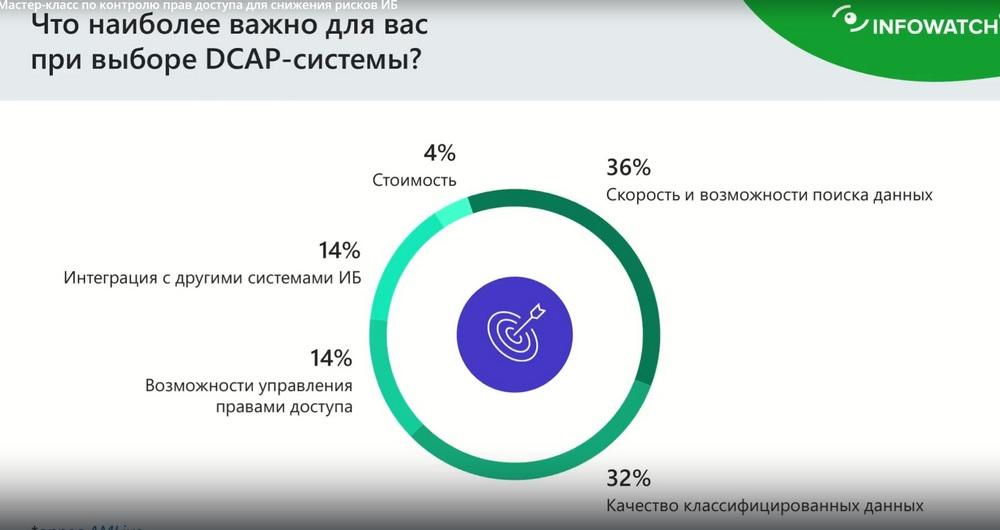
What exactly are DCAP systems important for an organization, why are they paying attention to them now, what tasks do they solve, and I will say right away that they solve tasks that no other system solves, so they are unique in their own way. Again, we used the results of surveys of our colleagues - AM.LIFE. As we can see, the first thing they pay attention to is data search - 36%. It is important that the system can understand where important confidential data is located. That is, the DCAP system must understand where everything is located. Okay, we have highlighted some resource, for example, a file server or a portal, which contains important documents that are uploaded and then used for the work of the entire company. We found these documents, what to do with them next? And then the system should understand what kind of data it is, what kind of documents it is. That is, this data needs to be classified in some way or understand how important the information is in them. And this is where the obvious connection of the DLP system is traced, it uses powerful content analysis engines to understand the degree of importance of the data that needs to be controlled. And in second place is data classification. So, data search, classification. And in third place is access rights management. Because we see where various important documents are located, but who has access to them? Usually, according to business processes, a so-called managed access matrix is built in IDM systems, the task of which is to reduce real access rights to those that an employee should have according to business processes. But the important difference between IDM and DCAP is that IDM looks at rights from above. It does not fall inside, it does not look at access rights to specific objects. And this is quite important. And this is the fundamental difference from DCAP, that DCAP looks at what kind of object, what kind of document it needs to protect. And what access rights it currently has, how they change over time, and how legitimate these changes are.
Integration with other information security systems is a fairly obvious answer. It could always not be included, because there are very many systems in the company's IT infrastructure. And in order to keep track of all this, of course, you need to somehow combine data and configure systems to respond to events that occur in these systems. Therefore, SIEM and other classes of solutions appear here, which allow you to combine events from different subsystems. DCAP is certainly no exception here, of course DCAP should be a supplier of events to their analysis systems. Accordingly, based on everything said, we come to the conclusion that the DCAP system is actually an association, i.e. a kind of business core of systems that is designed for discovery, document search, and content analysis.
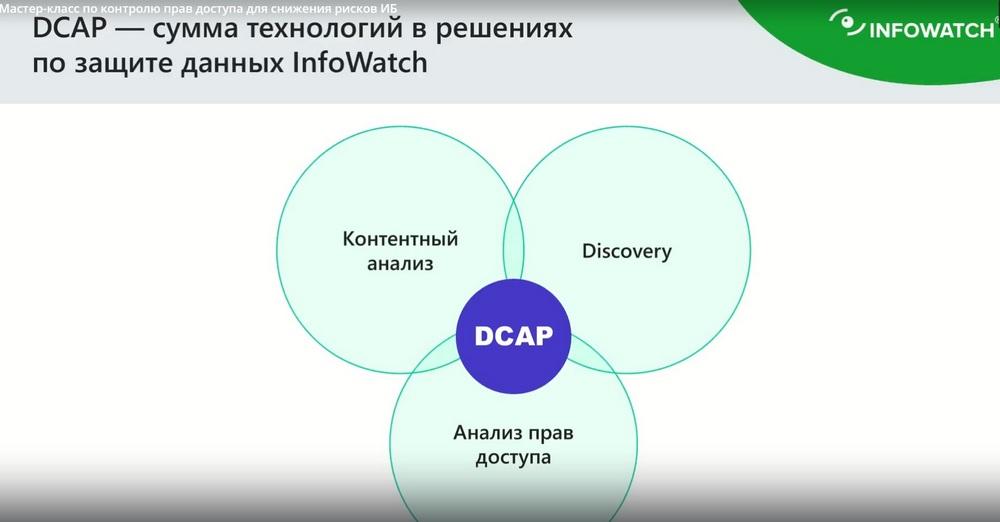
Moreover, content analysis should be tied to the company's business processes. That is, when we implement a DLP system, months pass before we can configure protection objects for specific organizations, for their business processes. Of course, there are systems for automatically creating protection objects, such as autoDLP, a data categorization system that was presented in the latest versions of Traffic Monitor. This greatly speeds up the process of creating protection objects, that is, the data that we must protect. In large organizations, especially if it is the financial sector, about 80% of documents are very well categorized according to certain templates and according to these templates it is necessary to carry them out in protection. And here you can see the obvious advantage of using DCAP together with the content analysis of the existing DLP system, because the result of setting up the DLP system can be used in the same DCAP. And in this way we get a closed, complete ecosystem. One product of this ecosystem, as a module, in this case it is, perhaps, Data Discovery, analyzes documents that are inside the company, analyzes access rights, transmits this information to DCAP, that is, DCAP becomes such a kind of "think tank", combining the functionality of several solutions.
If we talk about access analysis, let's take a file server as an example, on which access control is configured. How can you change access rights? Well, in several ways, I'll tell you about two. First, you can directly give the user access to the files that are located on the DFS share, or change the access rights in groups in the active directory. Moreover, often the very fact of changing the composition of groups will not be cut off by the DLP system. This requires other tools that are included in a separate module, which in turn is included in the active directory or any other directory service. It will look at the change in access rights, look at the change in the composition of groups, be able to compare it with the access rights that were obtained from the Discovery module before that. In this way, the security officer will understand that the access rights have changed. Sometimes this mode can be organized artificially in products. It is called sandbox mode, when a user is entered into certain groups and the security officer immediately sees how this will lead to a change in his access rights to information systems within his organization.
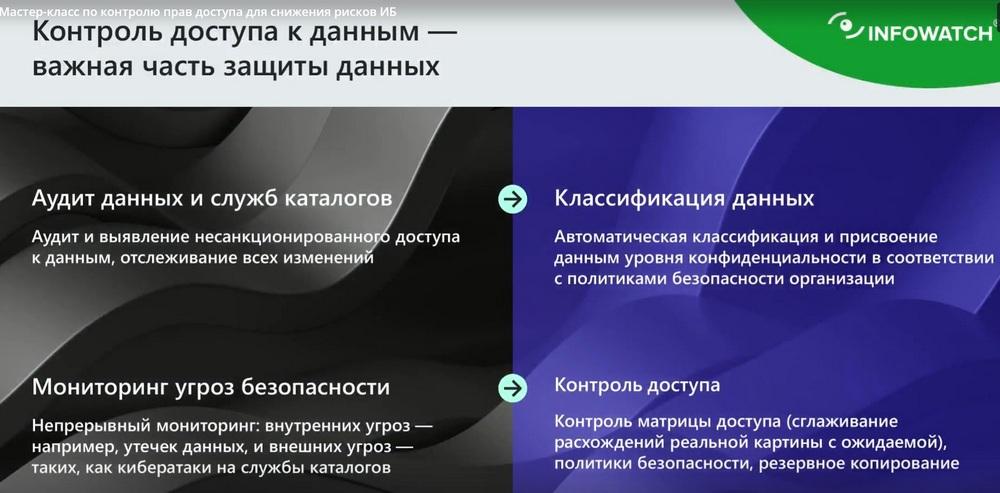
Thus, DCAP should audit data. Where are they located? An audit of directory services should be carried out, because directory services contain complete information about users, which we will later use to assign access rights to access lists in any system. DCAP should classify data in order to understand what kind of data appeared on the open share. And why? The DSP is located in the public folder or was located there for literally 5 minutes, and then someone removed it, but during this time 100 people have already downloaded it. DCAP should regularly monitor, audit, control changes that occur both in access rights and in the distribution of documents within the company, that is, the map or infofield should be constantly rebuilt. If we are talking about our new solution, Data Access Tracker is something related to DCAP. Therefore, we decided not to change the name, so as not to confuse anyone.
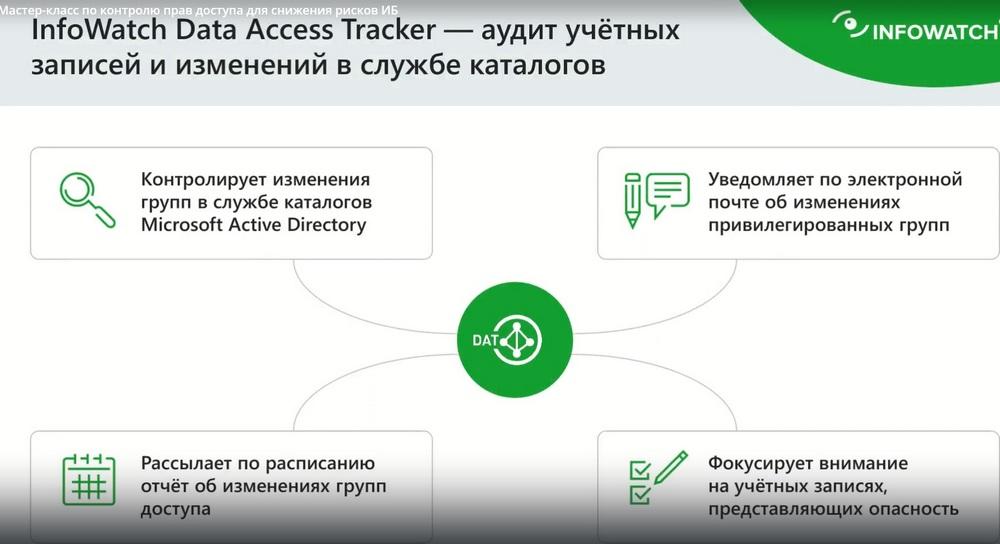
Accordingly, when we talked about access control, we mentioned changes in the directory service. Well, since most of you are probably already familiar with the InfoWatch product line, and you know that we just didn't have this module. What happens in the directory service and how this leads to a change in access rights to documents, we, unfortunately, could not understand. And this DAT module closes the need for control and audit of directory services.
Now it's Microsoft OD, and at the moment we are working directly with ALD developers, and ALD Pro will be added in the next few months. In fact, we are honestly working with the development of Astra, our testing department even manages to find various bugs in ALD Pro. And with joint efforts, all this is sent, immediately checked. So I think in the next couple of months we will have ALD Pro support.
So, DAT. Now we are starting to close those information domains with this DAT that we do not have in order to completely close the organization's need for a DCAP scenario. Often DCAP begins to suffer from poor content analysis. Since Traffic Monitor, which fits into the company's business processes, plus it is configured for the company and those protection objects, those policies that are implemented in Traffic Monitor, they can also be used in the DCAP system and can be used in DAT. This is very important. If DCAP uses some Open Source system for content analysis inside, then it should be conveniently configurable. And many companies now offer pre-configured categorization systems according to so-called compliances or laws, but if you want to add something of your own, this may require significant effort.
Here the system is closed, a system that works in the investigation center, about which, I think, many of you have already heard and are already using the results of setting up the DLP system.
We look at what is happening in AD from the point of view of the composition of the group, especially privileged groups, from the point of view of user accounts, how they change, what new ones appear, what are muted. We immediately notify security officers by e-mail about the main changes. Now the main task of DAT is to take a deep look at the directory service and understand what has changed.
How we conducted pilot testing. We started piloting in March of this year. About twenty large companies participated in the pilots. And we noticed such a trend. That, firstly, the task of auditing and controlling the directory service is really important. Why is it important? Because over the years of the company's existence, the directory service, that is, the main service where information about all users, organizational units, groups, group policies, and so on, is located, comes into a state of some kind of chaos. And DAT, as a system for actually analyzing domain controller logs, allows you to disassemble all this pretty quickly. There have already been cases when literally the next day after the introduction of DAT in fairly large, multi-domain companies, it was already possible to understand that something was wrong with us. Here. And the second task that DAT eventually solved, after we put things in order in the directory service, we now monitor specifically what is actually changing there over time. This especially helped companies with a branch-developed system, with local administrators and a security officer, who now saw in the investigation center all products related to access rights analysis and data analysis, he could easily and quickly understand what was happening and what it could lead to, which is of course very important from the point of view of the investigation.
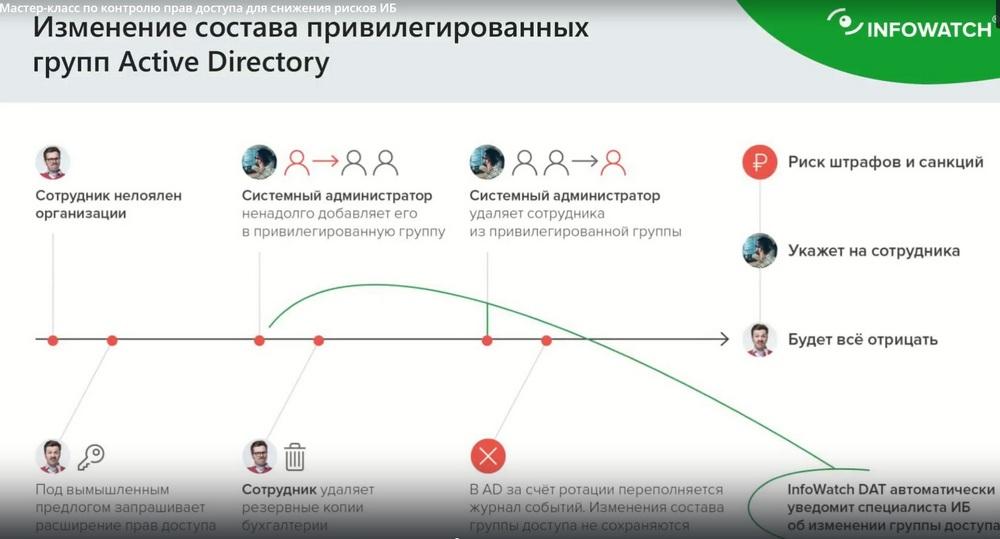
Let's look at a few examples, such as those that are very relevant now in our time, which can close the change in the composition of the privileged group of the active directory. There are two classes of groups. The first is pre-configured admins, such as Domain, Admin Schema, Admin Enterprise, Admin Exchange, Admin Etc. These are the groups of users and real administrators who are responsible for the functioning of the infrastructure. Natural changes in such groups, including even temporary people who are not authorized employees, can lead to rather dire consequences. No matter how it sounds, but still security officers with IT should be friends, but also help each other a little from the point of view of ensuring security.
The second group of privileged users is, of course, people who are responsible for the company's business. These are top managers, financial employees, these are HRs, that is, people on whom the business depends. And people who have access to information, the publicity of which may pose a threat to the company's reputation. Accordingly, these two groups of users, firstly, need to be identified, and secondly, their changes need to be controlled. And in this slide, we show how the system allows you to control changes in groups, for example, groups related to finance, accounting, and so on. That is, the temporary inclusion of employees of such a group, the provision of access and rights on behalf of this group can lead to access to closed financial information, to cash flows, obligations, and so on. If a person tries to use this for their own selfish purposes, it may not end well for the company.

The next interesting example. Changes or password reset by administrators. We have an analytical center in our company. And many incidents related to the theft of information, even with their damage, are related to the fact that, a simple example, a high-ranking employee goes on vacation, his password is reset and a new one is set and various bad actions are performed on his behalf. These examples are now very well known in the market. Changing or resetting a password is just one of the ways, by the way, this can be done programmatically, it is not necessary for the administrator to take his hands and reset someone's password and set his own. And then he made a setting that when the person returning from vacation, from a business trip, must enter this password. Any modern Trojan can do this. This system should understand and cut off. The security officer should see this immediately.
Failed login attempts and login attempts during off-hours are also of considerable interest; moreover, I would say that there is a system of the so-called UBA class – User Behavior Analysis. And such cases are highlighted there with maximum priority because this is non-standard employee behavior, it is a deviation, and any deviation is an anomaly. If you see that an employee usually works, say, from 9 to 18, and suddenly he started logging into the system on Saturday evening, and not even on the first try. This is a reason for the security officer to start worrying and figure out what, in fact, such an employee needed in non-working hours, and a reason to find out where the logins come from by device name, by its IP address. In systems of the so-called CAS-B class, there are maps of ordinary GEO IP, which show where employees in quotes logged in from, because usually these are hacking attempts. Yes, such multiple failed login attempts should be blocked, inactive accounts, especially admin accounts.
That is, employees of IT departments, especially in large companies, often change, and not only IT, but also support, and devops, and so on. And employees who are about to be fired, but still have high rights, can create so-called phantom accounts. We call them phantom because they seem to exist, but are not active, they are admin accounts, and a lot of trouble can be caused from under them.

Service accounts are usually used to run critical services. Application Server is a database. They use so-called service accounts that have Interactive Logon turned off. What does this mean? You can't log into a laptop under these accounts. If very simple. I think you are well aware of the dangers that such service accounts pose if, for example, the password is stolen from them. Firstly, such accounts are needed for the functioning of corporate critical systems, therefore, it is very important to observe password hygiene, not to write them down on paper, because all this is easily captured by some keyloggers. That is, accounts that were once used, but are not used anywhere now, but they are active, they usually have very easy or even empty passwords, and sometimes the company's GPO policies do not apply to the service account. They can be used to launch left-wing services, and services on servers. That is, service accounts must be controlled, and this is already possible in our system. Of course, the product can now work with a large number of problems that can lead to significant loss of information within the company. Here the system is built as a reporting system, where the security officer focuses on one specific problem. That is, on the one hand, we focus on showing events that occur in the directory service and focus on those events that are important from a security point of view and those that are important from the point of view of access rights, because DAT is still the core of the DCAP system.