The computer equipment brand iRU has been operating in the domestic market for over twenty years. During this time, the company has developed expertise in many areas, including its own research and development center, opened service centers in one hundred cities, and created a network of thousands of partners for supplying its products.
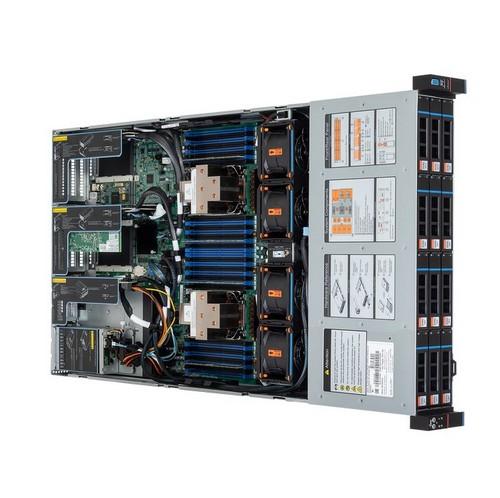
Despite the fact that iRU's assortment is mainly represented by client devices such as system units, all-in-one computers, and laptops, the company also pays special attention to the B2B segment, supplying server equipment to the market. At the time of writing, the product catalog featured sixteen models of rack servers and two in tower format. In this article, we will talk about the iRU Rock G2212IG4, which is positioned as a device for performance-demanding tasks, especially machine learning and neural networks.
Before continuing the story about this product, it should be noted that we are actually talking about the SL201-G4 platform, presented by the Chinese manufacturer Gooxi last year. In our opinion, this should be viewed from the point of view of the end consumer – they choose and buy a solution in the local market, receive support, service, and warranty here. At the same time, all this comes from a trustworthy company that is as close as possible to the consumer, which ensures prompt resolution of issues arising during operation, including optimal product configuration for the customer, availability of spare parts, and technical advice on working with the server.
Appearance
The device is made in a standard 2U case, 800 mm long. The front panel has twelve bays for 3.5" drives with hot-swap support. Without using special adapters, you can also install 2.5" drives. Each bay has status and activity indicators.
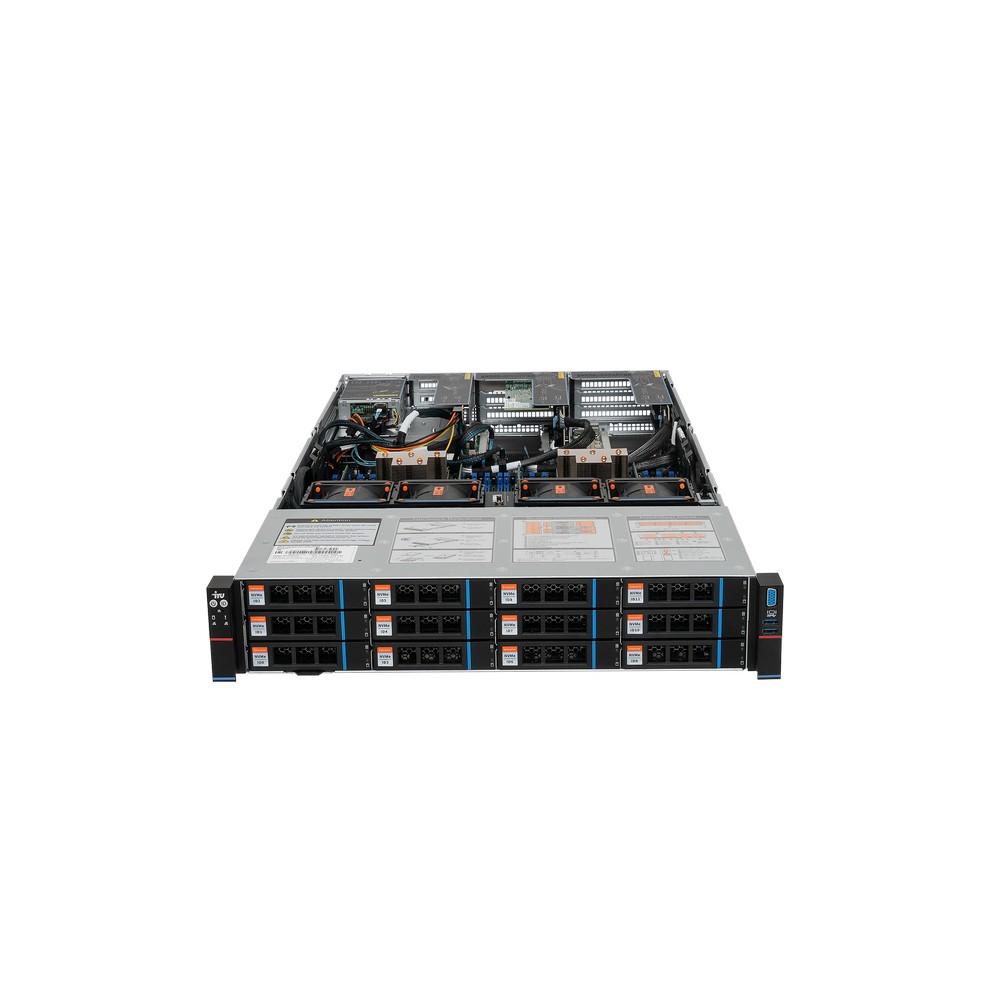
On the left side there is a block with buttons (power and ID with built-in LEDs, as well as a hidden reset button) and indicators (disk activity, system status, presence of OCP network cards), and on the right there are VGA and two USB 3.1 ports for quick connection of a console, drives, or other devices.
The rear panel is mostly occupied by slots for expansion cards. We will talk about their possible configurations later. In the bottom row, we see two OCP 3.0 slots for specialized expansion cards (usually used for network adapters), two USB 3.0, VGA, and an OOB management network port. On the right are two hot-swappable power supplies.
To access the "insides" of the server, you need to remove the top cover, which is closed with a latch with additional locking.
Mounting in a rack is carried out on the included rails with tool-less mounting. But for reliability, we recommend using screws as well.
Construction
The internal structure of rack servers rarely presents surprises. The model under consideration is no exception. In the front of the case are disk bays and a backplane. Behind them is a fan unit, which contains four large 8056 format fans, of course, with support for quick replacement, as well as adjustment and control of revolutions. Next comes the main motherboard with two sockets for processors and thirty-two slots for RAM.
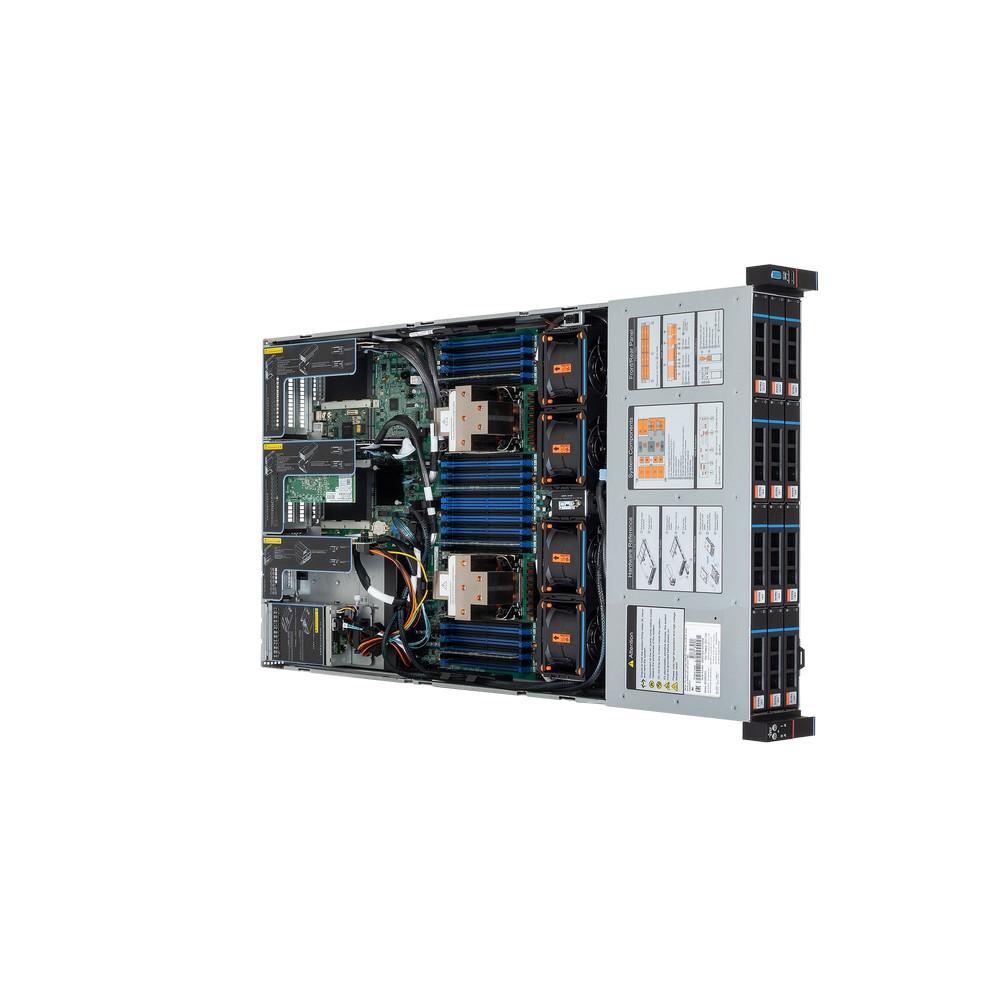
The processors are equipped with special-shaped radiators with heat pipes and on top of them – an air duct for distributing air flows. We remember that you can use very powerful processors here, so proper cooling is necessary for stable server operation. In the rear of the case are compartments for expansion cards and power supplies.
A feature of the platform is the ability to choose the configuration of expansion cards and additional disk bays. In particular, two slots above the power supplies can be either a place for half-height expansion cards or used to install disk drives.
Processors and RAM
The motherboard on the Intel C741 chipset is designed to install two Intel Xeon Scalable fourth or fifth generation processors for the LGA4677 socket. At the same time, you can use models with TDP up to 350 W, which means the possibility of working with all models of the series, except for one. So, the maximum here is the Intel Xeon Platinum 8592+ processors: 64 cores/128 threads, base frequency 1.9 GHz, maximum frequency 3.9 GHz, cache size 320 MB.
For DDR5 ECC RDIMM or RDIMM-3DS RAM, there are 32 slots, so the maximum volume can be 8 TB. If you plan to use maximum volumes – do not forget to check the capabilities of the processors. For maximum speed, you need to install modules in pairs.
Modern Intel Xeon processors have a sufficient number of PCIe 5.0 lanes to work with both peripherals and drives. In particular, the platform in question has 14 MCIO x8 connectors for connecting U.2 disks or riser cards.
Expansion cards
A key feature of the model is the ability to install two full-size video cards or accelerators with large dual-width cooling systems in PCIe Gen5 x16 slots.
The formal maximum configuration for expansion cards includes six full-height cards, four half-height cards, and two OCP 3.0 slots. It is easiest with the latter in terms of lines and standards – each OCP 3.0 has 8 PCIe lanes.
The slots for full-height cards are also all PCI 5.0 and support two configuration options – one x16 slot and two x8 slots (basic version) or two x16 slots (ordered separately). Slots for half-height cards support two options – one x16 slot or two x8 slots. As a result, if we talk about modern powerful video cards, you can install two full-size cards with dual cooling systems and a length of up to 330 mm at once. Special additional cables from the motherboard are used to power powerful accelerators. The maximum power consumption for one video card is 450 W.
Slots for half-height cards can also be used in different versions – one x16 slot or two x8 slots. Optionally, you can install modules with compartments for SFF drives here.
Although the motherboard itself can work with one installed processor, to use all expansion slots, you will need to install two processors.
Network interfaces
The basic version of the platform does not have any network interfaces. So, in any case, you will need to equip the server with a network adapter in the form of an OCP module or a standard expansion card.
Disk subsystem
The disk subsystem is represented by twelve bays for drives on the front panel, and all of them support three popular interfaces today – SATA, SAS and NVMe (U.2). At the same time, three SFF-8654 ports are installed to connect the first ones, four bays each, and for U.2 there are six MCIO ports with 8 PCIe lanes each. So, depending on the tasks, you can implement both a fast and a capacious disk subsystem. You can even combine disks with different interfaces.
Depending on the configuration, there is also an option to add two or four bays for 2.5" SATA or NVMe drives on the rear panel (also with hot-swap support). Just do not forget to count the controller ports.
In addition, if there are no requirements for hot-swapping, you can use two M.2 22110/2280 slots on the motherboard. However, they operate through the chipset and only support SATA.
The SATA controller in the Intel C741 chipset also serves three SFF-8654 ports on the motherboard, so the 12 main bays can also be connected to it. But this is more of a backup option. After all, in most cases, the modern disk subsystem requires both speed and fault tolerance, and the chipset controller can only provide basic configuration options. For some undemanding boot image storage options, the internal USB 2.0 port may also be useful.
Note that to use disks with the SAS interface, it is necessary to add the corresponding controller. The platform itself does not support this interface.
Power
Several power supply models are available, ranging from 800 W to 2600 W. Given the support for powerful processors and video adapters, these numbers are not surprising.
Management
The platform uses the popular BMC controller from Aspeed – AST2600. It implements a network port for OOB management, a VGA controller, and a serial port.
Remote management capabilities are standard for this class of devices. Through a dedicated network port, you can have full access to the device, including BIOS settings and the operating system desktop (if an external graphics adapter is not used to display it). Built-in tools allow you to monitor hardware sensor readings, conduct inventory, send notifications, view the event log, integrate into the monitoring system via SNMP, and update BMC and BIOS firmware. A power consumption limitation function is provided, which may be important for large installations. Of course, access control and rights differentiation were not forgotten either.
The BIOS was pleased with the iRU company logo during boot. Well, in fact, its functions and capabilities are standard for AMI solutions. In particular, this is support for the UEFI interface, including booting from devices and the network, a built-in console, and management of RAID- and network adapter settings.
Service and support
The equipment is assembled in Russia. This allows us to ensure both the availability of standard configurations and to quickly change them to meet customer requirements. Quality control is carried out for all servers, including load testing, which leads to a reduction in warranty claims.
The company supplies servers through a partner network. A standard three-year warranty is provided on the equipment. If necessary, you can order an extension to five years, as well as purchase OnSite and NBD packages.
It is stated that most components for warranty repairs are constantly available in the warehouse. If they are not available, the delivery time is up to three weeks. The terms for extended warranty packages are specified in the relevant agreements.
The equipment is provided with the necessary certificates, which is important for certain categories of customers.
The manufacturer provides technical support, including providing BIOS and BMC firmware updates.
Conclusion
The iRU Rock G2212IG4 server is interesting primarily for its versatility – the solution configuration can be customized for any range of tasks – from file storage and virtualization to working with neural networks and AI applications. Almost every item of technical specifications can vary within a wide range – processors, RAM, disk subsystem, expansion cards and communications. And here, the Russian assembly is of particular importance, allowing you to implement all these options in practice quickly and with a guarantee.