Translated with AI from the Russian original.
Event of the special project of the OCS Soft team - "PROdemo: Software Solutions Laboratory". At the meeting, we talked about: "Cyber Backup v17. Overview of the new version features".
At the event, the speakers told: what's new in v17 and about the main elements of the PostgreSQL DBMS cluster management interface based on Patroni.
Alexander Kalinin, technical expert at OCS, began his story about Cyber Backup version 17, which was released in June this year. OCS has a website for the "Department of Infrastructure Software and Information Security". On the site you can see almost all the demo stands that are in the company's portfolio. All these demo stands are implemented on the basis of a demo data center.
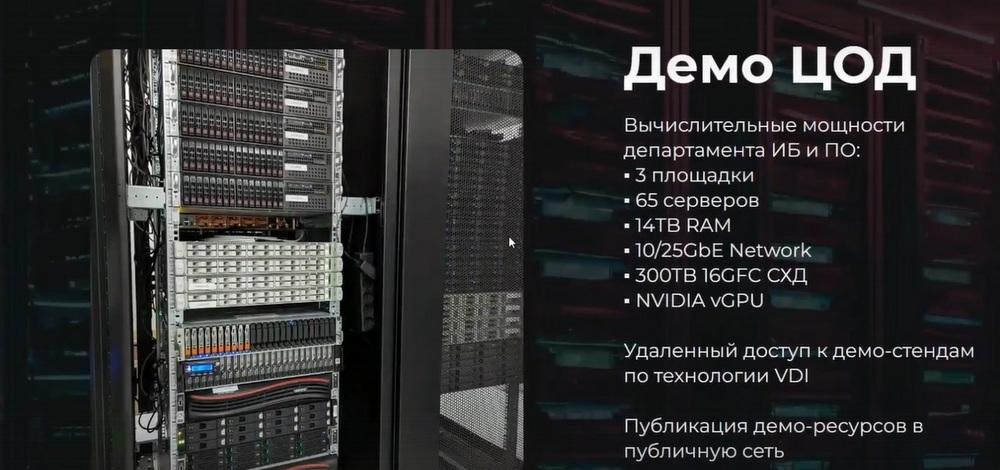
These are three sites, 65 servers, 14 TB of RAM, NVIDIA graphics cards. And we provide access to demo stands using VDI technology or some resources, separate applications. And on the basis of this data center, we show a number of services for partners.
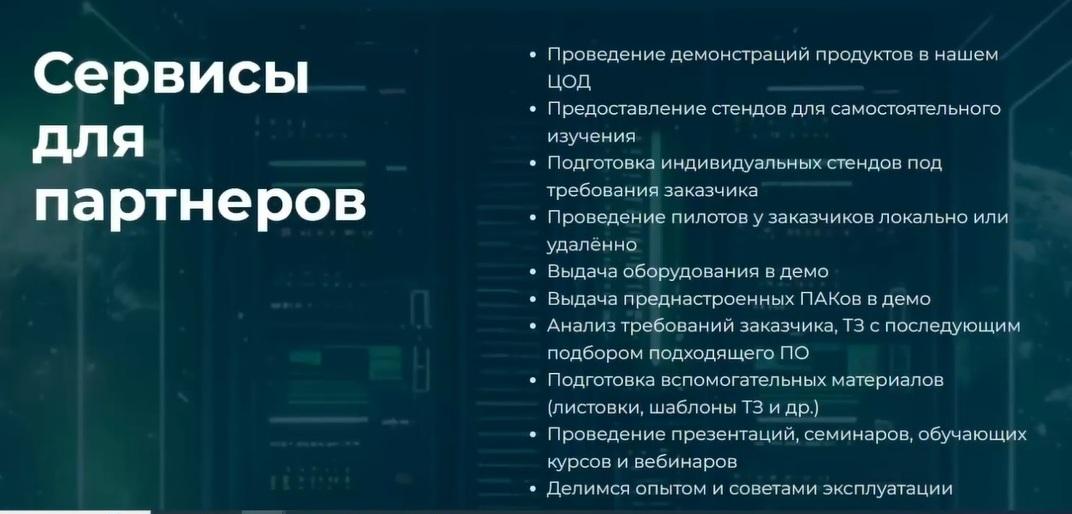
We also prepare individual stands according to the customer's requirements. We can conduct pilot projects locally or remotely. We provide equipment. We have a pool of servers. Sometimes we install something on these servers, for example, zVirt plus Cyber Backup. This is a so-called PAK, it can also be prepared. And a number of such standard activities, such as analyzing customer requirements, analyzing technical specifications with subsequent selection of suitable software, preparing auxiliary materials, such as leaflets, technical specification templates, etc. and so on. And, of course, we conduct presentations, seminars, training courses, webinars. We share our experience and tips on using our products.
Let's go back to the demo stands.
All popular virtualization platforms ZVirt, Brest from Astra, Basis.DynamiX, SpaceVM, VMmanager, HOSTVM, ROCA Virtualization, Alt Virtualization, Cyber Infrastructure, and even Container are available.
VDI is a little smaller, but there are also fewer solutions on the market. You can click the "more details" button, view some screenshots of the management console, if it is provided on the system, maybe some reports, etc., etc. You can see the demonstration scenario, the composition of the stand, that is, on the basis of which platform, virtualization, all this is implemented. And you can click the "book" button all this, and your wish to book a stand will be sent to Telegram. We will definitely contact you and discuss this issue.
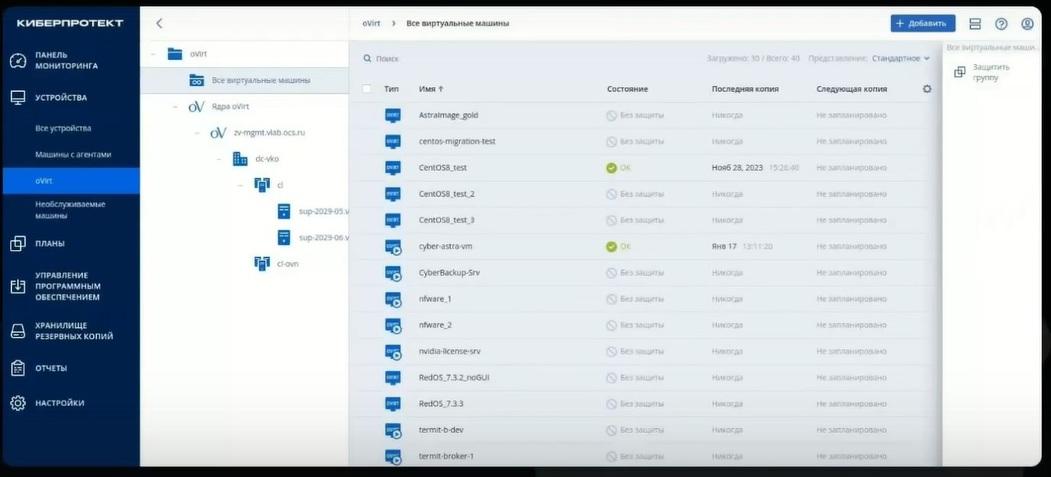
Then Alexander Sevastyanov, technical expert at OCS, continued the presentation about Cyber Backup, its capabilities, several slides will be devoted to the new 17th version, we will find out what's new there.
Cyber Backup has a three-component client-server architecture. There is a management server that stores all settings, monitors the execution of all operations, registers devices, monitors, provides a web interface, and so on.
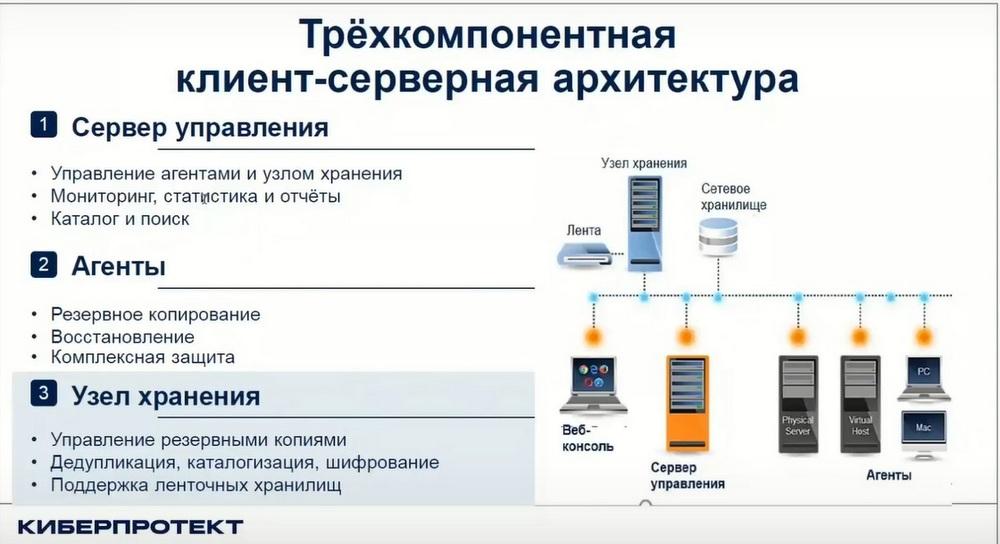
Agents are installed on client servers, workstations. Agents directly perform backup and recovery operations. A characteristic feature of agents is that they can operate independently of the management server. If the management server is unavailable, the agents know what to do and will perform their work as programmed on schedule, make backups, for example.
Storage nodes are not a mandatory part, but in some cases they are necessary. For example, this is if the technology is used for duplication during backup, when storing backups, for cataloging, for encryption and for supporting tape storage. In these cases, it is simply necessary. Well, otherwise, it can serve as a media server, although, according to colleagues from Cyberprotect, it is not yet a full-fledged media server, but in the near future they promised to improve it. Cyber Backup provides protection for a fairly large number of different workloads. These are various operating systems. Of course, Windows and its various editions are traditionally supported. Now, of course, Linux is relevant, various Linux both Western, such as Red Hat, Ubuntu and domestic production. Naturally, this is Astra Linux SE, Alt Linux 9, REDOS, and so on. Supports backups of various applications, various virtualization systems. The virtualization system is now very relevant. We have a fairly large list of supported systems. Modern domestic virtualization systems are also fully supported. These are Zvirt, Rosa. In the current version, support for Basis.DynamiX has begun. A large number of applications, databases. This is Postgres, first of all, MSSQL, MariaDB. Also, these are mail systems: Exchange, Communigate Pro, Mail and other systems.
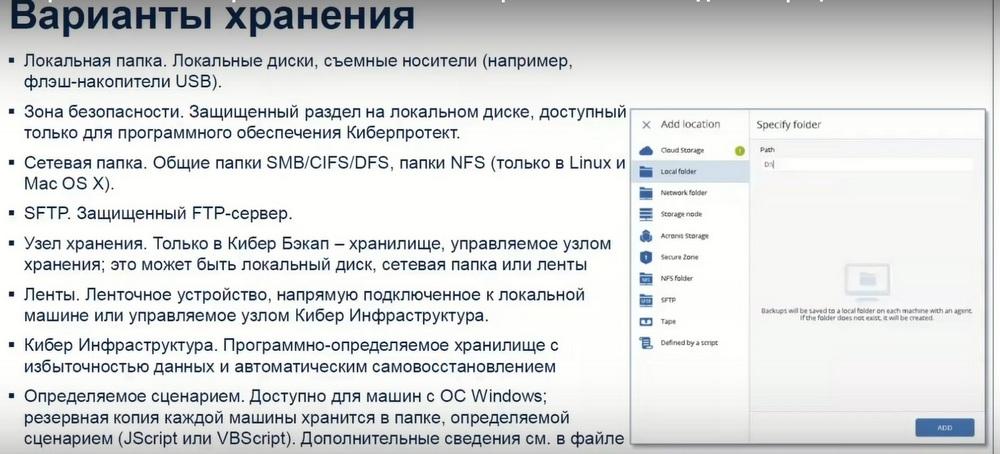
What storage options does Cyber Backup provide? First of all, this is a local folder and a network folder. Through the storage node, you can make backups to any other devices connected to the storage node. Another interesting option that Cyberprotect offers is to use Cyber Infrastructure as storage. Cyber Infrastructure is, in fact, a software-defined storage with data redundancy and self-healing, which is built from standard architecture servers with disks inside. That is, from 3-10 or more servers are combined. Their internal disk resources are combined into a single storage. And there you can manage data redundancy, so that if one server with disks fails, and even two or more servers, the data would still be available. The advantage is that you can build fast, convenient storage from standard architecture servers. And, maybe, even from old servers. That is, if new fast, powerful servers are used in production, then from old servers with disks you can build such storage and store data there. And this storage works quite easily, quickly and very efficiently with Cyber Backup.
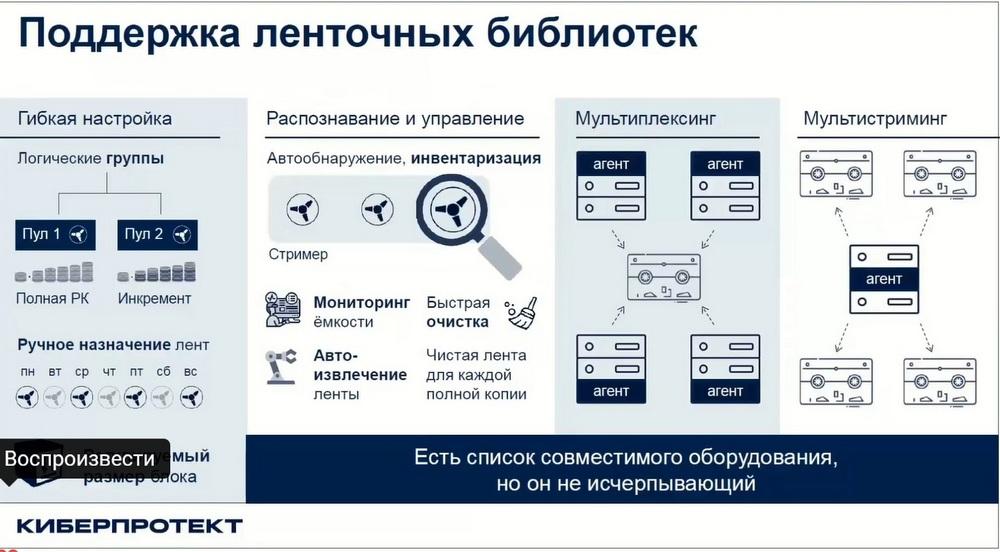
Support for tape libraries. The tape library supports various functions that Cyber Backup provides, such as tape detection, inventory, tracking residual capacity, tape cleaning, verification utilities, etc. In particular, multiplexing and multistreaming are supported. Although, of course, there are still certain points that need to be taken into account. For example, multistreaming during recovery will still not be possible, apparently. Because, despite the fact that you can read from several tapes, but when recovering from a storage node, data is still transmitted to agents via one channel. And therefore, there is still work to be done. It is not for nothing that they write that there were improvements in the 17th version, but also in future versions, I think that there will be improvements in terms of tape library support.
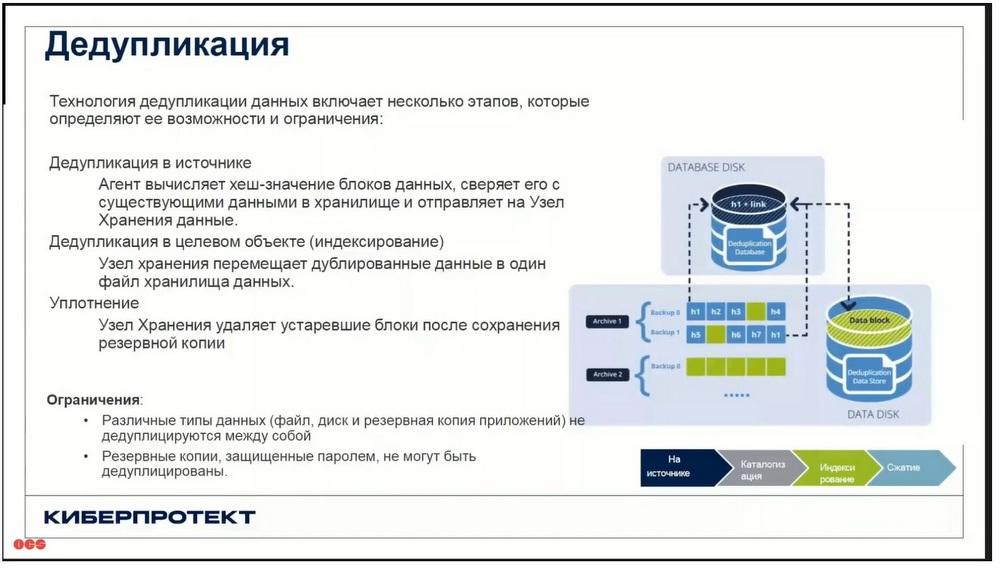
Deduplication is primarily used at the source. The hash sum of the data block is calculated at the source and, accordingly, the presence of the same data block is already checked in the storage. In the second stage, deduplication is used on the storage node. Data blocks are checked for their uniqueness. Here we are already talking about global deduplication, that is, deduplication with the data that came to the storage node from other backups. Deduplication reveals the uniqueness of blocks with the presence of the same blocks in other backups.
But, as for deduplication technology, specialists from Cyberprotect recommend using this technology with caution due to the fact that it does not always give advantages. On both sides, it requires additional resources. Hardware requirements for the storage node increase, additional space is required for deduplication databases, and therefore there is a certain additional load on the processor. Therefore, you need to test and see.
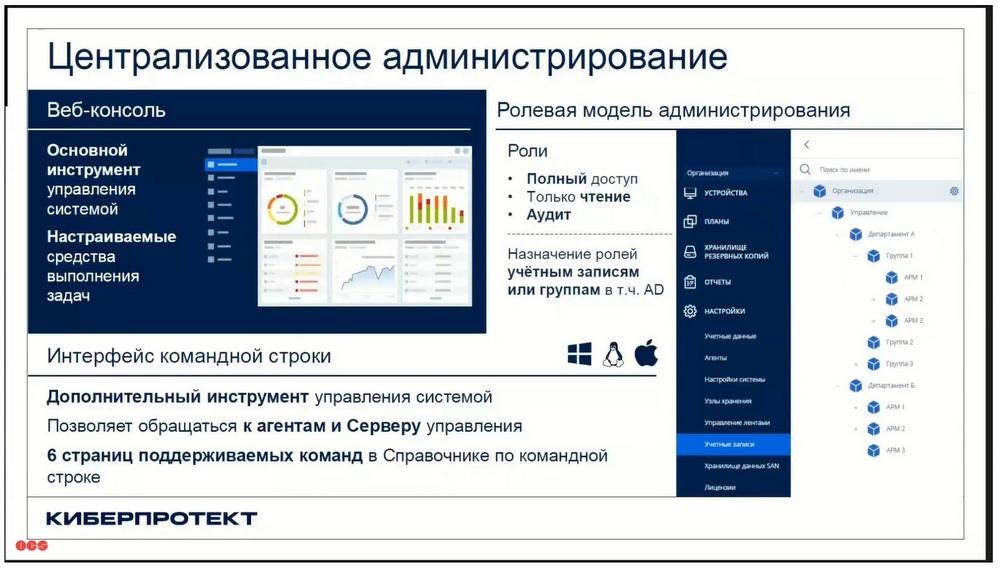
Centralized administration. There is a web console with fairly rich features. It allows you to see all the information about the system, about devices, about rules. It should be noted that the web console allows you to create various administrators, assign various roles to administrators. That is, there may be an administrator with a full set of rights and privileges, or there may be some administrator or user who only has read access. For example, this may be an employee of the information security department. There is also a useful role of auditor, who has limited visibility into what is happening in the system.
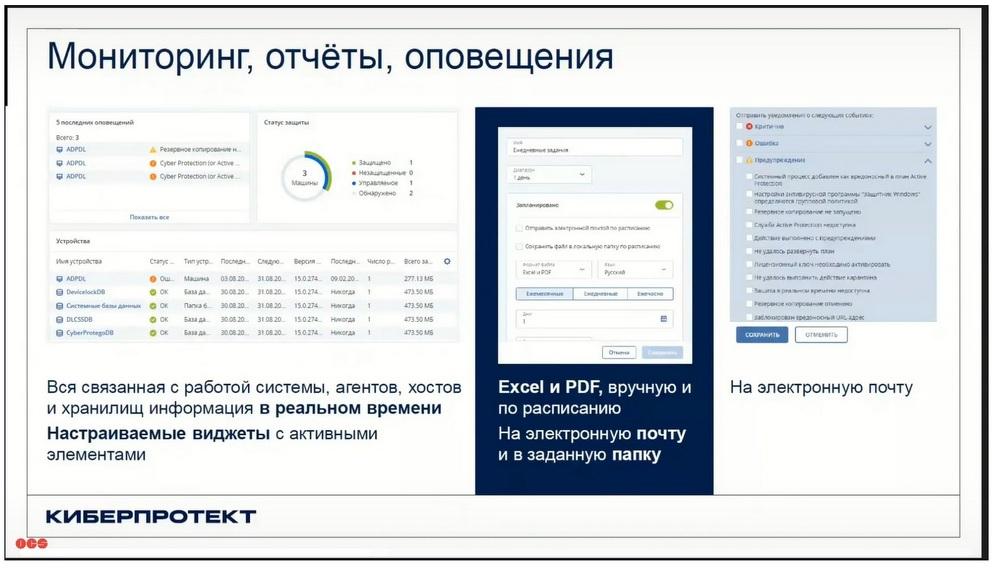
Monitoring, reports, alerts. The web console has a built-in information dashboard with a large number of useful informative widgets. Information about what is stored in the system can be exported to various formats and receive this information in the form of reports. It can be uploaded to Excel, PDF, or you can receive it by email. This is also a useful feature.
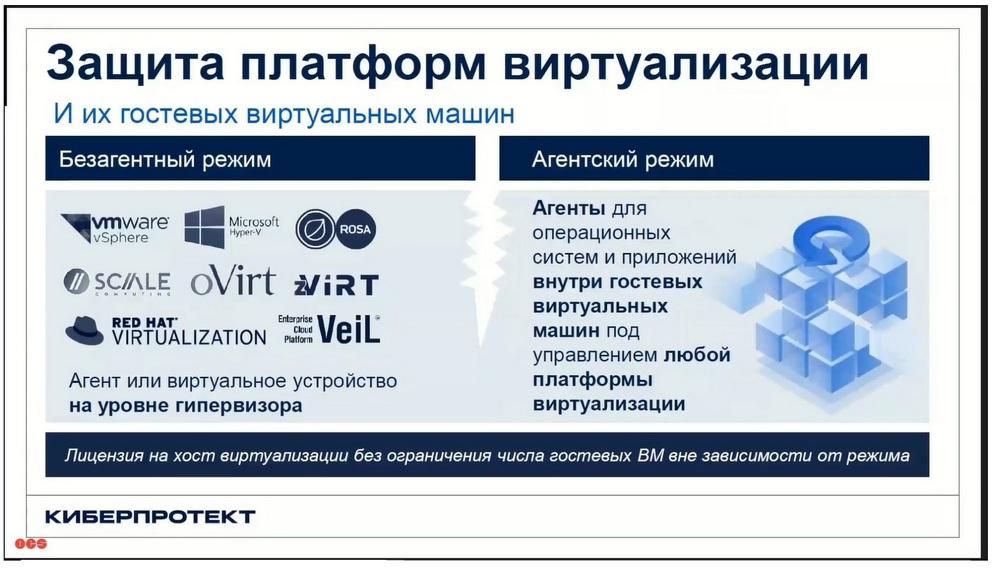
Virtualization platform protection. CyberProtect divides the capabilities in this area of virtualization protection into agentless mode and agent mode. Of course, everyone is interested in agentless mode, when you can back up without installing agents inside the virtual machine. In most cases, you need to deploy a so-called virtual appliance or virtual appliance in order to connect to it, for example, screenshots in order for it to retrieve data. But sometimes you need to insert some additional agents at the hypervisor level.
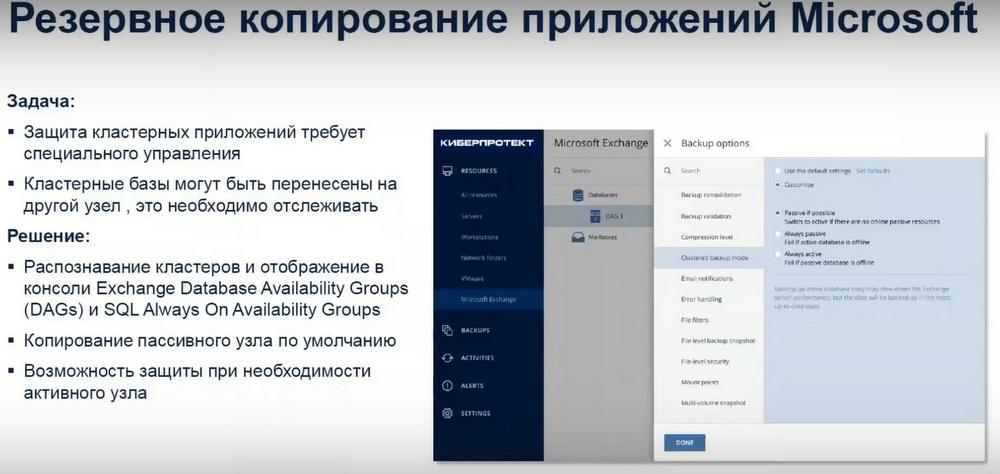
Microsoft application backup is a well-known feature of this product. This product has well-known roots. It used to work quite actively with the Microsoft application. And now it actively protects various applications, Active Direct, Share Point, etc.
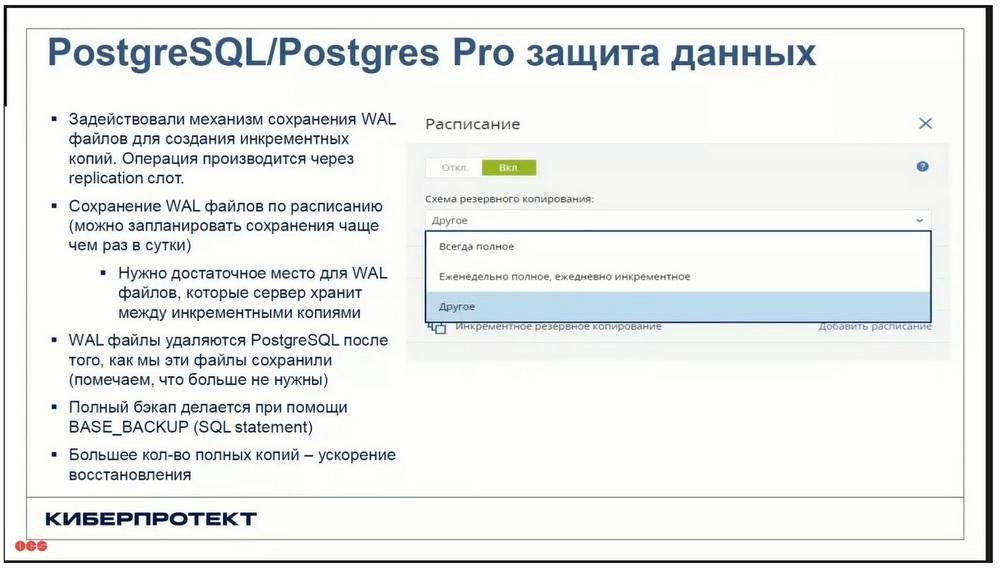
PostgreSQL / Postgres Pro. What is interesting here is that at the moment they have interesting features in Cyber Backup. They protect the protection process, the backup process, through a replication mechanism. That is, a backup agent that can be located on the same server where the production database is located, or it can be located on another server or virtual machine. This agent connects to the Postgres database over the network, opens a replication slot, and gives the appropriate Base_Backup command. (This is to make a full backup.) In order to do this incrementally or download logs, a different command is used in this case. But all this happens through a replication mechanism.
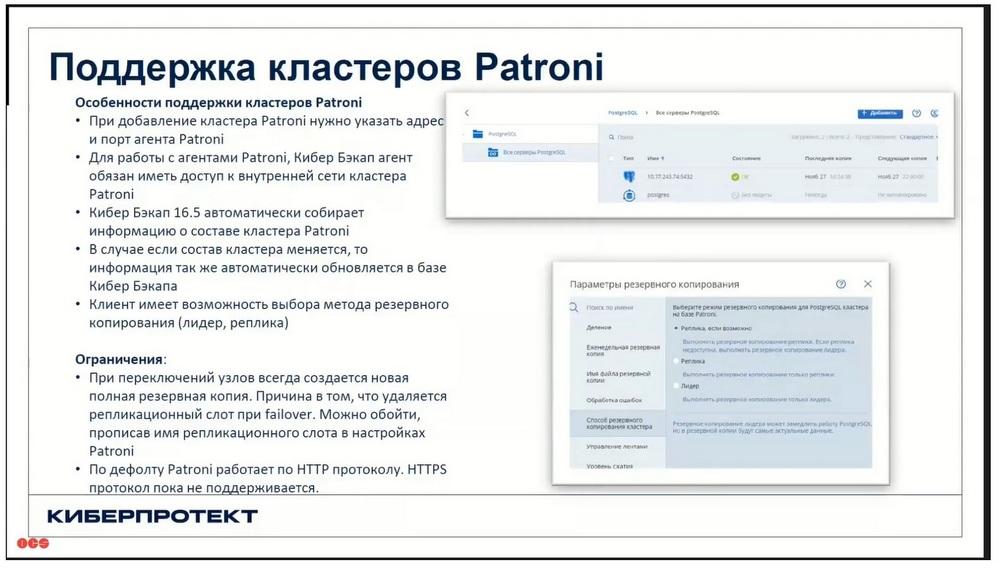
Patroni cluster support. A Patroni cluster is a piece of software that monitors the availability of the Postgres database. Usually three or more nodes are used. The classic option is three nodes, when a Patroni master, called the leader, runs on one node. Moreover, each node runs its own database. Patroni uses a replication mechanism between databases. That is, we have, for example, three nodes, one of them is the leader, this is the main database with which users work. The other two databases are replicas, where data is replicated from the main node. There are also databases there, and disk space is also required to host the databases. The Cyber Backup agent understands which of the nodes is the leader and performs backups from the leader, regardless of which node the leader is on, one, the other, or the third. It refers to Patroni and receives this information.
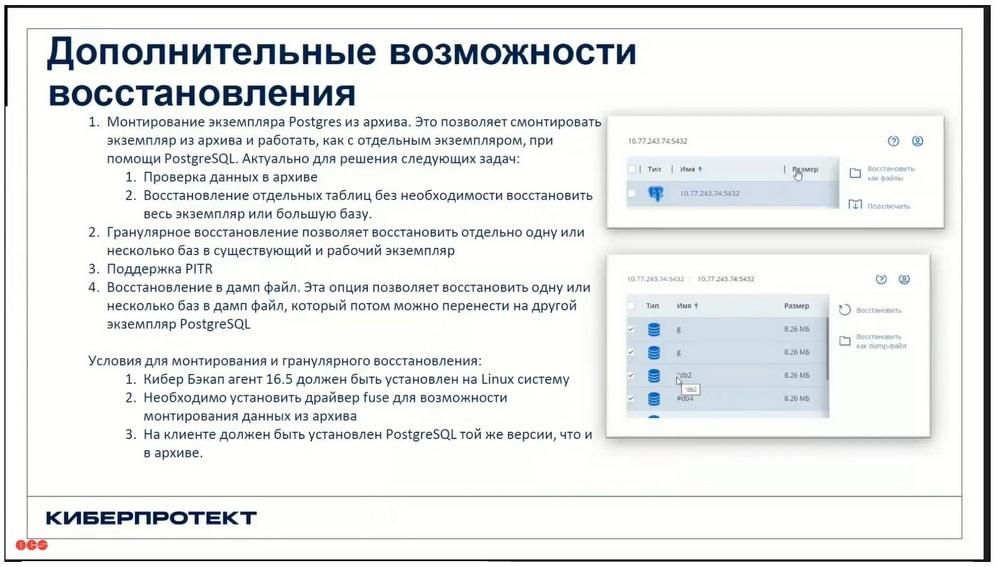
About additional recovery options. In addition to the fact that Cyber Backup downloads files, it can receive a backup in the form of a dump file. This technology allows you to restore individual tables. Without having to restore the entire instance. In some cases, this may be useful and in demand. This technology also allows you to restore the database to a specific point in time. This is Point-in-Time Recovery (PITR) technology.
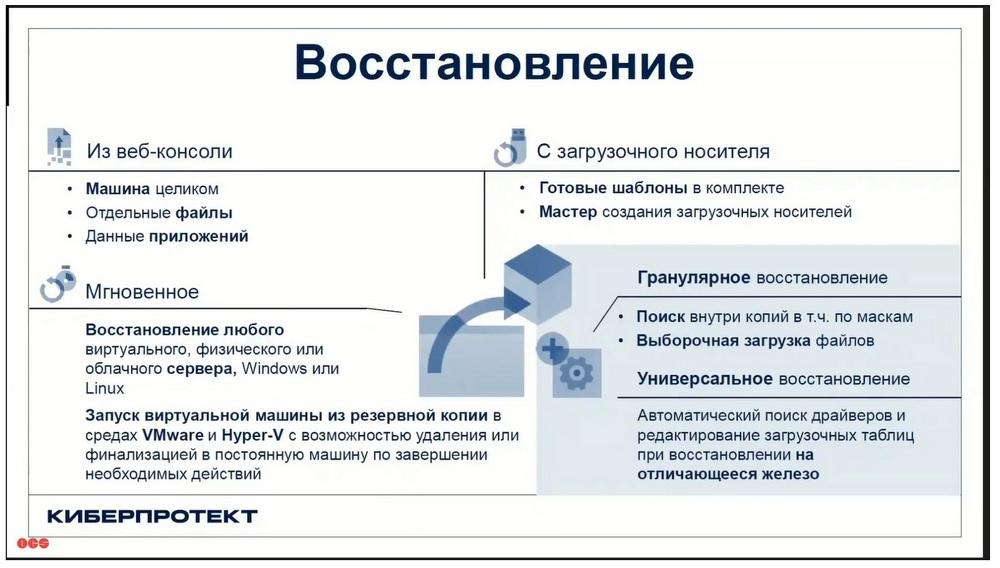
Recovery. Obviously, everything depends on the load that is being backed up. This can be a virtual machine that can be restored entirely. Or individual files can be restored. You can use instant recovery technology, you can run a virtual machine from a backup. You can do granular recovery, for example, of mail servers or database servers. There are various fairly wide possibilities.
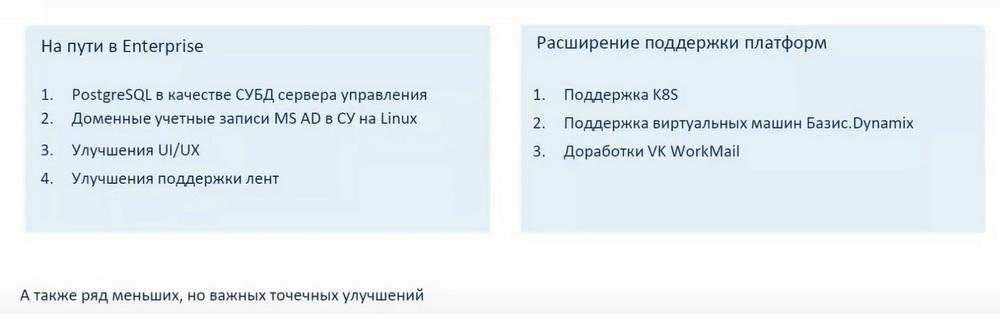
What's new in version 17? In version 17, this is simply listed on the slide above, we will now go through these slides.
Prior to version 17, the management server used SQLite. And sometimes they recommended using an external MS SQL server for large installations. Starting with version 17, it is recommended to use Postgres for large installations, and for small ones as well. That is, Postgres is an internal database that is used to store all information inside the management server. But this is only available on Linux at the moment. Active Directory accounts can be used for the management server on Linux. This is a new feature. Unfortunately, Cyber Backup does not yet integrate with other directory servers, but they are working on it. I think that this feature will appear in the near future.
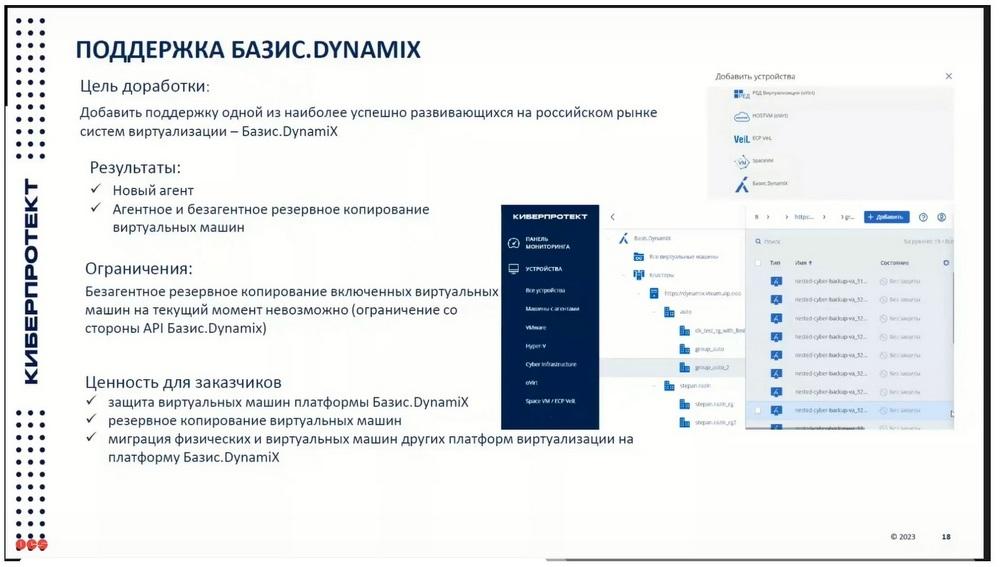
Support for Basis.DynamiX has appeared. This is now a fairly popular system. They say about themselves that they are "number 1" in virtualization systems on the Russian market. Support has appeared, but, unfortunately, it still has limitations. Agentless backup is only possible when the machines are turned off. CyberProtect explains this limitation by the fact that it is a limitation on the part of the API, which is represented by Basis. And now both companies are working on this. And in the next release, apparently, this limitation will be removed.
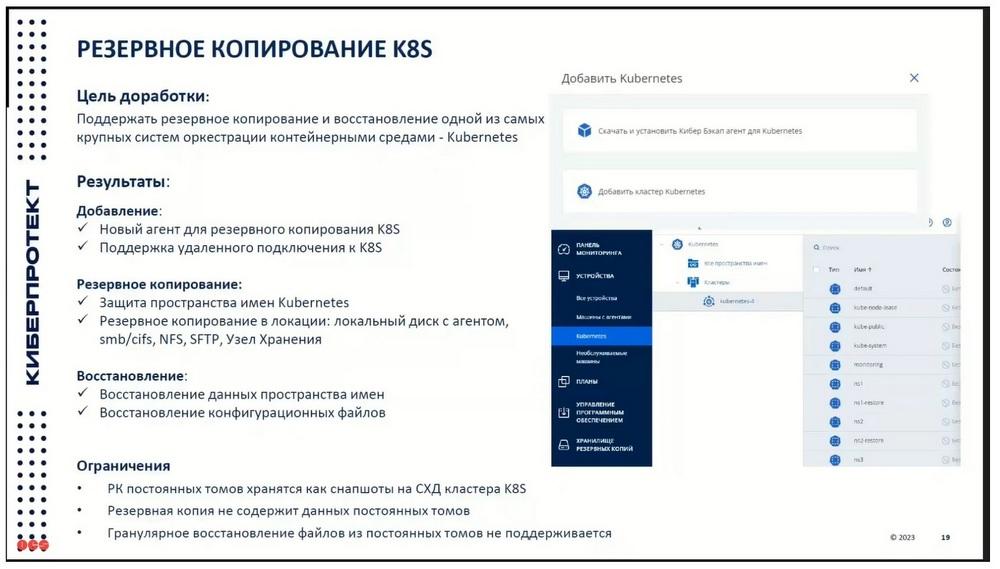
CyberProtect supports various new workloads. Usually, when the first release comes out, as in this case with Kubernetes support, and with Basis.DynamiX support as well, it has a lot of limitations. They are working on this quite hard and systematically. And in the near future, the functionality of these agents will undoubtedly expand. In Kubernetes, only the ability to back up namespaces and some configuration files is currently supported. And backing up, for example, data that is stored on permanent volumes is not yet supported. I think there will be improvements in the near future.
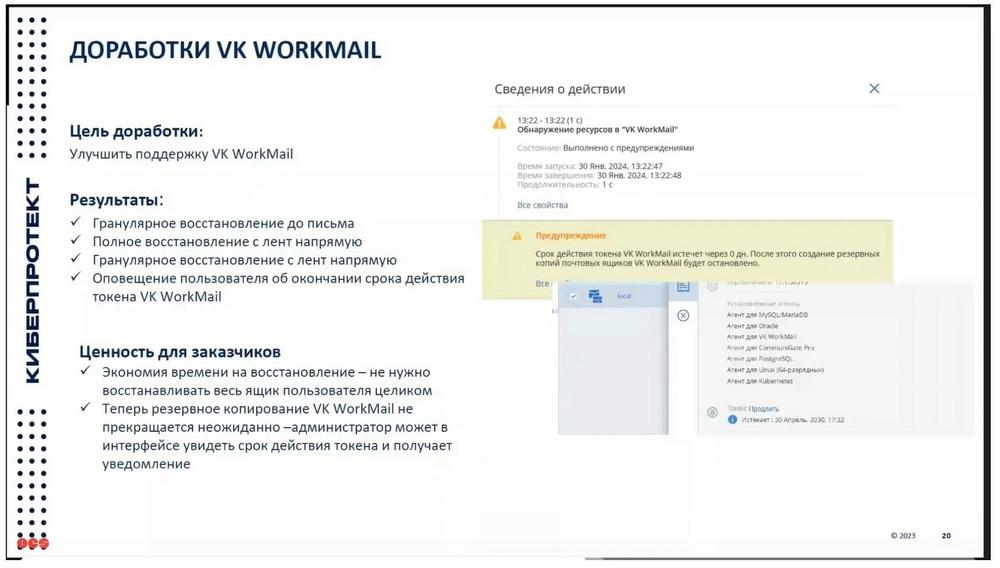
The same with VK WorkMail. VK WorkMail is, I understand, the first release that was released in support of the 17th version of Cyber Backup. But as a result, granular recovery, full recovery from tapes, and so on are still possible here.
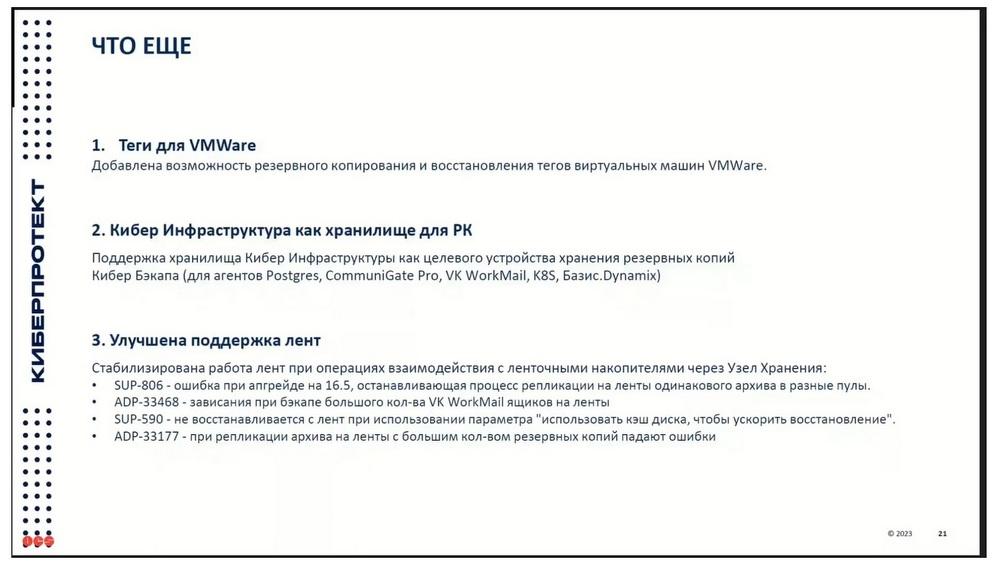
In version 17, as they write, the ability to back up virtual machine tags has been added. Of course, the company understands that backing up tags is not the biggest advantage. The main goal is to use tags specifically to dynamically determine which machines to back up and which not to, as was the case in other foreign backup systems. When it was possible to specify a special tag and this machine was automatically put on backup in this way. That is, the administrator who administers virtual systems, virtual infrastructure, could specify the tag, and the system automatically picks it up, and during the next backup, which is performed according to the schedule, a backup is made in the virtual machine.
Cyber Infrastructure as a storage for backups. The fact is that support for Cyber Infrastructure has now become relevant, in demand, and is gaining popularity. In previous versions, data for not all workloads supported by Cyber Backup could be copied to Cyber Infrastructure. Now almost all agents that exist, both new and old, support Cyber Infrastructure as a backup storage.
All illustrations belong to CyberProtect and OCS.