An event by OCS and "DACOM M", a Russian developer of the import-substituting virtualization ecosystem Space. The event is dedicated to an overview of the Space VDI platform: key innovations in releases 5.3 and 5.4, as well as the adaptability of Space VDI to changing requirements and optimal resource utilization. Space VDI is undergoing significant changes aimed at increasing the solution's fault tolerance, implementing new functions, and increasing the overall performance of the system.
Event program: cluster architecture, fault-tolerant scheme, scaling, Space Agent PC (VDA) and Space Gateway.
Today's speaker: Ruslan Belov, Product Director of Space VDI.
Today we will talk about what was released in the latest releases of Space VDI 5.3, which appeared after the 4th quarter of 2023, and Space VDI 5.4, which was released just a month ago.
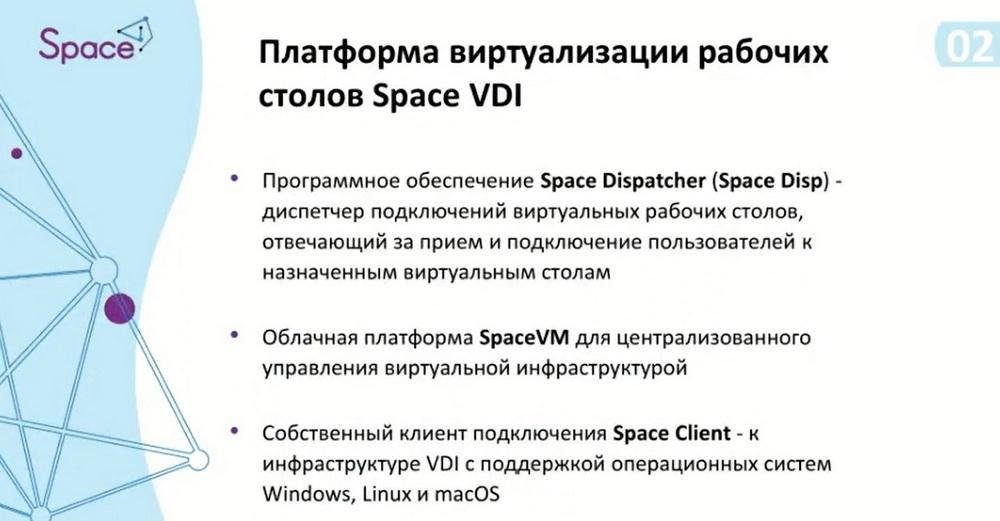
The VDI ecosystem is a set that includes the following components:
- Space VM cloud platform for centralized infrastructure management,
- Space Disp software (Space Disp) – a connection dispatcher for virtual desktops, responsible for connecting users to assigned virtual desktops,
- Space Client, a proprietary connection client to the VDI infrastructure with support for Windows, Linux, and macOS.
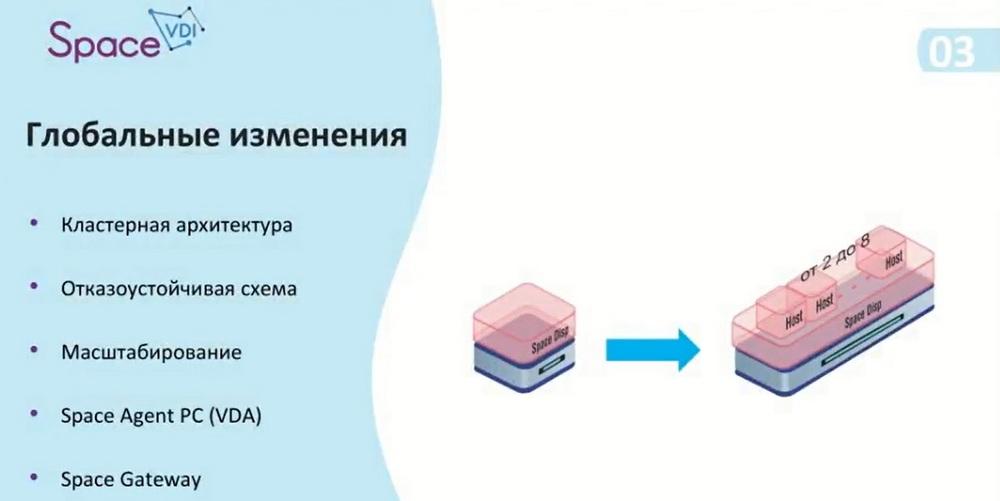
Today we will be talking about Space Disp. We have divided the changes into 5 categories: cluster architecture, fault-tolerant scheme, scaling usage, Space Agent PC (VDA), and Space Gateway. We decided to abandon the single dispatcher instance and switch to a multi-dispatcher. This allowed us to create a fault-tolerant scheme and expand the scaling options for the infrastructure itself. In addition, we added the ability to connect physical machines and added functionality such as Space Agent PC, a utility that is installed on physical machines and allows you to transmit information about their status. In the future, this agent can be used to manage the machine itself and configure its configuration. For security, we have improved our IS gateway.
Let's move on to the topic of cluster architecture, and define the entities that will be used here.
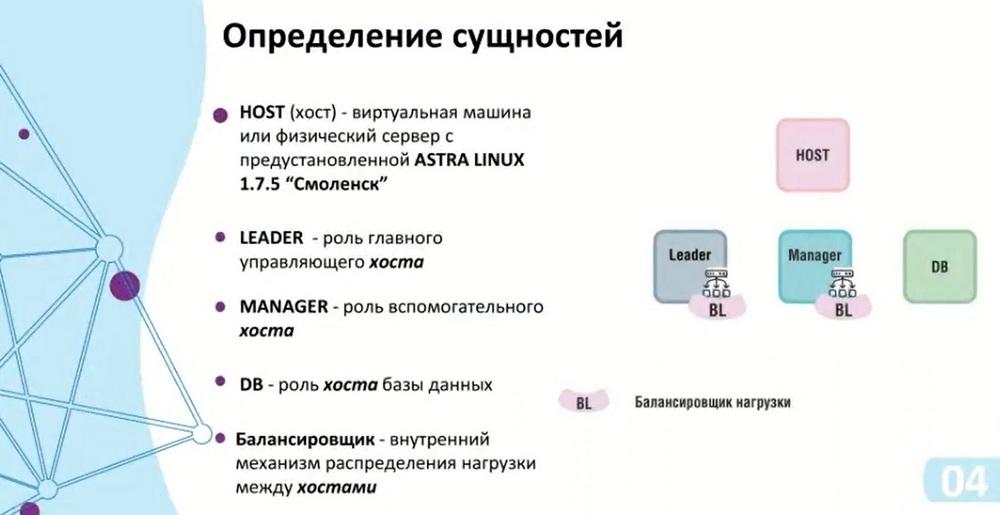
The first entity is HOST – a virtual machine or physical server with pre-installed ASTRA Linux 1.7.5 – "Smolensk", we do not yet support other operating systems. You can assign a specific role to the host with the OS: Leader, Manager, and DB (database). Leader and Manager will participate in load distribution in the management cluster, and the database will be located in the data cluster. There is also an element here called a balancer (BL), which distributes the load between the hosts.
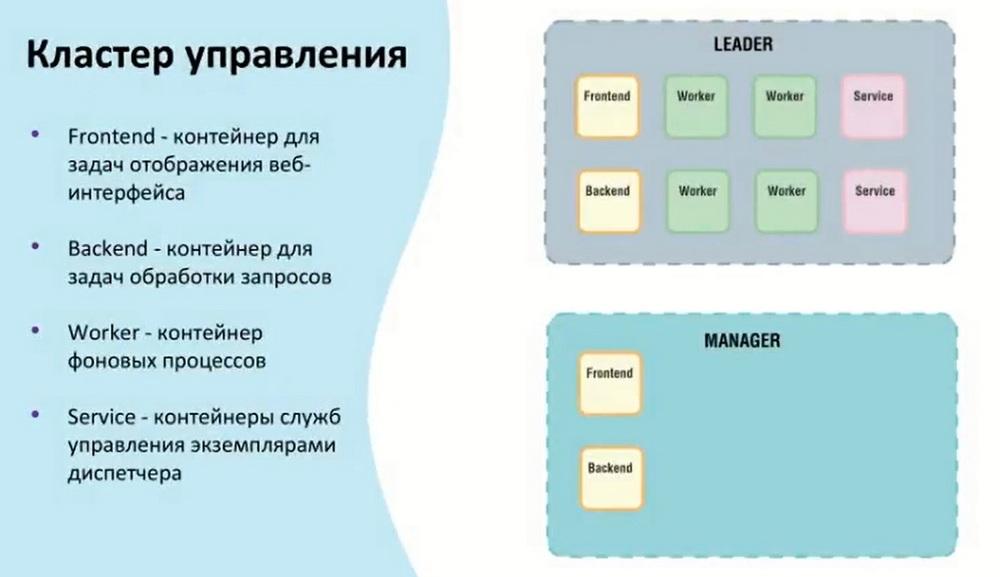
The management cluster can act as Leader and Manager. Leader is the main host that takes on the tasks of connecting and conducting internal background services. Manager combines all Frontend and Backend containers. This is done so that in the event of a Leader failure, it is possible to obtain information about the status of containers and other data. In the event of a Leader failure, it is possible to access the web interface itself through the Manager.
Regarding the data cluster. Initially, it consisted only of the database itself, but after its expansion with the possibility of replication. Since release 5.4, standard database tools have been used for replication. There are no restrictions on setting up the replicated database and the replication options themselves. Availability to data from both DBs is ensured.
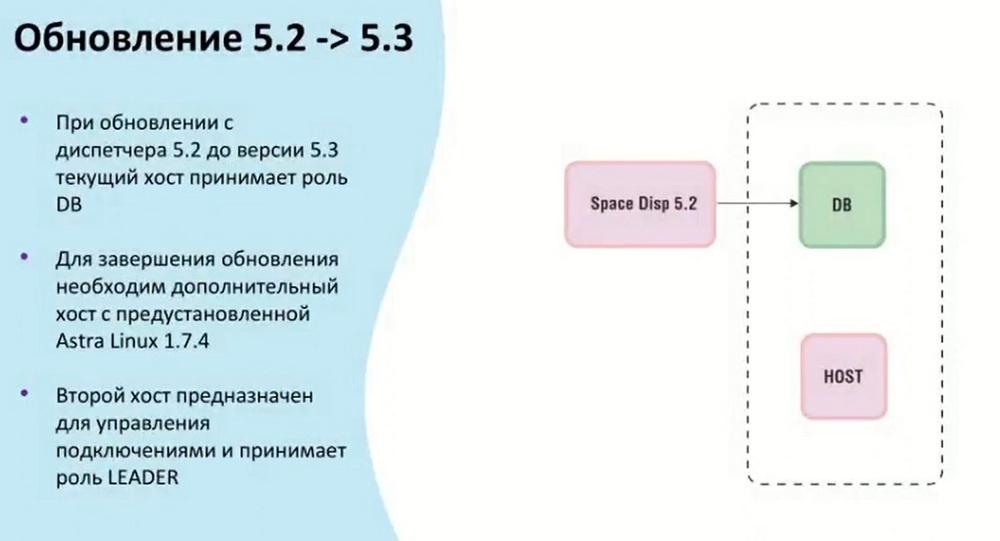
Since two clusters have appeared, at least two hosts will be required for them, so that they appear when updating the dispatcher from 5.2 to 5.3, the current host takes the DB role. And the second host, which was configured for a specific management cluster, will take the Leader role. If there are several of them, the rest will take the Manager role. The Leader and Manager roles are set manually. First, the database is updated, then the hosts themselves in the management cluster.
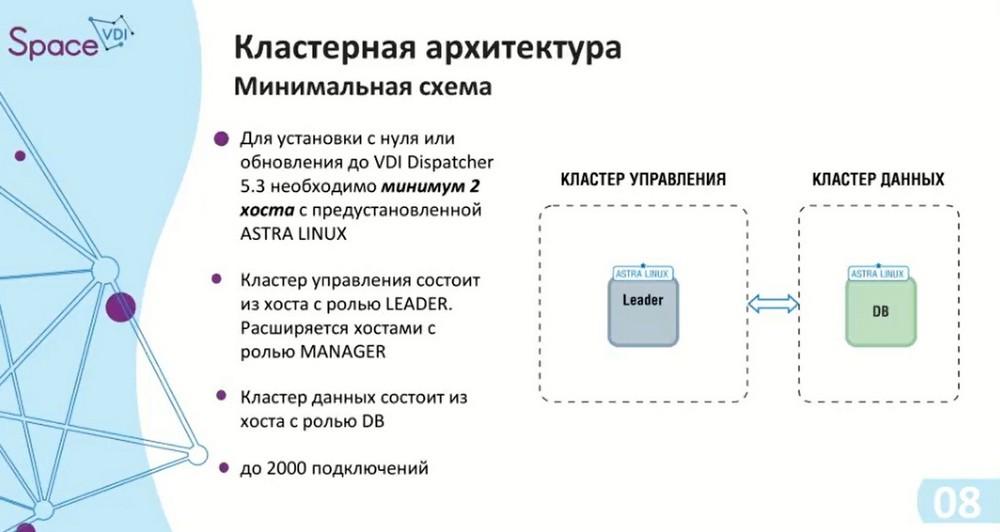
About cluster architecture. Due to the fact that there are two clusters, there is also a minimum scheme: two hosts with ASTRA Linux OS, so you need to have two licenses. ASTRA Linux 1.7.4 is used for release 5.3. The management cluster, as in the case of a single instance, can support up to 2000 connections. Now we have a minimum fault-tolerant scheme - three elements in the management cluster: the Leader itself and two Managers.
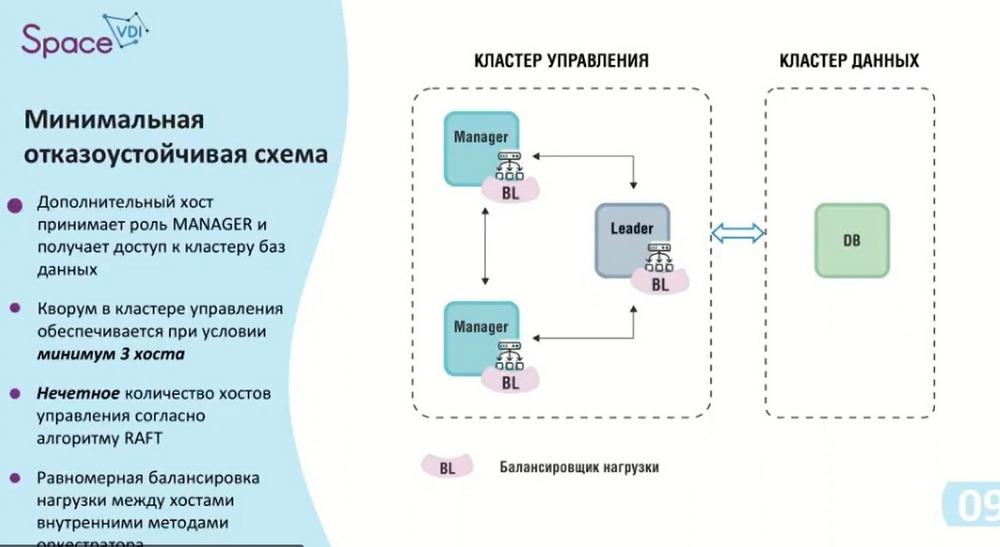
According to the used RAFT algorithm, to ensure fault tolerance, there must be an odd number of hosts. In this case, the balancer starts working, it distributes the load between the hosts. This minimum scheme can be called the first contour, it provides up to 6000 connections. If you need fewer connections, but a fault-tolerant scheme, then only this option is suitable.
If the leader and manager are in the same cluster and the leader cannot cope with the load, it will transfer the remaining connections to the manager itself.
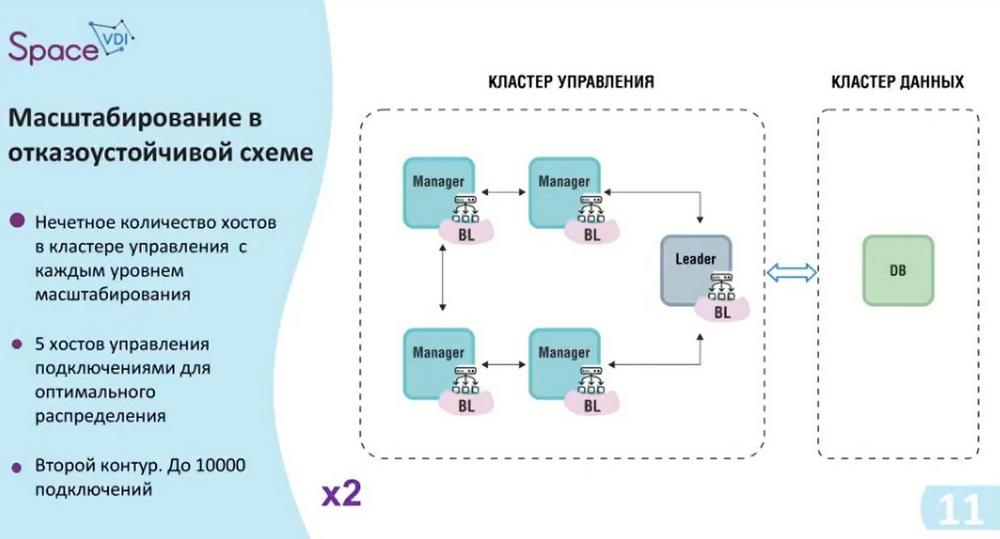
We are also approaching the second contour. As I already said, we have an odd number of hosts in the management cluster. We add two additional hosts, thereby we get a management cluster with the possibility of up to 10 thousand connections and, of course, we do not forget that ASTRA Linux must be installed on each host, that is, in this case we need 6 ASTRA Linux licenses.
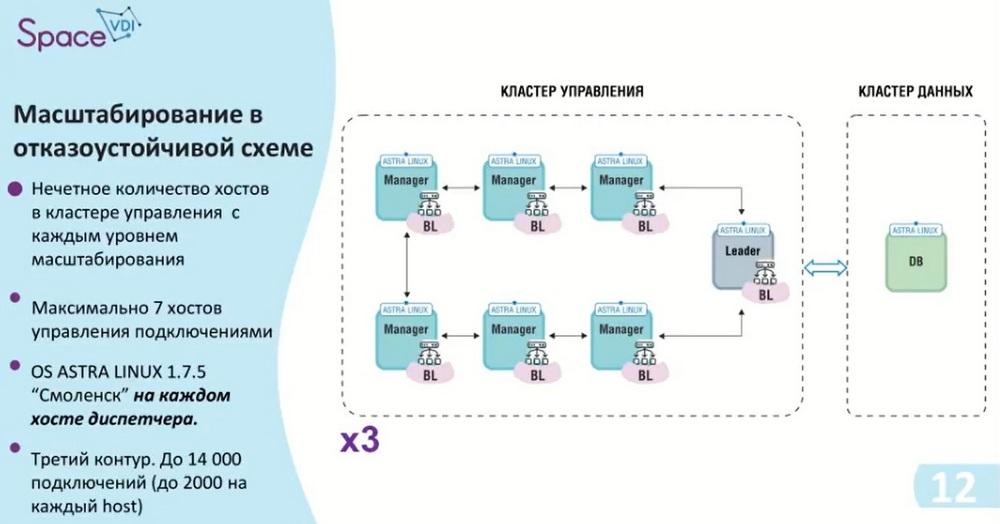
This contour was the last for release 5.3. As I already said, our improvement was made towards the data cluster. That is, here we add two more hosts to the management cluster, thereby providing 14 thousand connections, 2 thousand per host and 8 hosts. And accordingly, if we need replication, the maximum fault-tolerant scheme is shown in the next slide.
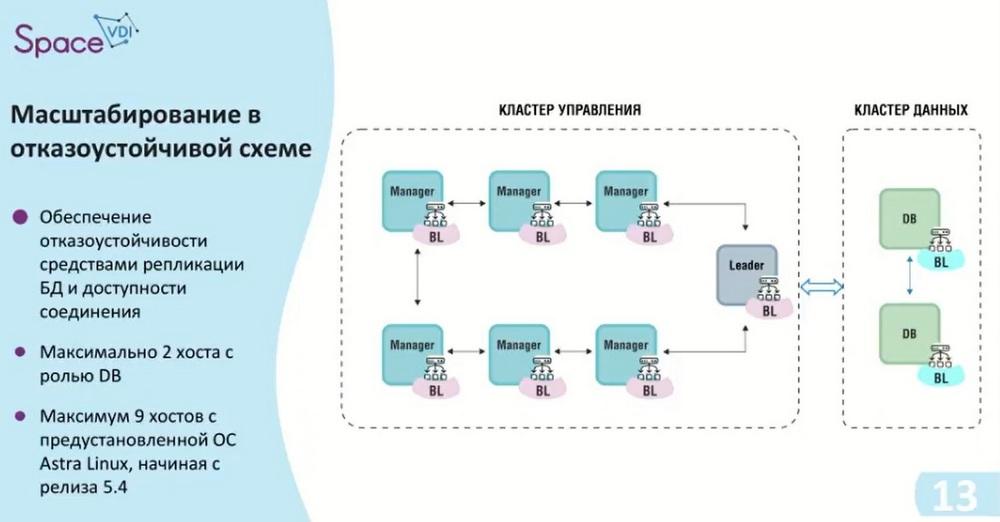
That is, again, an odd number of hosts in the management cluster, there are seven of them, and this is the maximum number, i.e. the dispatcher no longer supports more. If you need more than 14000 connections, then what to do in this case, we will evaluate in the following slides.
Here, a Virtual IP is used between the management cluster and the data cluster, giving us access to each database. As you can see on this slide, a load balancer has appeared on the database. This means that if access to a replica is required at some point, it can become the primary. And we will read and write data from it.
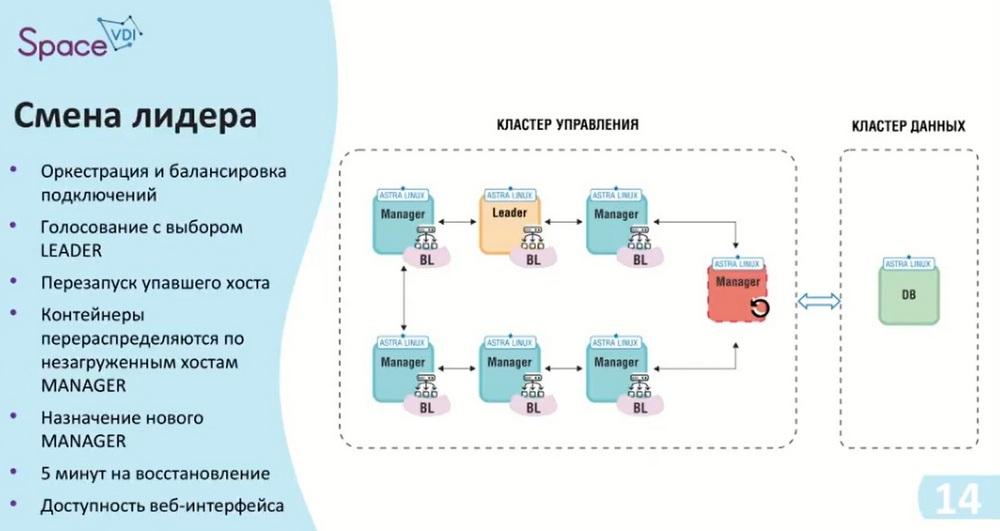
If one of the hosts fails, in this case, the leader failed. The leader assumes the role of manager after it is restarted. The role of the leader itself is passed further down the chain. Here, the algorithm specified - RAFT - is used, there is a vote for a free leader, and the next one on the list of hosts who is free and can take on this role, occupies it. The balancing itself is cyclical and also transfers its connections to other hosts. When the leader is disconnected, there is a pause that lasts approximately 5 minutes. During this time, the orchestration tools and containers that are on the leader, or on the host that failed, begin to move to the host that has assumed the role of leader.
As we saw in the first slides, the interface will be available in any case, and we can track its status. The only thing that is not available to us is some background services and some processes that were running on the leader.
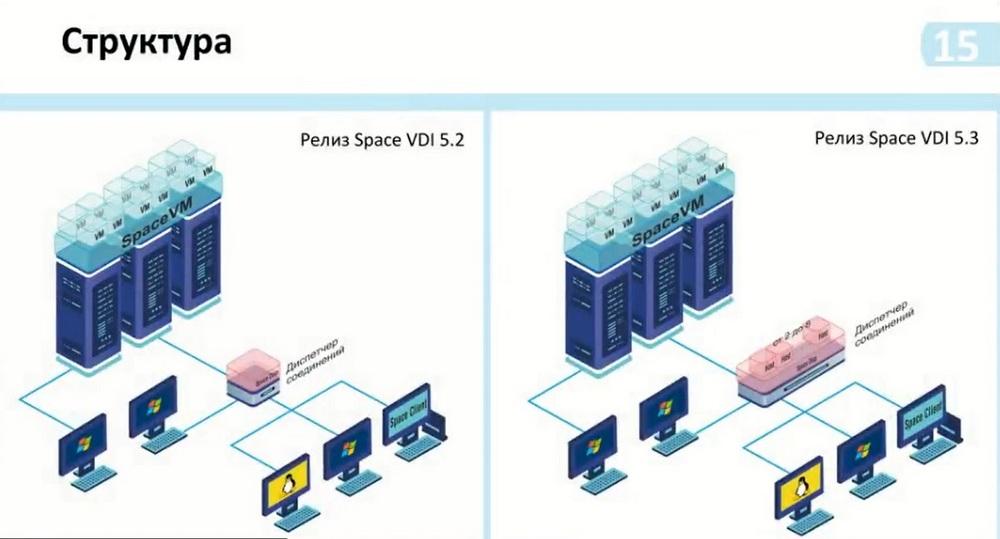
Such changes in the scaling itself with the release of VDI 5.2 and VDI 5.3 are shown on the slide. That is, in general, they have not changed much. We see that the connection manager itself has become larger. There are now 2 to 8 hosts on the manager itself. Here we specify - without replication. Replication has become a core part of the scheme. It is installed optionally and depending on the need for use.
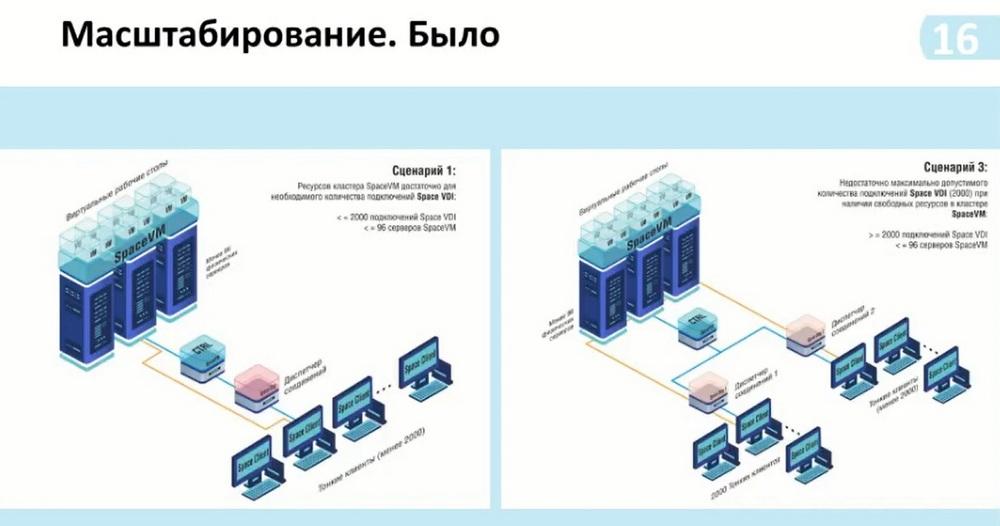
And according to this scheme, we could also see the possibility of connecting from two thousand or more users. Before that, to do this, we needed to install another connection manager and connect it to the same controller, that is, the SpaceVM virtualization servers. Thus, we had more than two thousand connections, but there was no connection between these managers. That is, for each manager, it was necessary to install a list on the client to which we connect. And thus, the first free one was available to us. It is necessary to somehow regulate the internal means of grouping virtual desktops. That is, this group is included in this manager, and another group is included in this containerization manager.
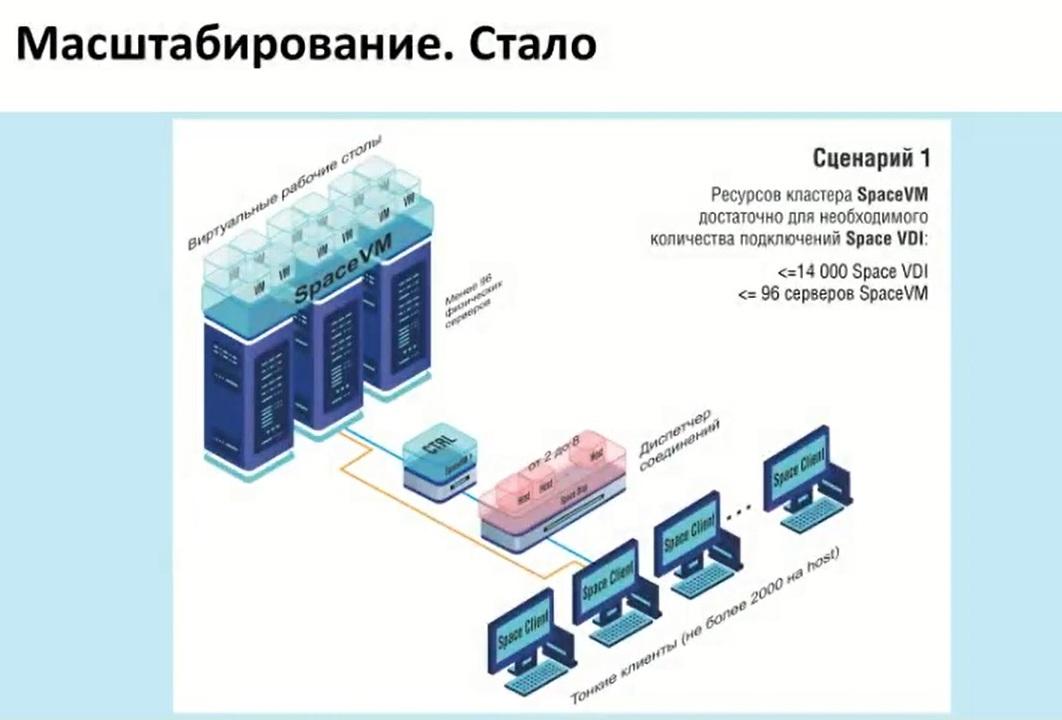
Now, with the addition of containerization, that is, we can provide up to 14 thousand connections, and this number of connections is sufficient for standard use, we can already operate on the pools themselves and groups of these pools, depending on how many connections we need.
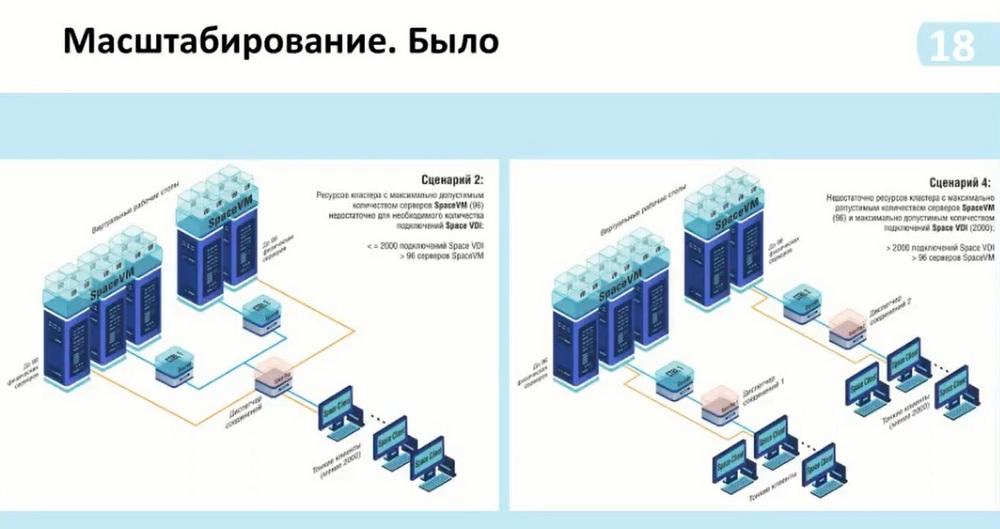
Also, if it was necessary to use more power, if one Space VM cluster was not enough to process desktops, or if we had high-load processing moments, such as modeling, we could use two clusters. And thus, for each cluster, we needed an additional manager in case of an increase in the same number of connections. Now we also use one manager and can add several clusters to it. That is, there does not have to be two, three is also possible.
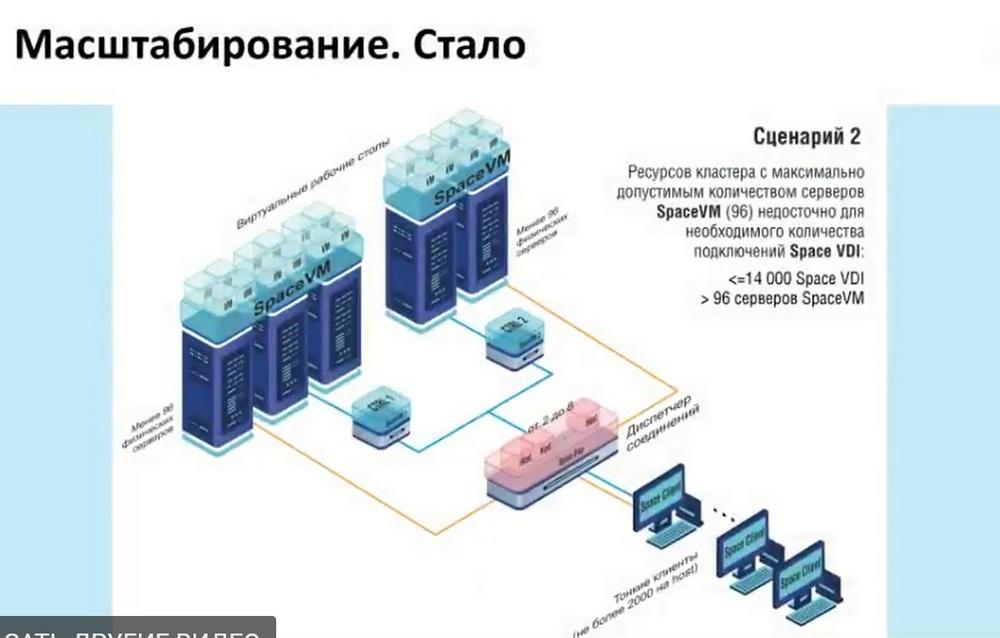
Next, additional scaling options. As before, the manager, which was in a single instance, when it was necessary to increase the connections that the manager part itself - the broker - was unable to support, we added an additional broker.
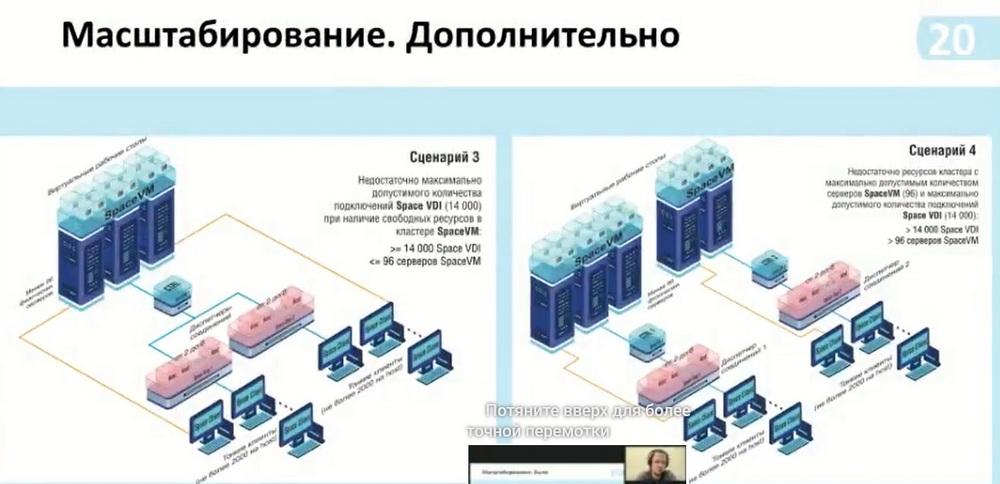
Here it is possible to use more than 14 thousand connections, here two multi-managers are connected to one controller. If the cluster itself allows supporting more than 14 thousand connections and, accordingly, it is possible to calculate these capabilities. Or, if we need to isolate data, we can do it as shown in scenario 4.
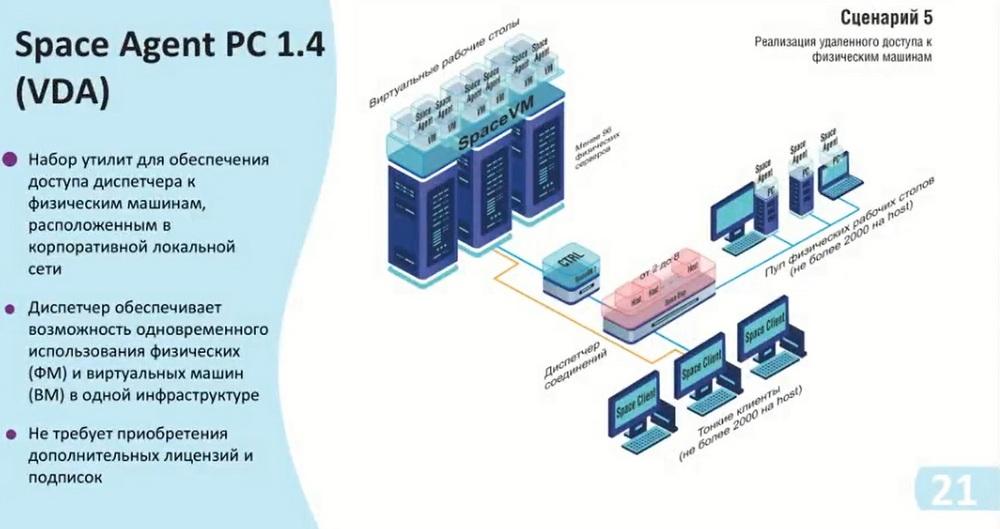
These scenarios have been reworked from the scenarios of releases before 5.3. Now an additional scenario has been added. The physical pool allows us to calculate up to 2000 clients per host, and the beauty of it is that you can use this manager not only specifically for some functionality, i.e. virtual desktops, or physical desktops, but all together. For example, we have 7 hosts with the ability to connect up to 14000. And we can divide them either equally or dynamically. And thus, we have the opportunity to flexibly configure the infrastructure itself, as well as save on the resources themselves. That is, if there is no Space VM power itself, which can provide us with desktops, but there are physical devices to which we can provide access, then we can include them in this scheme. In addition, the use of Space VM does not require additional licenses, and you can use them immediately.
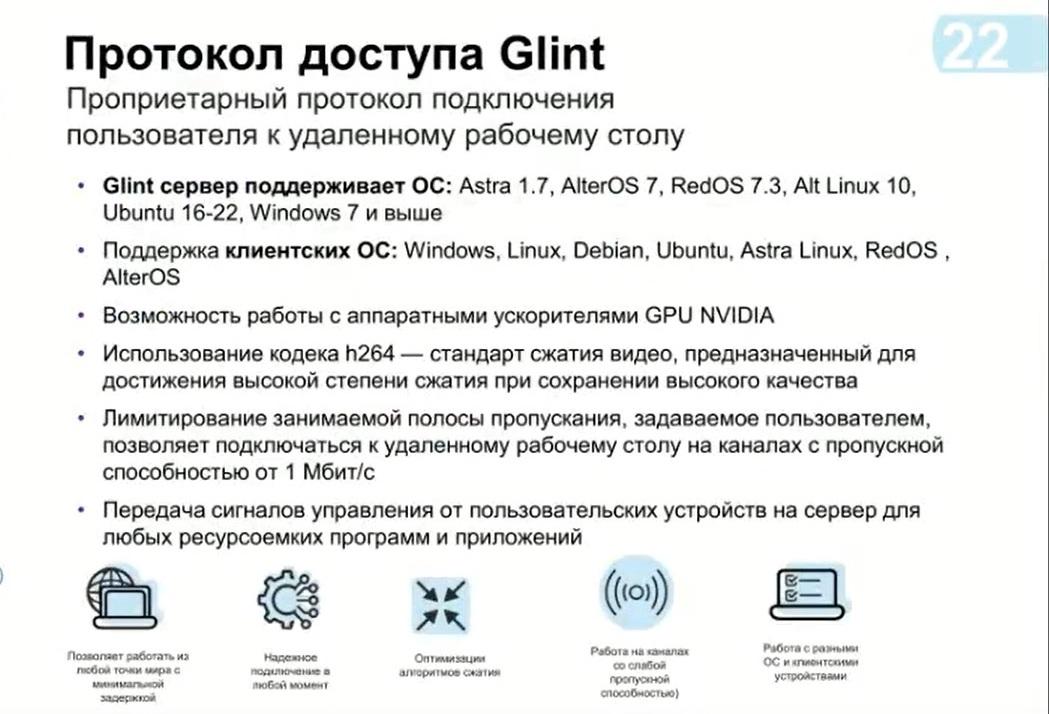
We now exclusively use ASRTA Linux as the guest operating system, and accordingly the operating system of the desktop itself. And for connection, we recommend using our project in this case, if it is necessary to use standard office solutions. But it also allows you to process the graphic part with three-dimensional modeling. But if you need some high-load solutions, with fast dynamic scenes, and you have a good bandwidth, you can use the Loudplay protocol.
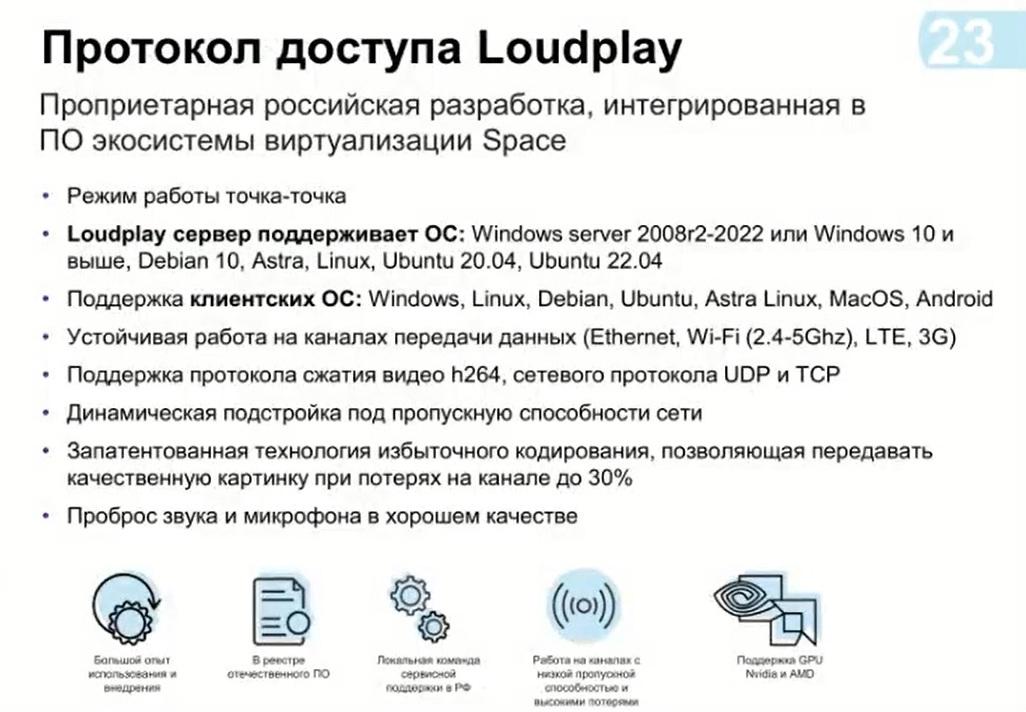
A month ago, we released solutions for operating systems specifically Unix, that is, Linux systems, that is, such as Demi, ASRTA Linux, Ubuntu, and thus we can already use them in our solutions.
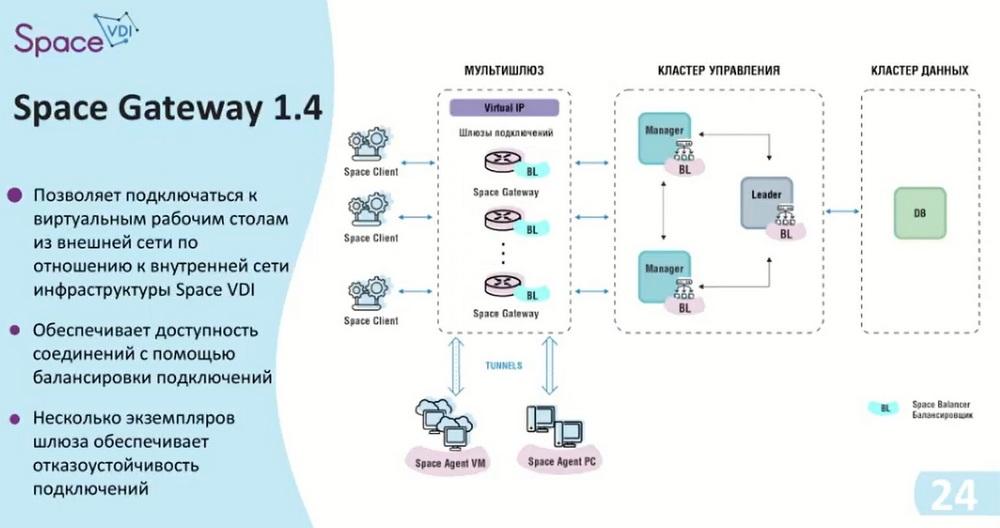
In order for us to safely exit the Internet, we have developed the Space Gateway. This gateway is placed between the client devices themselves and the manager. The gateway itself has the ability to configure a public port on itself, and thus blocks access to some part of the infrastructure, i.e. the virtual desktop or the physical desktop itself, creating tunnels. That is, when connecting to a specific desktop, the manager transmits information that a connection is required, this connection is sent to the gateway, and the gateway raises a tunnel with a configured port range. Thus, the data already reaches from the client to the management cluster.
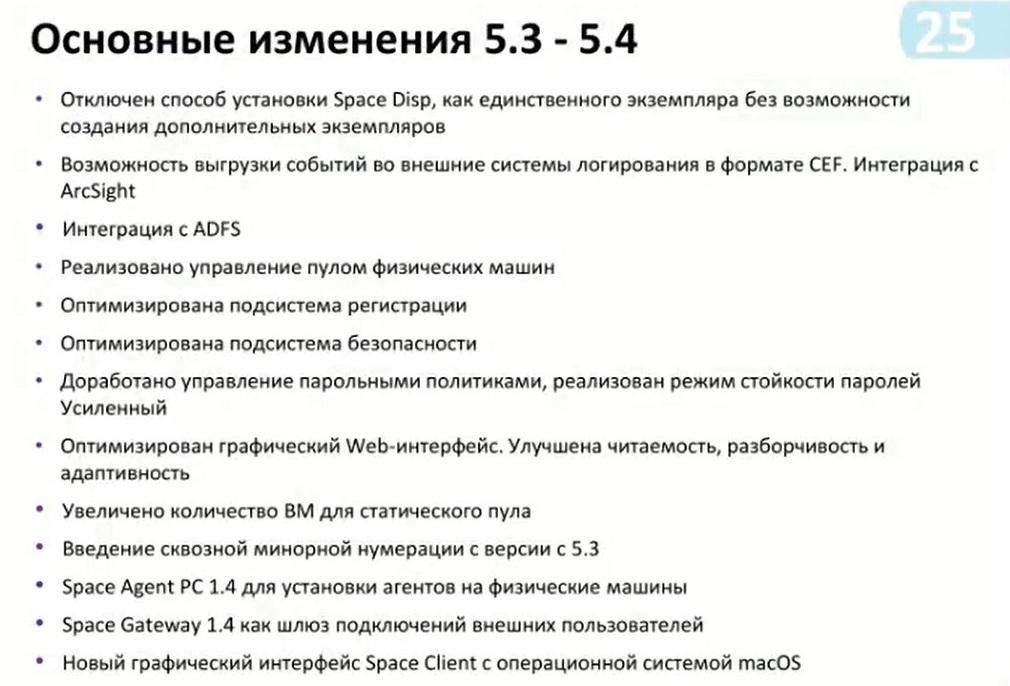
Now about the changes that occurred during the transition from 5.3 to 5.4. The main change is that we abandoned the single instance of the possibility of using the manager itself. We also added logging options, such as integration with ArcSight and the CEF format. Integration with directory services such as ADFS has been made, which has added the possibility of both two-factor authentication and self-management with directory services and through this service. The main change is the implementation of physical machine pool management, optimization of registration subsystems, means of integration with the site and other logging capabilities. Optimization of security subsystems. This implies that we are now working on options with clipboards, connecting to external devices, i.e. connecting via USB such as the media themselves, or smart cards. That is, we now have the ability to only turn them on/off. The refinement of support for various functionality will be in our future releases.
Password policy management has also been improved. Here we obliged users to change the password in case the administrator provides the user with their temporary password, the user must change it upon entry. This allows you to maintain data confidentiality and, accordingly, enhance security.
We also redesigned the web interface itself. Readability and legibility have been improved. There were times when colors were not perceived quite correctly through the remote access protocol. We also did a redesign here. The number of virtual machines for the static pool has been increased. The maximum possible number was 100 virtual machines in the static pool. And we mainly recommended using an automatic pool. Now we have increased them to 1000 virtual machines. Well, and in general, with the use of a multi-manager, we will consider the option to increase it depending on the number of hosts.
One of the changes occurred precisely in inversion. Now all the components that are used in the manager, we will number by the minor part. That is, for example, now there will be a version for such components as Space Agent and Space Gateway, also 1.4 and 1.4, respectively. And the refinement of the graphic part of the Space Client is also finished.