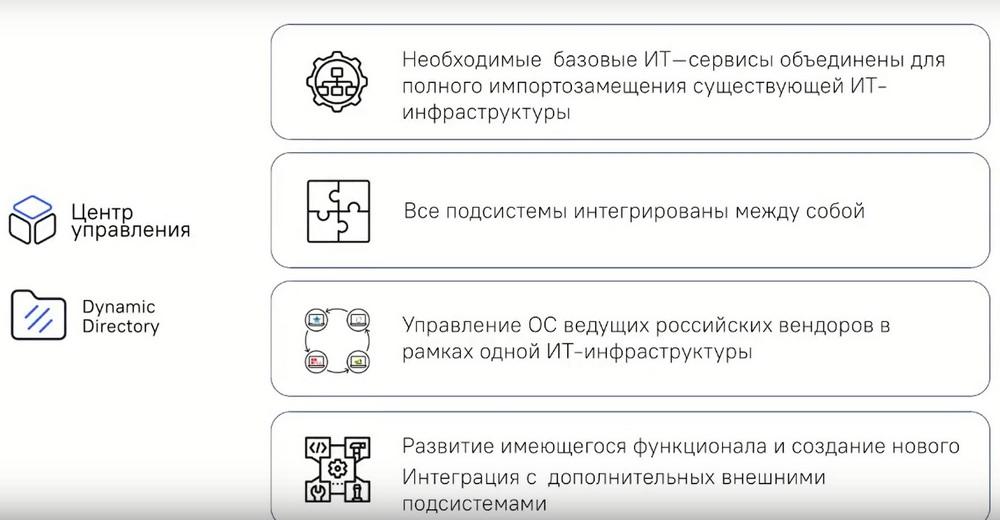
Event by OCS and STC IT ROSA, a Russian developer of system and infrastructure software. Here we will talk about the set of services necessary for centralized IT infrastructure management, which includes the Dynamic Directory directory service subsystem and the ROSA Control Center, which solves the problems of PC configuration management and software updating and distribution.

Today's program:
- How to seamlessly coordinate and effectively manage a large number of different components of an organization's IT system, using import-independent products that can replace foreign analogues: Microsoft Active Directory, Microsoft System Center Configuration Manager, and Microsoft Windows Server Update Services.
- A story about the key features of ROSA Control Center and Dynamic Directory, we will provide comparisons with foreign analogues.

Nikolay Dovzhenko, Technical Sales Support Consultant, STC IT ROSA, began his presentation by suggesting a discussion about centralized management solutions from STC IT ROSA. ROSA is engaged in the creation and development of infrastructure and system software so that companies can build an effective infrastructure.
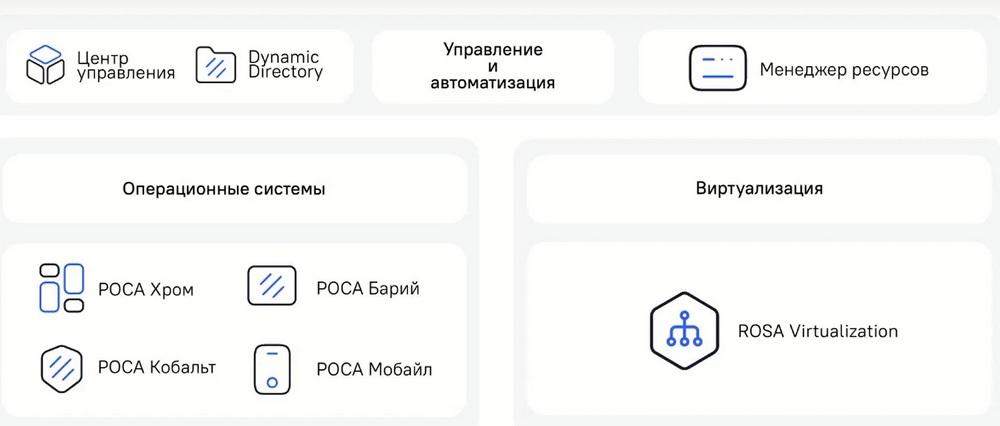
We have been on the market since 2010 and have sufficient expertise to meet the needs of the company's IT products. Let's start with our product portfolio. It consists of the following operating systems: ROSA Chrome, ROSA Barium, ROSA Cobalt, and ROSA Mobile. Also, a platform for centralized management of operating systems and access. This is "ROSA Control Center" and Dynamic Directory. The portfolio also includes the RОSA Virtualization virtualization environment and the hybrid and virtual environment management system, which is the "Resource Manager".
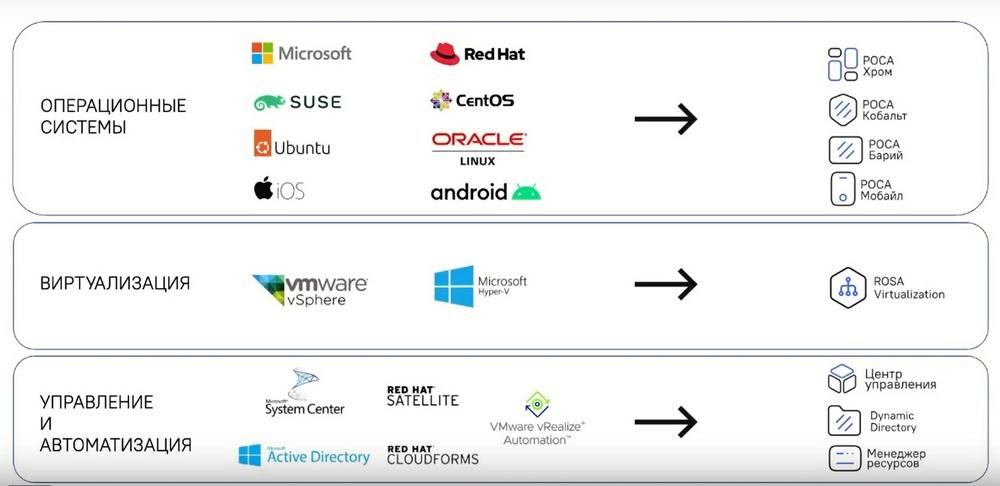
In the slide above, we can see which foreign products we are replacing. These are operating systems, virtualization systems, and centralized IT infrastructure management systems for the company. Since today we will be talking about centralized management, then a few words about what goals and objectives centralized management covers.
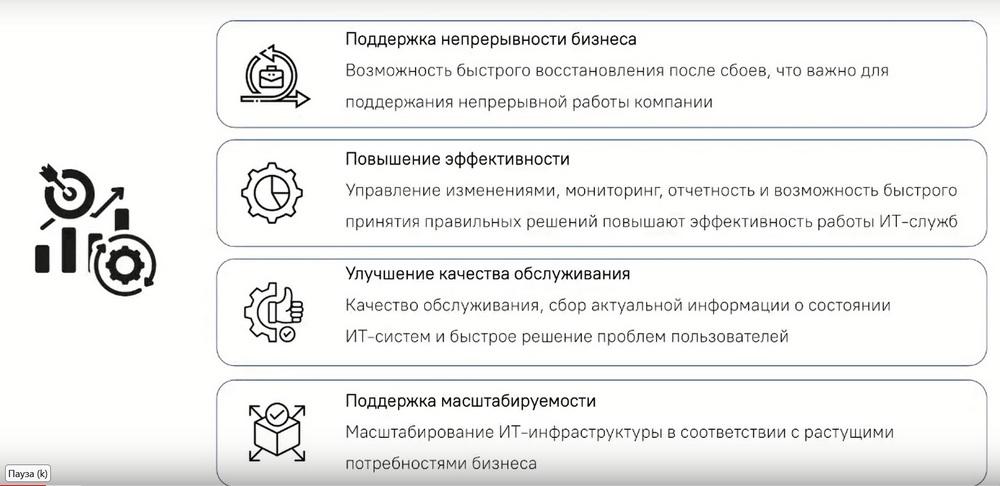
The feasibility with centralized management is to support business continuity. Why is this important? Because even the slightest downtime for a company means financial and reputational losses. Ideally, of course, these costs should be minimized. And then there is increased efficiency. That is, monitoring and reporting will help us here for more efficient use of resources. Next, of course, is improving the quality of service. That is, based on all sorts of metrics about the state of IT systems and end ARMs within the company and their state. Next, this is scalability support. That is, any IT infrastructure, in order to be effective, must be able to quickly and efficiently scale to meet the challenges of a growing business.
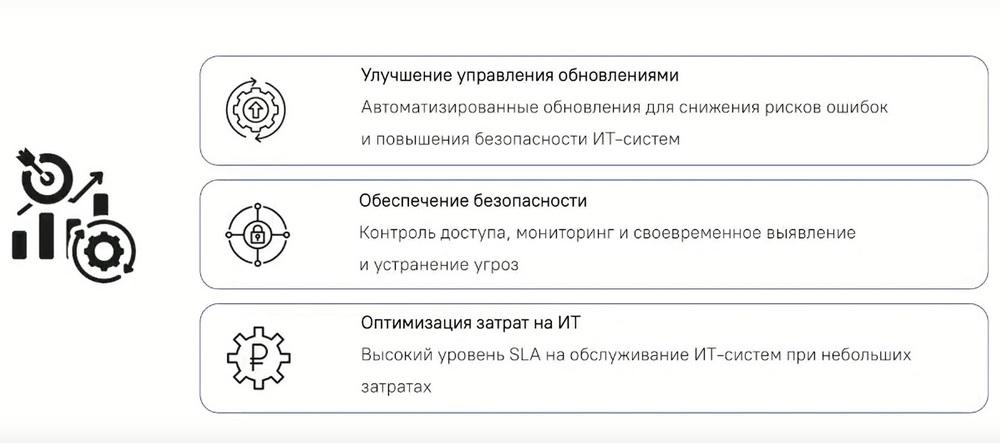
What other goals and objectives are there? This is improving update management. If we have intensive workplaces in the company and they are not updated in time, then these are security breaches, this is the unavailability of all sorts of updated functions, and accordingly, this reduces the efficiency of employees working at end devices. Also, optimizing IT infrastructure costs, this is a high level of response to all sorts of incidents that have occurred and their prevention.
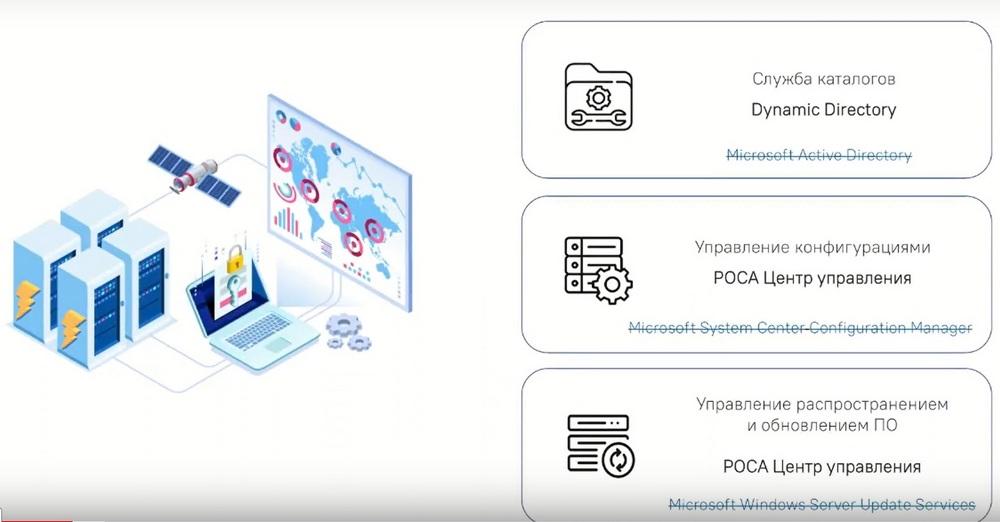
In this slide, we can assess which products of our company replace which foreign products. Dynamic Directory is a domestic directory service management system, it replaces Microsoft Active Directory, which many companies still use at the moment, they are used to the conveniences that this product has. Also, "ROSA Control Center", this platform is more suitable for managing end ARMs. It allows you to manage the configuration of both ARMs and operating systems on them. And it also helps to manage the distribution of software and its updates. Our system is based on free open source software. And our products are adapted for use by Russian customers in the Russian market.
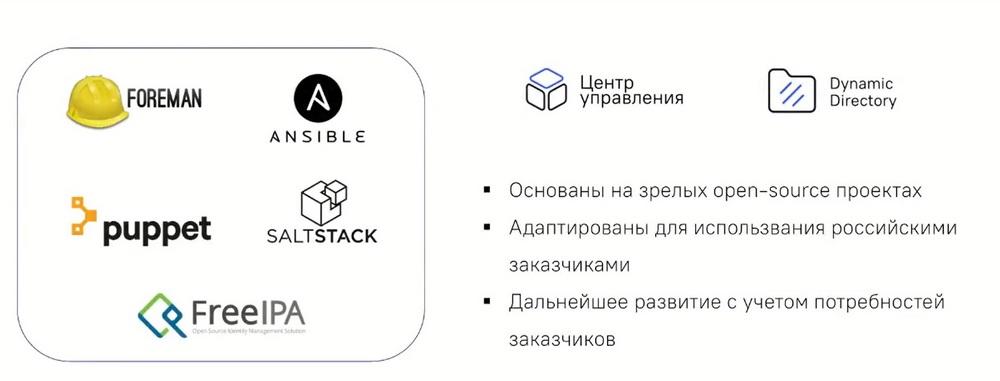
We will dwell on this slide in more detail, because quite often I come across such an objection that we can assemble a similar solution ourselves based on free software completely free of charge. Yes, you can assemble similar software, but, firstly, it will not pass FSTEC certification, it will not be in the Register, plus it will be unsafe, because in order to pass all these events, you need to spend a lot of human resources and a lot of finances. This is in terms of legislation. Now in technical terms. Our developers constantly check the code and applications, and packages of each application for all sorts of malware, vulnerabilities, and backdoors. To do the same manipulations with all the code of free software, you need to spend a lot of resources. And if you calculate all these costs, then purchasing a ready-made solution is much more profitable than creating it from scratch.
Directory service management systems: Dynamic Directory
The directory service management system is needed to manage access within a large company. That is, this is division by departments, this is division of access to printers, cameras, and other office equipment.
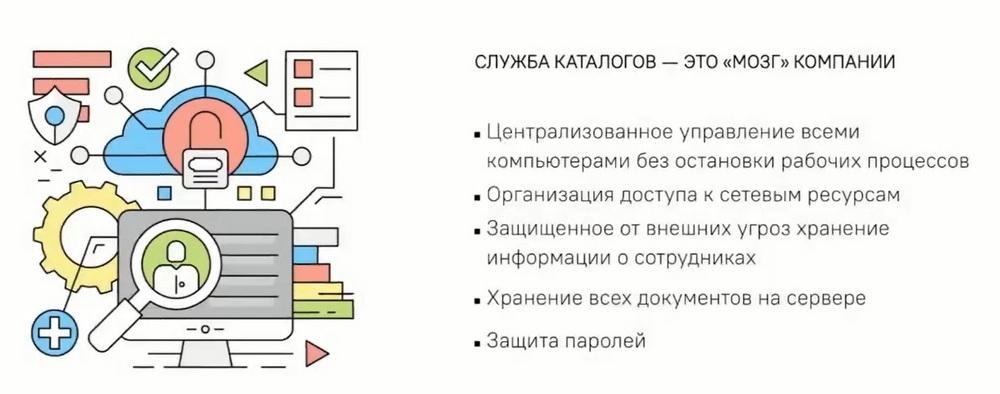
Who needs a directory service management system? Firstly, this is needed by IT specialists. Because this management system, access management, allows you to create a single IT catalog that contains key information about the company's resources, such as computer parameters, printer parameters, for which departments computers or printers are intended, and accordingly, what structure they are part of.
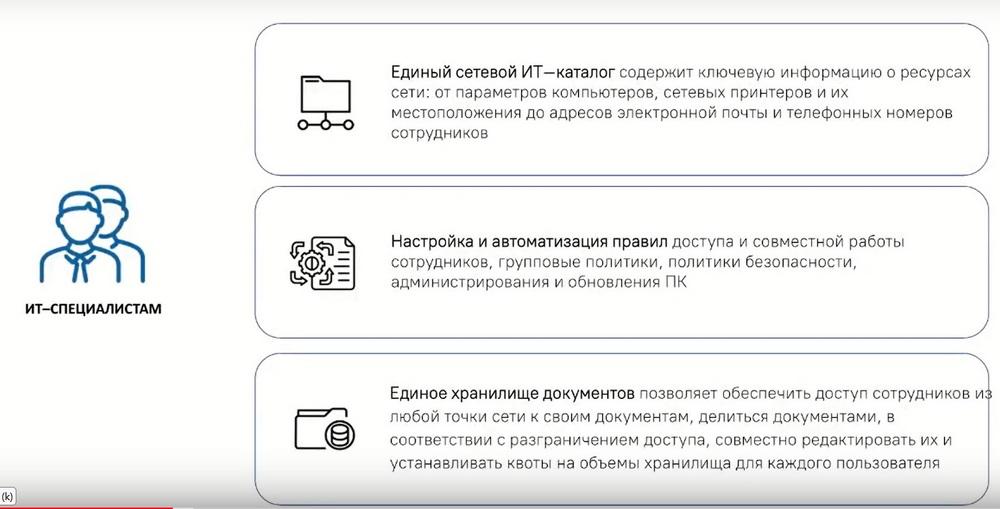
Everything is carried out controllably, centrally, and distributed across all departments. Setting up automation of access rules and collaboration. That is, here we are already talking about access policy. We can centrally set the necessary access rules through our system, as well as through a single document repository. Almost everywhere, the company has some kind of common internal cloud and, accordingly, it is divided into folders by departments. And each department that does not own this folder should not be able to use this folder or somehow use documents from the folder of the department to which it does not belong. We are also centralized with the help of Dynamic Directory, with the help of access control we can manage these security directions.
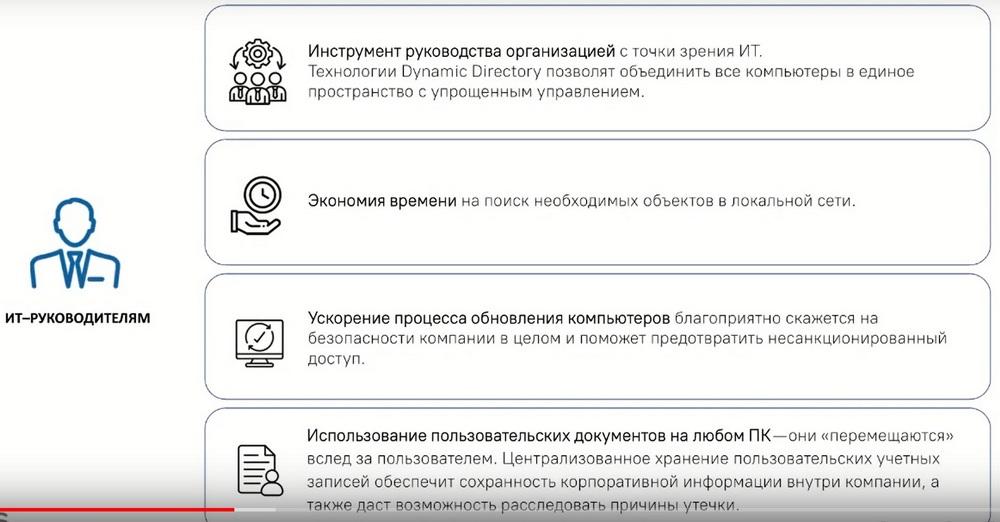
Also, the directory and access management system is necessary for IT managers. With the help of the directory service, managers will be able to track all ARMs, their status, and, accordingly, access to the company's resources in a single space. The second point is saving time on searching for the necessary objects in the local network. That is, just when we have everything divided into folders, by departments, by access, then searching, all this, and distributing access is much easier than if it were all in a common folder. Firstly, the search will take too much time. Secondly, each employee will be able to use each file and document, which is absolutely unsafe and ineffective.
Untimely computer updates are a security breach and a failure to receive some new functions specifically on end ARMs. With the help of Dynamic Directory we can also set update policies for end ARMs and use the company's resources more effectively.
Using documents on any PC. Thanks to the directory service, when creating an account, we can log into it, authorize on absolutely any ARM inside the company.
If our users work in shifts, then you can use two accounts on one PC and access rights are easily configured in a single window mode.
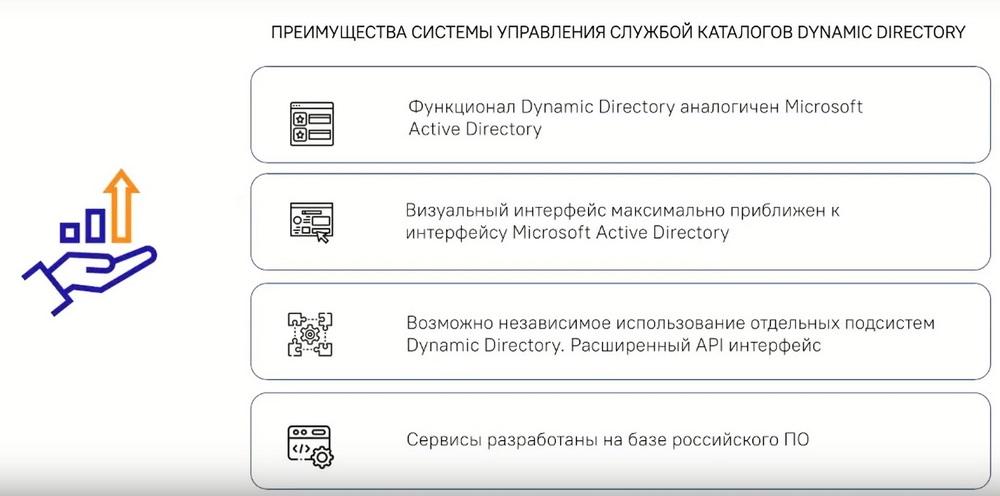
What advantages does the Dynamic Directory directory management system give us? Firstly, the functionality of Dynamic Directory is as similar as possible to Microsoft Active Directory. The visual interface is also as close as possible to the Microsoft Active Directory interface. This is done so that administrators who previously worked with Active Directory can quickly and at a lower cost switch to using Dynamic Directory. Our product also has the ability to independently use individual Dynamic Directory subsystems and an extended IP interface for adding all sorts of additional services, such as, for example, additional monitoring. And what is also important is that all services are developed on the basis of Russian software. Which will also be impossible when creating a similar product from some Open Source projects.
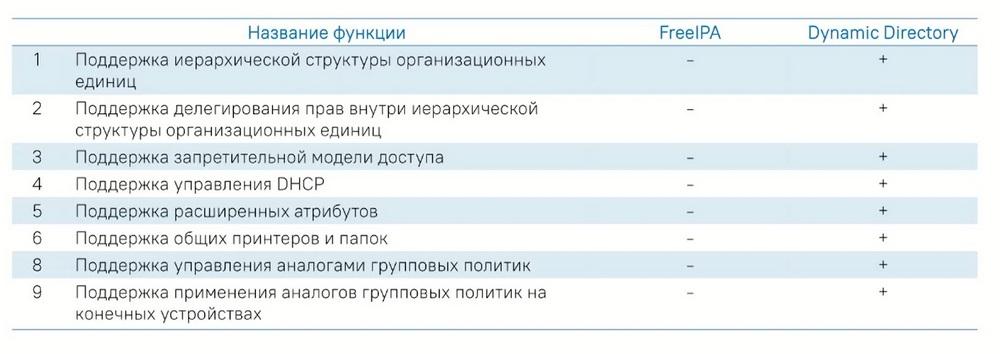
Next, we will compare the Open Source project with the Dynamic Directory system. If we take FreeIPA out of the box, it does not have support for a hierarchical structure of organizational units. That is, this is exactly the structure that we are all used to in Active Directory. Out of the box, FreeIPA does not have it. We have this function in Dynamic Directory. It is also important to support the delegation of rights within the hierarchical structure of organizational units. And this function provides more flexible functionality for transferring rights within the organizational structure of the company, which significantly reduces time. Also, support for the prohibitive access model, since there was no support for the hierarchy, then support for the prohibitive access model in FreeIPA is also not feasible. We have this functionality. Next, this is support for managing the DHCP server using a web interface, which accordingly increases ease of use. Support for extended attributes, as well as shared printers and folders. This functionality increases the percentage of security of interaction within the company, because it differentiates access. And support for managing analogs of group policies. And also an important function is support for applying analogs of group policies on the end device. That is, before applying the access policy, the administrator can check it without affecting the real infrastructure.
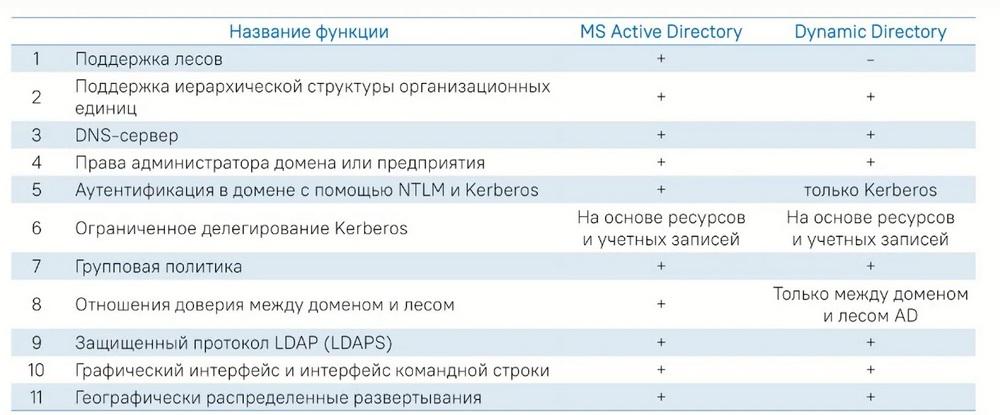
The main difference between Dynamic Directory and Microsoft Active Directory
The main thing is that support for forests is currently not implemented by any of the vendors. We plan to support this function on the roadmap at the end of 2024. Then this function will be implemented. Authentication in the domain is only possible with the Kerberos protocol. Because even NTLM in the Linux environment is considered unsafe. The FSTEC spoke about the use of NTLM, that this protocol should preferably not be used, since it is unsafe.
Unique features of Dynamic Directory
There was a question about operating system support. Yes, we can work with all domestic operating systems right out of the box.
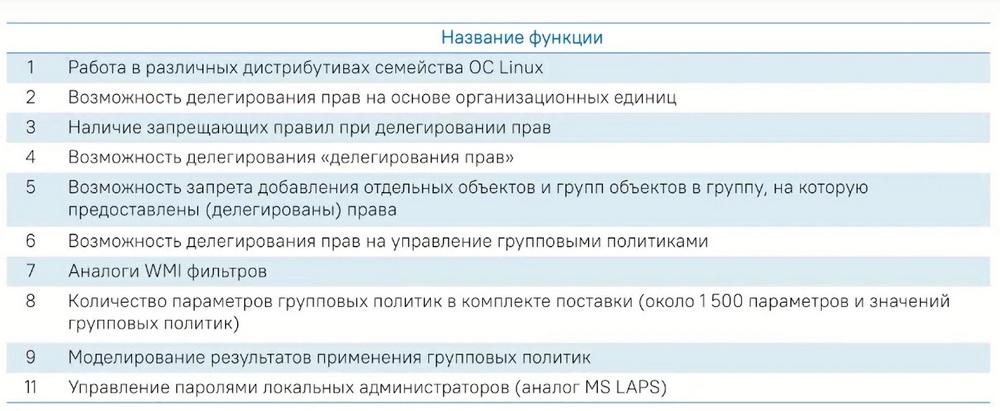
That is, this is ROSA, Astro Linux, RED OS and Alt Linux. The possibility of delegating rights based on organized units. Also - this is the possibility of delegating rights. That is, in our directory service management system, it is possible to delegate rights from one employee to another, and so on. The administrator can transfer rights to the next user, and the next users, within their powers, can transfer rights to the next user, and the administrator will not have to manually transfer rights to 10 thousand users every time.
Also, the number of group policy parameters currently in the delivery package is about 1500 and this value is growing, the policies are also being finalized.
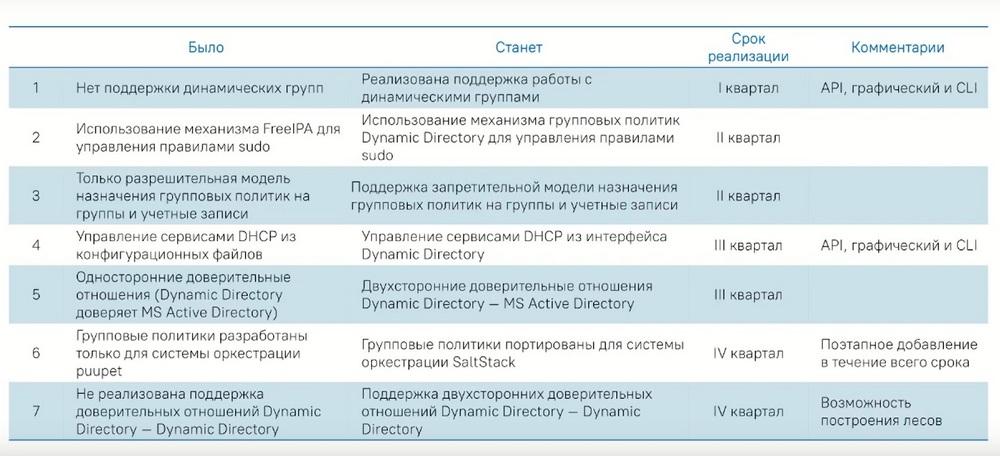
Here we can take a closer look at our roadmap in the development of Dynamic Directory. Let's take the third quarter. This is the management of DHCP services from the graphical interface and also from the console interface. Also, two-way trust relationships are planned for the 3-4 quarter of 2024. And it is also planned to add support for the SoltStack orchestration system.
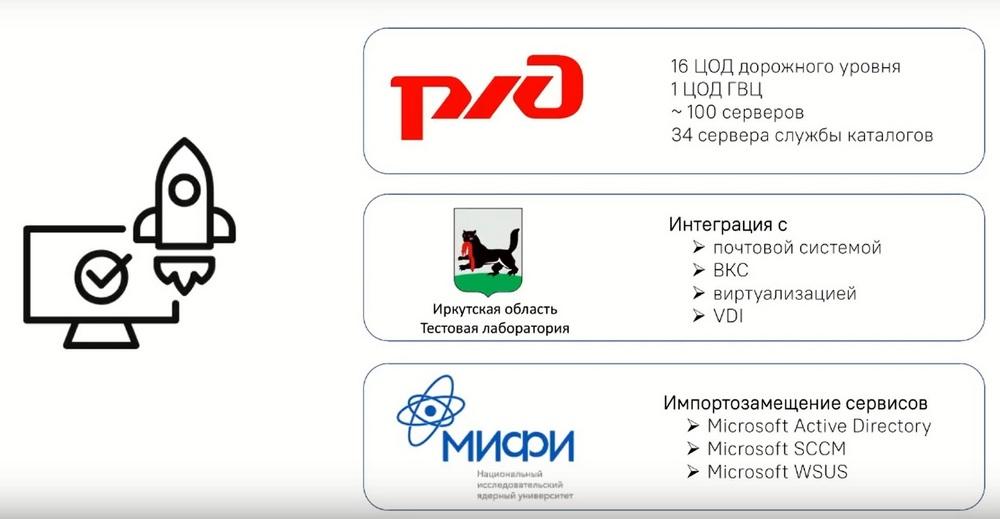
About our implementation experience: you can see quite large numbers on the slide. Even in the Russian Railways project - this is 16 data centers, one main data center, approximately 100 servers and 34 directory service servers. This is quite a lot. According to the users of this installation, we did not deploy it from scratch, that is, it is quite easy to deploy from scratch. We migrated more than 10 thousand users, and accordingly, the entire installation that was organized also functions to this day.
We also implemented a fairly large-scale project at MEPhI, which is the replacement of Microsoft Active Directory. And accordingly, this project also functions to this day and does not cause any complaints.
ROSA Control Center
ROSA Control Center is a platform for centralized management of workstations, operating systems, and also a private cloud within the company. ROSA Control Center is a single platform for managing the life cycle of operating systems and software on them.
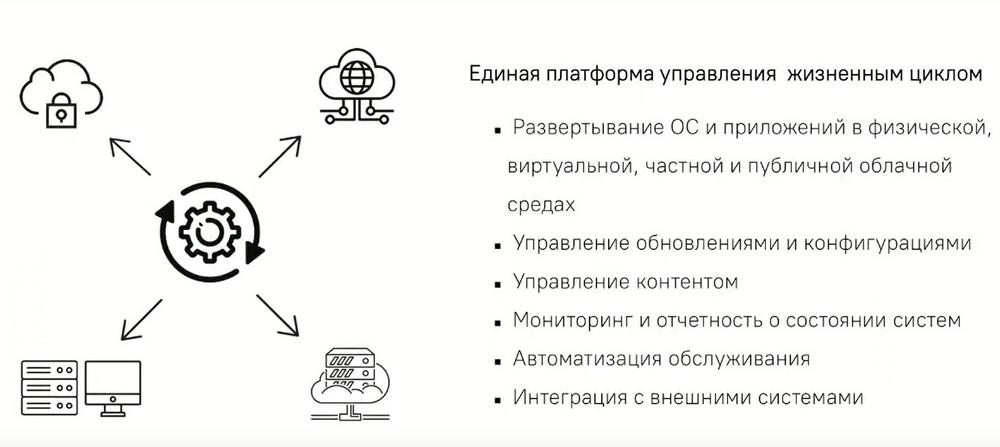
What functionality does ROSA Control Center have? This is the deployment of operating systems and applications in physical, virtual and private clouds, respectively. Managing the update and configuration of software on ARMs, content management, that is, updating applications, packages, and so on. Monitoring and reporting on the status of systems, both hardware and virtual, when we need to install all kinds of packages, as well as the state of fullness, for example, of the same system disks. Another function is service options. That is, here we can automatically set options for updating ARMs, updating individual packages, and integrating with external systems.
Just like in Dynamic Directory, in ROSA Control Center, we have an open API that you can add and integrate into your systems, for example, monitoring. The graphical interface of ROSA Control Center is a fairly simple and intuitive user interface, to which administrators of companies also quickly adapt based on feedback from our partners.
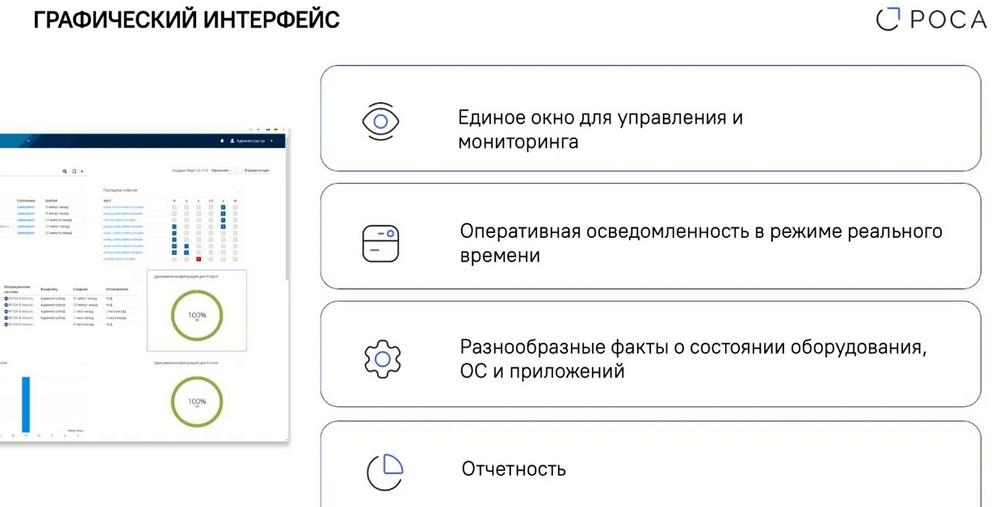
The graphical interface provides a single window for infrastructure management and monitoring. All the tiles that are presented on the initial tab can be moved, replaced, and also add some new ones by the administrator, specifically for ease of use. Also, the graphical interface has the ability to quickly be aware of events in real time, which also increases the efficiency of use. Also, various facts about the state of ARMs, that is, software, hardware, as well as operating systems and applications.
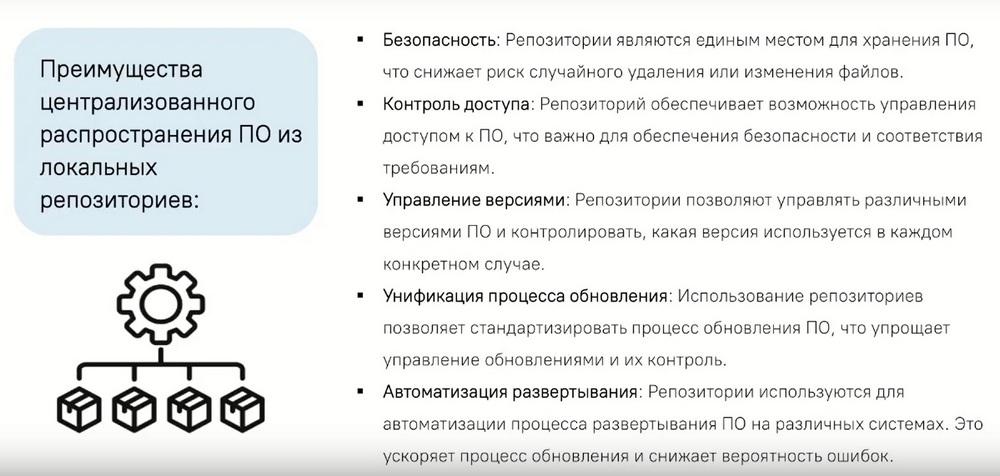
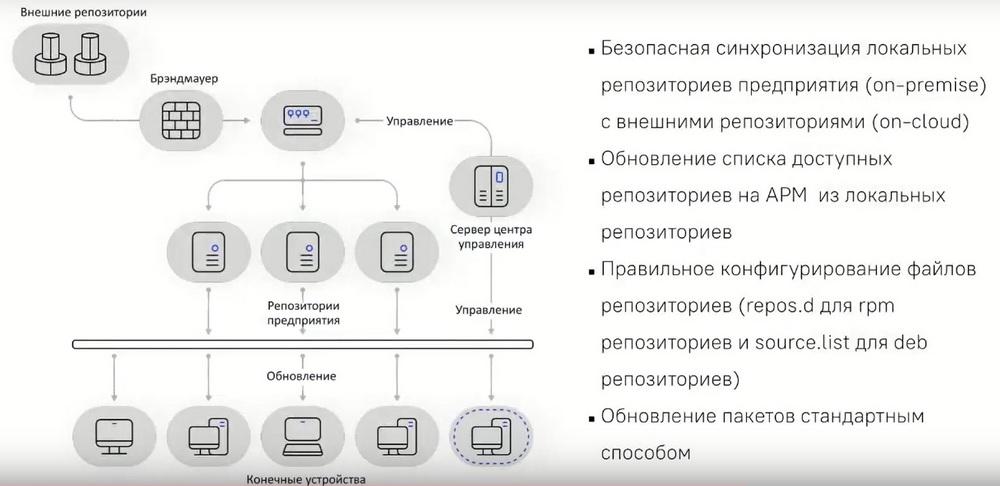
Reporting, in turn, allows you to respond in a timely manner to incidents within the infrastructure. ROSA Control Center also allows you to manage repositories. This is relevant for enterprises with a closed loop, where there is no Internet access. The repository is a single place to store software in a company with a closed loop. As a result, this greatly reduces the risk of accidental deletion or modification of files by the administrator or users. It also helps to manage versions within the local repository, because in the global repository the software version may change, but for some reason it is not applicable in the current infrastructure. So the administrator can manage this function and leave exactly the version that is necessary for use within the company on the local repository. Content management also allows you to unify and standardize the update process, that is, all ARMs of the company will receive the same software version.
There is also such a function - deployment automation. In this case, such a deployment helps to reduce time and reduce the human factor in terms of errors.
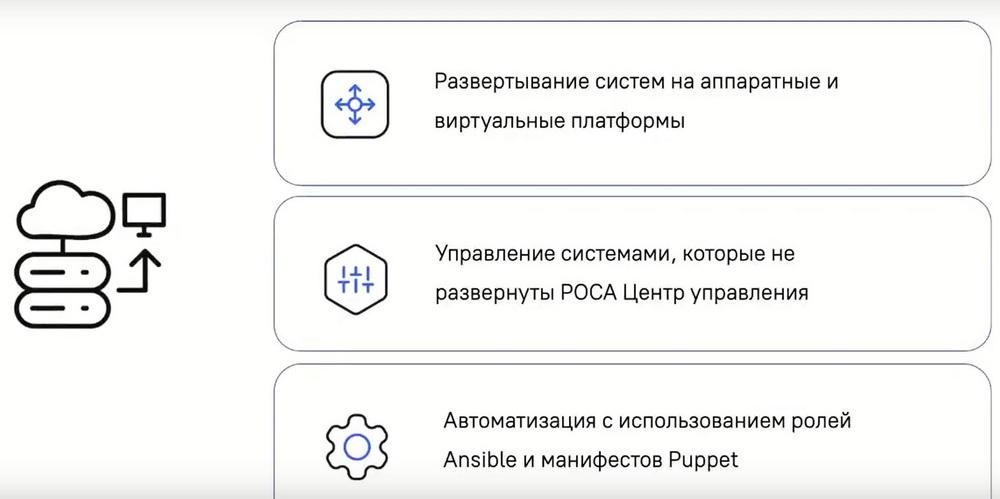
ROSA Control Center helps to deploy systems on hardware and virtual private clouds, manage systems that are not deployed in ROSA Control Center. That is, if you have PCs ARMs in your company on which, for example, RED OS is installed, then through the "Search" tab, respectively, ROSA Control Center detects these ARMs, while the administrator can add ARMs not added to the system and also manage them. Automation is also possible using Ansible roles and Puppet manifests.
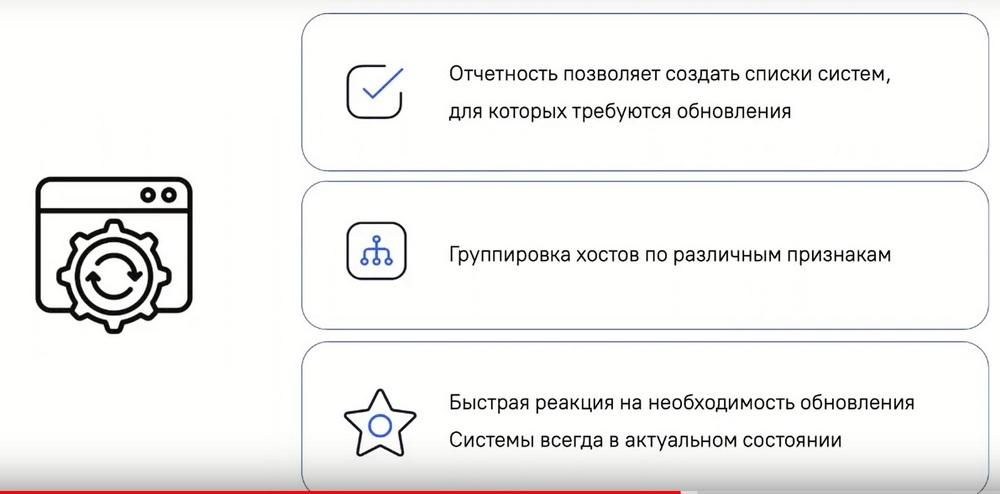
Update management allows you to create lists of systems for which an update is required. That is, in an automated mode, the administrator can track systems and receive notifications about those of them that should be updated in order to close vulnerability gaps and add updated functionality. It is possible to group hosts according to various criteria, that is, grouping hosts of the final ARMs, either by departments for ease of administration, or it is possible to group by some memory criteria, by the state of processors, by the amount of RAM, and so on. That is, there are a lot of criteria and possibilities. Quick response to the need to update the system in order to keep it always up to date.
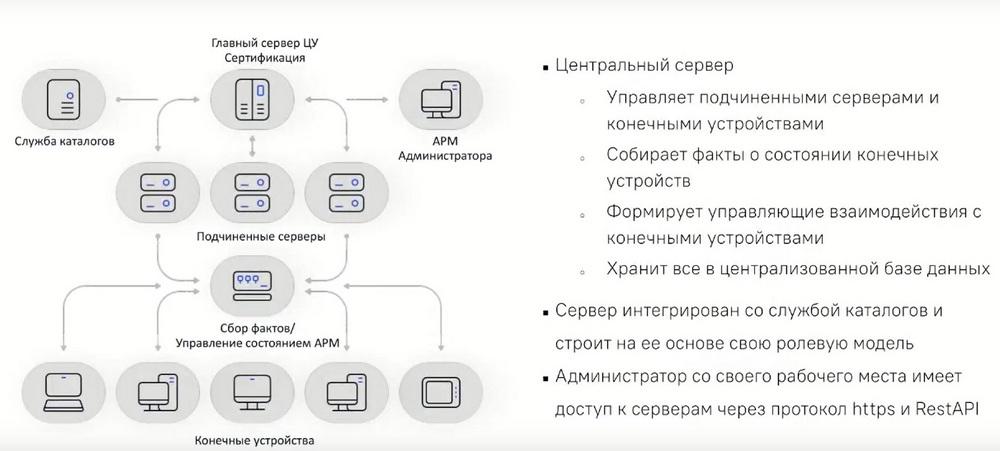
The architecture of the Control Center consists of a main control center and subordinate ones. That is, the main control center is mainly engaged in certification, and accordingly, the subordinate servers are engaged in managing end devices. It is also possible to manage local repositories to minimize all sorts of confusion with versioning for closed circuits of companies.
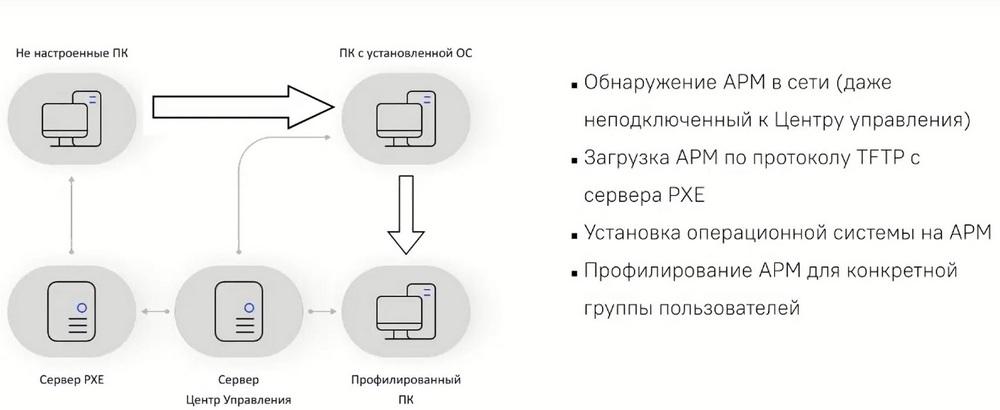
Regarding the deployment of end ARMs. The ROSA Control Center system can detect computers, even if they have not been previously connected to the ROSA Control Center. This allows you to load operating systems onto ARMs via PXE, and this, accordingly, makes it possible to manage these systems centrally.
Not everyone uses Linux now, so it is necessary to simplify the transition from other operating systems to domestic secure OSs. So, migrating to domestic operating systems is also possible with ROSA Control Center.
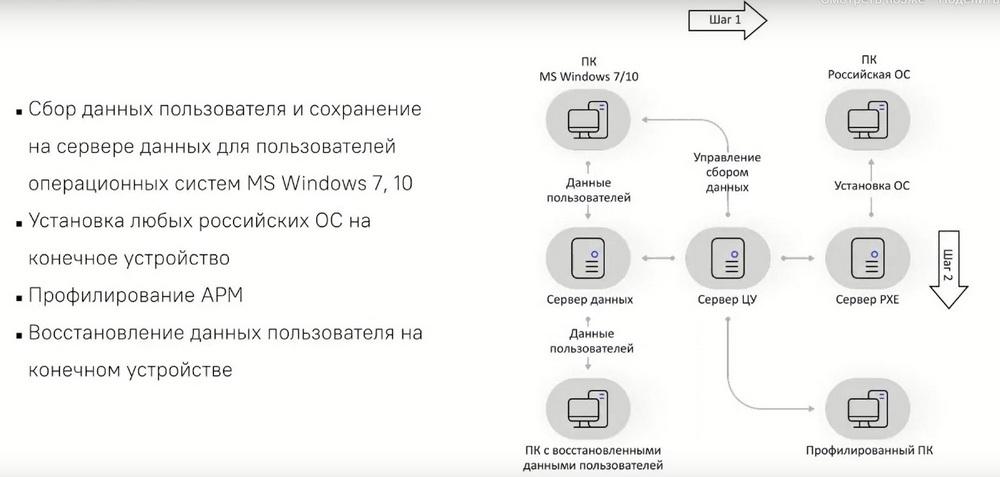
The Control Center collects data about users and saves it on the server. Next, the Russian operating system is also installed centrally, then the ARM is profiled, that is, all kinds of applications are added during installation so that the administrator does not manually install all kinds of applications and services after the OS installation, which significantly reduces the administrator's working time and the time for deploying and configuring the operating system for specific employee tasks. And then there is also automated recovery of user data on the end device.
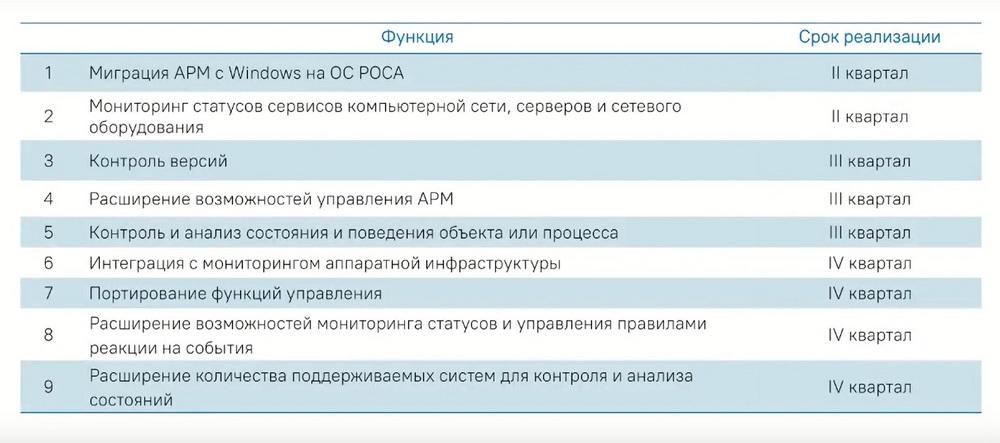
Roadmap for ROSA Control Center for 2024. In the third quarter, we plan to add a version control channel, expand the ability to manage end ARMs, control and analyze the state of behavior of an object or process in the operating system for more flexible tracking of user and system actions and to improve security. Integration with hardware infrastructure monitoring, that is, for more flexible tracking of the physical condition of computers. Porting management functions, expanding the monitoring capabilities of the status and managing event response rules. Here, the system will be able to respond to all kinds of incidents in semi-automatic mode. And, of course, expanding the number of supported systems for monitoring and analyzing the state of the system itself.
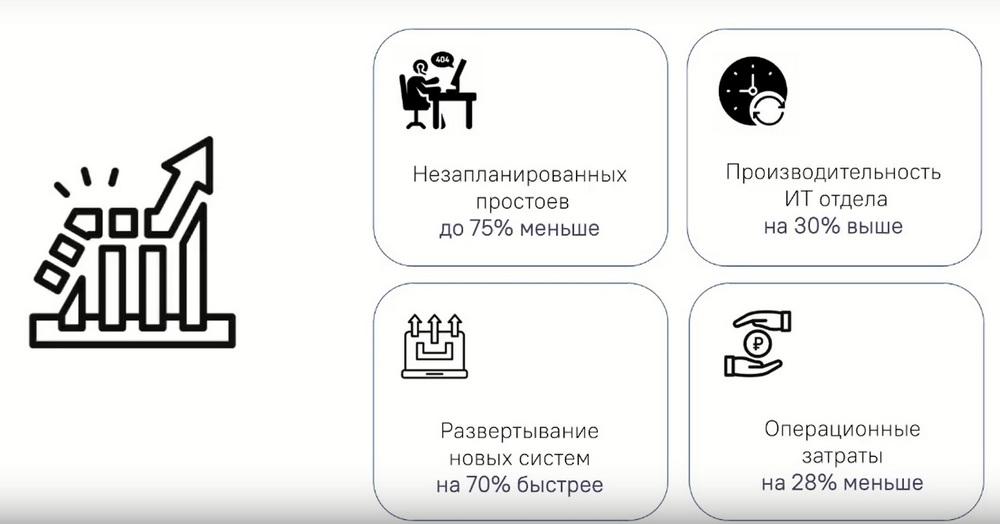
A few calculations based on feedback from our clients, that is, the effect of implementing centralized management: unplanned downtime is reduced by 75% due to fewer human errors, downtime due to software not being updated in time, or due to the fact that some software is specifically missing from an employee's PC and has to be installed manually. The productivity of the IT department increases by 30% due to the fact that IT specialists do not have to manually administer ARMs. All this is done centrally in a single window mode. The deployment of new operating systems also increases by 70% due to the fact that it also takes place centrally and all additional configurations, that is, all kinds of services, all kinds of applications, it is possible to install all these applications at the time of installation of the operating system. The company's operating costs are reduced by 28%. Unplanned downtime is 75% less compared to the absence of centralized management. That is, here we are talking more about managing end ARMs, and not about managing directory services. Also, if we talk about the directory service section, then here we have 75% less downtime due to the fact that in the absence of a directory service system, we have a very large warehouse of company files, to which every employee has access. That is, here we do not have any structure and in order to use all kinds of documents and files, you need to spend a lot of time. When we have it structured, then accordingly it will take much less time and downtime in connection with the search for the necessary information, the necessary file is greatly reduced.